Checking a small TCP port range with Netcat helps when a service move, firewall rule, or temporary listener leaves several adjacent ports in question. The check shows which ports in that narrow span accept a TCP connection without sending application data.
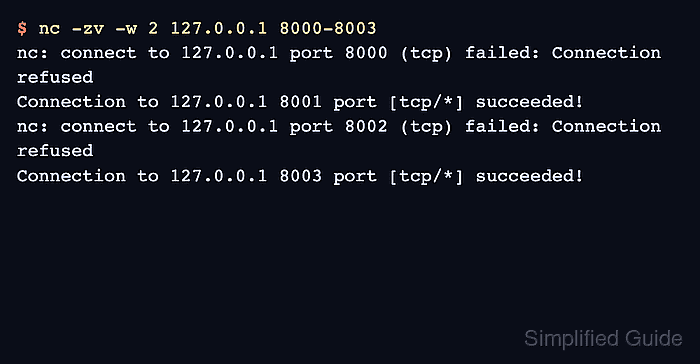
OpenBSD nc uses -z for a zero-I/O scan and accepts numeric ranges such as 8000-8003. Adding -v prints one line per attempted port, while -w limits how long each connection attempt can wait before a filtered or unreachable path delays the check.
The examples below use netcat-openbsd on Ubuntu 26.04 against loopback listeners on two known ports. Run this only on hosts and ranges you are authorized to test, keep ranges small, and read the per-port lines instead of treating a single exit status as proof that every port in the range is open.
Steps to check a TCP port range with Netcat:
- Choose the target host and the smallest approved TCP range that covers the services being checked.
A Netcat range check is not a broad discovery scan. Use it for a narrow validation window, and use an approved scanner or change process for larger inventories.
- Run a zero-I/O verbose scan with a bounded timeout.
$ nc -zv -w 2 127.0.0.1 8000-8003
nc: connect to 127.0.0.1 port 8000 (tcp) failed: Connection refused
Connection to 127.0.0.1 8001 port [tcp/*] succeeded!
nc: connect to 127.0.0.1 port 8002 (tcp) failed: Connection refused
Connection to 127.0.0.1 8003 port [tcp/*] succeeded!
Replace 127.0.0.1 and 8000-8003 with the target host and numeric range. -z opens the TCP connection only, -v prints the result, and -w 2 bounds waits for ports that do not answer.
- Record the ports that print succeeded as accepting TCP connections.
In the example, 8001 and 8003 accepted connections. Ports 8000 and 8002 were reachable but refused the connection because no listener accepted TCP there.
- Treat timeout and routing errors as different evidence from refusal.
A timeout usually means packets were filtered, dropped, or routed somewhere that did not respond before -w expired. Recheck the target address, network path, and firewall state before assuming the service itself is closed.
- Check the exit status only when a script needs a range-level result.
$ echo "$?"
0
OpenBSD nc returned 0 in the verified mixed-range test because at least one port succeeded. Parse the verbose output when automation needs the exact open and closed port list.
- Probe a successful port with the expected protocol when the range check is only the first sanity check.
A TCP connection proves that something is listening, but it does not prove the intended service answered. Use a banner grab or protocol request for the selected open port.

Mohd Shakir Zakaria is a cloud architect with deep roots in software development and open-source advocacy. Certified in AWS, Red Hat, VMware, ITIL, and Linux, he specializes in designing and managing robust cloud and on-premises infrastructures.


