When an application cannot reach a TCP service, the first split is whether the client can open the socket at all. Netcat reports the TCP handshake result directly, so the failure can be handed to the right layer as an accepted connection, a refused port, an unanswered path, or a name that did not resolve.
OpenBSD nc uses -z for a zero-I/O TCP probe, -v for the connection result, and -w to stop unanswered attempts from hanging the terminal. That combination tests TCP setup only; it does not prove that HTTP, TLS, authentication, or an application request will work after the socket opens.
The examples use netcat-openbsd on Ubuntu 26.04 with loopback and documentation-only addresses for repeatable output. Replace the host and port with the endpoint being diagnosed, run probes only against systems you are allowed to test, and keep the exact output with the ticket or handoff because each failure string points to a different owner.
Related: How to test a TCP port with Netcat
Related: How to set a Netcat connection timeout
Related: How to connect to a TCP service with Netcat
Tool: Netcat Command Generator
Steps to troubleshoot TCP connectivity with Netcat:
- Probe the failing endpoint with a short timeout.
$ nc -vz -w 3 app.example.net 443
Replace app.example.net and 443 with the service host and port. Use the same command after each change so the output difference points to one layer instead of a changed test.
- Treat a succeeded line as an open TCP path, then move the investigation to the protocol or application layer.
$ nc -vz -w 2 127.0.0.1 18080
Connection to 127.0.0.1 18080 port [tcp/*] succeeded!
The host accepted a TCP connection on that port. If the application still fails, check the request format, TLS expectation, Host header, banner, credentials, or proxy path rather than chasing basic reachability.
- Treat Connection refused as a reachable host with no listener accepting that port.
$ nc -vz -w 2 127.0.0.1 18081
nc: connect to 127.0.0.1 port 18081 (tcp) failed: Connection refused
The packet reached a system that actively rejected the connection. Check whether the service is running, bound to the expected address, listening on the expected port, or blocked by a firewall rule that sends rejects instead of dropping traffic.
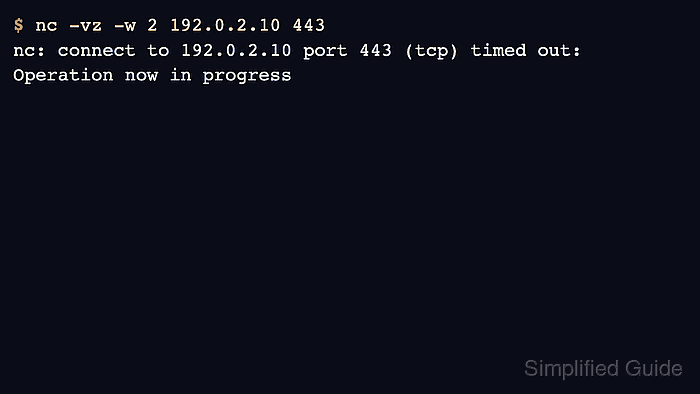
- Treat timed out as an unanswered connection attempt.
$ nc -vz -w 2 192.0.2.10 443
nc: connect to 192.0.2.10 port 443 (tcp) timed out: Operation now in progress
A timeout means no TCP answer reached the client before the deadline. Check the route, firewall or security policy, load balancer target state, and whether the service is bound only to another interface.
- Treat a getaddrinfo message as a name-resolution failure before TCP starts.
$ nc -vz -w 2 no-such-host.invalid 443
nc: getaddrinfo for host "no-such-host.invalid" port 443: Name or service not known
Fix the hostname, DNS record, resolver configuration, search suffix, or inventory entry before testing the port again. If a known IP address works while the hostname fails, keep the network path separate from the DNS fix.
- Retest the original endpoint after correcting the layer identified by the first failure.
$ nc -vz -w 3 app.example.net 443
Connection to app.example.net (203.0.113.20) 443 port [tcp/https] succeeded!
A succeeded TCP probe proves the socket opened, not that the application transaction completed. Run the protocol-specific client next when the original user-facing request still fails.

Mohd Shakir Zakaria is a cloud architect with deep roots in software development and open-source advocacy. Certified in AWS, Red Hat, VMware, ITIL, and Linux, he specializes in designing and managing robust cloud and on-premises infrastructures.


