SNMP traps let routers, switches, and appliances report events at the moment they happen instead of waiting for a scheduled poll. In Nagios Core, the trap must pass through a local receiver and arrive as a passive service result before it appears in monitoring state.
Net-SNMP provides snmptrapd, which listens for notifications and can call a traphandle program when an accepted trap arrives. The handler can write a PROCESS_SERVICE_CHECK_RESULT command into the Nagios Core command FIFO, which is normally /var/lib/nagios4/rw/nagios.cmd on Debian and Ubuntu package installs.
The trap daemon user becomes a trusted command submitter, so give it only the command-file group it needs and restrict accepted trap sources. A single SNMPv2c linkUp test proves the handoff; production handlers can map specific OIDs to different services, return codes, or plugin output.
Steps to receive SNMP traps in Nagios Core:
- Install the Net-SNMP trap daemon and client tools on the monitoring server.
$ sudo apt update && sudo apt install --assume-yes snmptrapd snmp
Debian and Ubuntu packages create a Debian-snmp service user for snmptrapd. Use the equivalent package and service user on other Linux distributions.
- Confirm that Nagios Core accepts external commands and passive service results.
$ sudo grep -E '^(check_external_commands|command_file|accept_passive_service_checks)=' /etc/nagios4/nagios.cfg
check_external_commands=1
command_file=/var/lib/nagios4/rw/nagios.cmd
accept_passive_service_checks=1
Enable external commands first when check_external_commands is 0 or the command file path is missing.
Related: How to enable external commands in Nagios Core - Check the command FIFO group.
$ sudo ls -ld /var/lib/nagios4/rw /var/lib/nagios4/rw/nagios.cmd
drwxrwsr-x 1 nagios nagios 4096 Jun 25 00:27 /var/lib/nagios4/rw
prw-rw---- 1 nagios nagios    0 Jun 25 00:27 /var/lib/nagios4/rw/nagios.cmd
The leading p on nagios.cmd means it is a FIFO. The group shown on the command file is the group that trusted local integrations need for write access.
- Create an object file for the passive trap result.
$ sudoedit /etc/nagios4/conf.d/snmp-trap-receive.cfg
- Add a passive host and service that match the trap handler target.
- snmp-trap-receive.cfg
define command {
    command_name            check_snmp_trap_passive
    command_line            /usr/lib/nagios/plugins/check_dummy $ARG1$ "$ARG2$"
}

define host {
    use                     linux-server
    host_name               web01.example.net
    alias                   Web server trap source
    address                 192.0.2.10
    active_checks_enabled   0
    passive_checks_enabled  1
}

define service {
    use                     generic-service
    host_name               web01.example.net
    service_description     SNMP Trap
    active_checks_enabled   0
    passive_checks_enabled  1
    check_command           check_snmp_trap_passive!0!Waiting for SNMP trap
    max_check_attempts      1
}
Skip the host block if web01.example.net already exists. Nagios Core ignores passive results for host or service names that are not loaded in the running configuration.
Related: How to add a service check in Nagios Core - Create the trap handler script.
$ sudoedit /usr/local/sbin/nagios-snmp-trap-handler
- Add the handler that converts a received trap into a passive service result.
- nagios-snmp-trap-handler
#!/bin/sh
NAGIOS_CMD=/var/lib/nagios4/rw/nagios.cmd
NAGIOS_HOST=${1:?host name required}
NAGIOS_SERVICE=${2:-SNMP Trap}

read trap_host
read trap_transport
trap_sender=$trap_transport
case "$trap_transport" in
    *'['*']:'*)
        trap_sender=${trap_transport#*[}
        trap_sender=${trap_sender%%]*}
        ;;
esac

trap_oid=unknown
while IFS= read -r line; do
    case "$line" in
        *snmpTrapOID.0*|*1.3.6.1.6.3.1.1.4.1.0*|*iso.3.6.1.6.3.1.1.4.1.0*)
            trap_oid=${line##* }
            ;;
    esac
done

now=$(date +%s)
printf '[%s] PROCESS_SERVICE_CHECK_RESULT;%s;%s;1;WARNING - SNMP trap %s from %s\n' \
    "$now" "$NAGIOS_HOST" "$NAGIOS_SERVICE" "$trap_oid" "$trap_sender" > "$NAGIOS_CMD"
The handler maps every accepted trap to a WARNING result for one service. Add OID-specific branches later when different traps need different return codes or service descriptions.
- Make the trap handler executable.
$ sudo chmod 0755 /usr/local/sbin/nagios-snmp-trap-handler
- Allow the snmptrapd service user to write to the Nagios Core command FIFO group.
$ sudo usermod --append --groups nagios Debian-snmp
Use the group that owns /var/lib/nagios4/rw/nagios.cmd on the monitoring server. Do not make the command FIFO world-writable; any process that can write this FIFO can submit Nagios Core external commands.
- Verify that the trap daemon user has the command-file group.
$ id Debian-snmp
uid=101(Debian-snmp) gid=103(Debian-snmp) groups=103(Debian-snmp),101(nagios)
- Open the snmptrapd configuration file.
$ sudoedit /etc/snmp/snmptrapd.conf
- Authorize the trap sender and call the handler.
- snmptrapd.conf
authCommunity log,execute monitor-traps 192.0.2.10
traphandle default /usr/local/sbin/nagios-snmp-trap-handler web01.example.net "SNMP Trap"
Replace monitor-traps with a site-specific community and restrict the source to trusted sender addresses. Prefer SNMPv3 authentication and privacy when the sending devices support it.
- Validate the Nagios Core object configuration.
$ sudo nagios4 -v /etc/nagios4/nagios.cfg
Nagios Core 4.4.6
##### snipped #####
Reading configuration data...
   Read main config file okay...
   Read object config files okay...
##### snipped #####
Total Warnings: 0
Total Errors:   0

Things look okay - No serious problems were detected during the pre-flight check
Fix every reported object, command, template, or path error before reloading Nagios Core.
Related: How to validate the Nagios Core configuration - Reload Nagios Core so the passive service object becomes active.
$ sudo systemctl reload nagios4
Use the service name and control method from the local installation when Nagios Core was installed from source.
Related: How to manage the Nagios Core system service - Restart snmptrapd so it reads the new configuration and group membership.
$ sudo systemctl restart snmptrapd
- Enable snmptrapd at boot.
$ sudo systemctl enable snmptrapd
- Send a test trap from the authorized sender.
$ snmptrap -v 2c -c monitor-traps monitor.example.net "" \
  .1.3.6.1.6.3.1.1.5.4 \
  .1.3.6.1.2.1.2.2.1.1.2 i 2
Run the test from the host or device address allowed by authCommunity. The OID 1.3.6.1.6.3.1.1.5.4 is the standard linkUp notification.
- Check that snmptrapd logged the received trap.
$ sudo journalctl --unit=snmptrapd --no-pager --since '5 minutes ago'
Jun 25 00:28:55 monitor snmptrapd[228]: 2026-06-25 00:28:55 web01.example.net [UDP: [192.0.2.10]:41660->[192.0.2.5]:162]:
Jun 25 00:28:55 monitor snmptrapd[228]: iso.3.6.1.6.3.1.1.4.1.0 = OID: iso.3.6.1.6.3.1.1.5.4
Jun 25 00:28:55 monitor snmptrapd[228]: iso.3.6.1.2.1.2.2.1.1.2 = INTEGER: 2
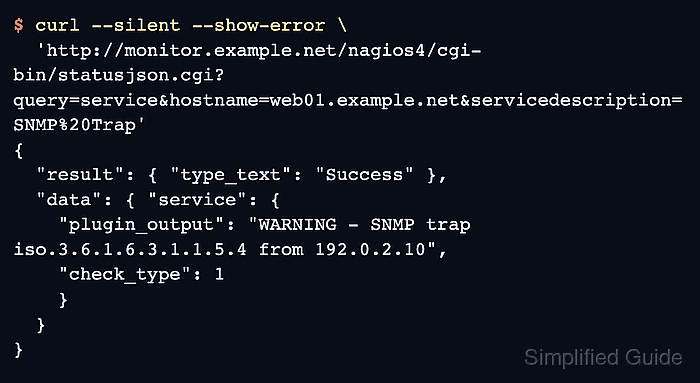
- Confirm that Nagios Core shows the passive trap result.
$ curl --silent --show-error --get \
  'http://monitor.example.net/nagios4/cgi-bin/statusjson.cgi' \
  --data-urlencode 'query=service' \
  --data-urlencode 'hostname=web01.example.net' \
  --data-urlencode 'servicedescription=SNMP Trap'
{
  "result": {
    "type_text": "Success"
  },
  "data": {
    "service": {
      "plugin_output": "WARNING - SNMP trap iso.3.6.1.6.3.1.1.5.4 from 192.0.2.10",
      "check_type": 1,
      "accept_passive_checks": true
    }
  }
}
check_type 1 means Nagios Core processed a passive result. Use the local CGI URL and authentication method for that site; the same plugin output should appear on the service status page.

Mohd Shakir Zakaria is a cloud architect with deep roots in software development and open-source advocacy. Certified in AWS, Red Hat, VMware, ITIL, and Linux, he specializes in designing and managing robust cloud and on-premises infrastructures.


