Mail transport depends on an SMTP listener that accepts connections and returns a greeting quickly enough for other mail systems to continue delivery. Nagios Core can check that handshake as a service on the mail host, so a refused connection, slow banner, or wrong listener port becomes an alertable service state.
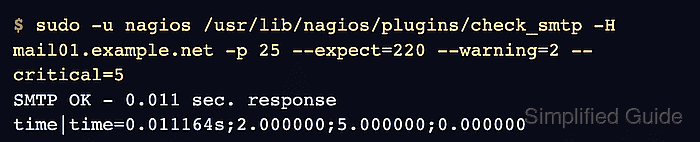
The check_smtp plugin opens the SMTP connection, checks the first response line, and reports response time as performance data. On Ubuntu and Debian package installs, the plugin path is /usr/lib/nagios/plugins/check_smtp and site-specific object snippets can be placed under /etc/nagios4/conf.d.
A host object should already represent the mail endpoint, such as mail01.example.net. A small command object with separate arguments keeps the port, expected greeting, warning threshold, and critical threshold visible in the service definition before the scheduler loads the new SMTP check.
Related: How to install Nagios plugins
Related: How to add a host in Nagios Core
Steps to monitor SMTP with Nagios Core:
- Confirm that Nagios Core loads the custom object directory.
$ grep '^cfg_dir=' /etc/nagios4/nagios.cfg
cfg_dir=/etc/nagios-plugins/config
cfg_dir=/etc/nagios4/conf.d
Add a cfg_dir or cfg_file entry first when custom objects are stored somewhere else.
Related: How to add a Nagios Core object configuration directory - Run the SMTP plugin manually from the monitoring server.
$ sudo -u nagios /usr/lib/nagios/plugins/check_smtp -H mail01.example.net -p 25 --expect=220 --warning=2 --critical=5
SMTP OK - 0.011 sec. response time|time=0.011164s;2.000000;5.000000;0.000000
Use --starttls for submission ports that require STARTTLS, and use --ssl for implicit TLS listeners such as port 465. Keep the tested options aligned with the listener that mail clients or remote mail exchangers actually use.
Related: How to run a Nagios plugin manually - Create a command object snippet for the reusable SMTP check.
$ sudoedit /etc/nagios4/conf.d/check-smtp-port.cfg
- Add the command definition.
define command {
    command_name    check_smtp_port
    command_line    $USER1$/check_smtp -H $HOSTADDRESS$ -p $ARG1$ --expect=$ARG2$ --warning=$ARG3$ --critical=$ARG4$
}
Separate arguments keep the service object readable and avoid hiding several plugin options inside one quoted command argument.
- Create a service object snippet for the mail host.
$ sudoedit /etc/nagios4/conf.d/mail01-smtp.cfg
- Add the SMTP service definition.
define service {
    use                    generic-service
    host_name              mail01.example.net
    service_description    SMTP
    check_command          check_smtp_port!25!220!2!5
}
The host_name value must match an existing host object. Replace 25 only when the service should monitor a different listener, such as a submission or implicit TLS port.
Related: How to add a service check in Nagios Core - Validate the Nagios Core configuration.
$ sudo nagios4 -v /etc/nagios4/nagios.cfg
Nagios Core 4.4.6
##### snipped #####
Reading configuration data...
   Read main config file okay...
   Read object config files okay...

Running pre-flight check on configuration data...

Checking objects...
	Checked 9 services.
	Checked 2 hosts.
	Checked 181 commands.
##### snipped #####
Total Warnings: 0
Total Errors:   0

Things look okay - No serious problems were detected during the pre-flight check
Do not reload Nagios Core while Total Errors is greater than 0; the new service can be rejected with the rest of the changed object files.
- Reload Nagios Core to apply the service object.
$ sudo systemctl reload nagios4
Package installs on Ubuntu and Debian use the nagios4 unit. Use the local unit or init script name on source installs and other distributions.
Related: How to manage the Nagios Core system service - Confirm that the nagios4 service is active after the reload.
$ sudo systemctl is-active nagios4
active
Check /var/log/nagios4/nagios.log or the journal before retrying the reload if the service is not active.
Related: How to check Nagios Core logs - Check the SMTP service result after the next active check.
$ curl --silent --show-error 'http://monitor.example.net/nagios4/cgi-bin/statusjson.cgi?query=service&hostname=mail01.example.net&servicedescription=SMTP'
{
  "format_version": 0,
  "result": {
    ##### snipped #####
    "type_code": 0,
    "type_text": "Success",
    "message": ""
  },
  "data": {
    "service": {
      "host_name": "mail01.example.net",
      "description": "SMTP",
      "plugin_output": "SMTP OK - 0.001 sec. response time",
      "perf_data": "time=0.000571s;2.000000;5.000000;0.000000",
      "has_been_checked": true,
      "checks_enabled": true
    }
  }
}
Use the real Nagios Core URL and credentials when CGI authentication is enabled. If the service remains pending, force one service check or wait for the next scheduled interval.
Related: How to reschedule an active check in Nagios Core

Mohd Shakir Zakaria is a cloud architect with deep roots in software development and open-source advocacy. Certified in AWS, Red Hat, VMware, ITIL, and Linux, he specializes in designing and managing robust cloud and on-premises infrastructures.


