Building a MySQL or MariaDB primary-and-replica pair gives one database server the write role and another server a continuously updated copy for reads, backups, reporting, or failover preparation. The setup is complete only when the replica has imported the same starting data, connected back to the primary over TCP, and replayed a new primary write.
The basic file-and-position method uses the primary server's binary log as the handoff point. A consistent logical dump seeds the replica, the dump header records the binary log file and position, and the replica starts reading from that exact coordinate so it applies only changes made after the snapshot.
Use the same database family and compatible versions unless a mixed-engine topology has already been tested. Current MySQL uses CHANGE REPLICATION SOURCE TO with SOURCE_* options, while current MariaDB still uses CHANGE MASTER TO with MASTER_* options even though START REPLICA and SHOW REPLICA STATUS are accepted.
Steps to build a MySQL/MariaDB primary and replica setup:
- Confirm the server roles, addresses, and dataset before changing either server.
Primary: db-01.example.net (192.0.2.40)
Replica: db-02.example.net (192.0.2.41)
Port: 3306
Database: appdb
The replica account host must match the address the primary sees for the replica. Replace the documentation addresses with the real private addresses or DNS names used on your database network.
- Edit the primary server configuration file.
# MySQL on Debian or Ubuntu
$ sudoedit /etc/mysql/mysql.conf.d/mysqld.cnf

# MariaDB on Debian or Ubuntu
$ sudoedit /etc/mysql/mariadb.conf.d/50-server.cnf
Common Red Hat-family paths include /etc/my.cnf and files under /etc/my.cnf.d/. Use the active server file for your package, not a client-only option file.
- Enable binary logging and assign a unique primary server_id.
[mysqld]
server_id = 1
log_bin = mysql-bin
binlog_format = ROW
bind_address = 192.0.2.40
Each server in the topology needs a different server_id. For MariaDB, add log-basename = primary1 if you need binary log filenames that do not change with the host name.
- Restart the primary database service.
# MySQL
$ sudo systemctl restart mysql

# MariaDB
$ sudo systemctl restart mariadb
- Confirm the primary is writing a binary log.
# MySQL 8.4
$ mysql --host=db-01.example.net --user=root --password --execute "SHOW BINARY LOG STATUS\G"
*************************** 1. row ***************************
             File: mysql-bin.000002
         Position: 331
     Binlog_Do_DB:
 Binlog_Ignore_DB:
Executed_Gtid_Set:

# MariaDB
$ mariadb --host=db-01.example.net --user=root --password --execute "SHOW MASTER STATUS\G"
*************************** 1. row ***************************
            File: mysql-bin.000002
        Position: 331
    Binlog_Do_DB:
Binlog_Ignore_DB:
If the log file is empty or no row is returned, binary logging is not active on the primary and the replica cannot start from a durable file position.
- Create a replication account on the primary for the replica address.
# MySQL
$ mysql --host=db-01.example.net --user=root --password --execute "CREATE USER 'repl'@'192.0.2.41' IDENTIFIED BY 'ReplPass123!';"
$ mysql --host=db-01.example.net --user=root --password --execute "GRANT REPLICATION SLAVE ON *.* TO 'repl'@'192.0.2.41';"

# MariaDB
$ mariadb --host=db-01.example.net --user=root --password --execute "CREATE USER 'repl'@'192.0.2.41' IDENTIFIED BY 'ReplPass123!';"
$ mariadb --host=db-01.example.net --user=root --password --execute "GRANT REPLICATION REPLICA ON *.* TO 'repl'@'192.0.2.41';"
Use a real secret instead of the sample password. Current MariaDB accepts REPLICATION REPLICA, but some grant output still displays the legacy REPLICATION SLAVE wording.
- Create a consistent dump of the database on the primary with replication coordinates in the dump header.
# MySQL 8.4
$ mysqldump --host=db-01.example.net --user=root --password --databases appdb --single-transaction --routines --triggers --events --source-data=2 > /var/tmp/appdb-seed.sql

# MariaDB
$ mariadb-dump --host=db-01.example.net --user=root --password --databases appdb --single-transaction --routines --triggers --events --master-data=2 > /var/tmp/appdb-seed.sql
Use --all-databases instead of --databases appdb when the replica must start with the whole server state.
--single-transaction keeps InnoDB tables consistent without a long write lock, but it does not protect non-transactional tables such as MyISAM.
- Copy the seed dump to the replica server.
$ scp /var/tmp/appdb-seed.sql db-02.example.net:/var/tmp/appdb-seed.sql
- Edit the replica server configuration file.
# MySQL on Debian or Ubuntu
$ sudoedit /etc/mysql/mysql.conf.d/mysqld.cnf

# MariaDB on Debian or Ubuntu
$ sudoedit /etc/mysql/mariadb.conf.d/50-server.cnf
- Assign the replica its own server_id and relay log.
[mysqld]
server_id = 2
relay_log = replica-relay-bin
read_only = ON
On MySQL, add super_read_only = ON when privileged local sessions should also be blocked from accidental writes. Leave write protection off only for a server that will intentionally accept local writes.
- Restart the replica database service.
# MySQL
$ sudo systemctl restart mysql

# MariaDB
$ sudo systemctl restart mariadb
- Import the seed dump on the replica before starting replication.
# MySQL
$ mysql --host=db-02.example.net --user=root --password < /var/tmp/appdb-seed.sql

# MariaDB
$ mariadb --host=db-02.example.net --user=root --password < /var/tmp/appdb-seed.sql
Import into an empty or disposable target dataset. Importing a primary snapshot over unrelated data can produce duplicate keys, stale rows, or later replication stops.
- Read the commented replication coordinate line near the top of the dump.
-- CHANGE MASTER TO MASTER_LOG_FILE='mysql-bin.000002', MASTER_LOG_POS=1215;For MySQL dumps made with --source-data=2, the commented line uses CHANGE REPLICATION SOURCE TO and SOURCE_LOG_FILE plus SOURCE_LOG_POS instead.
- Point the replica at the primary with the coordinates from the dump header.
# MySQL 8.4
$ mysql --host=db-02.example.net --user=root --password --execute "CHANGE REPLICATION SOURCE TO SOURCE_HOST='db-01.example.net', SOURCE_PORT=3306, SOURCE_USER='repl', SOURCE_PASSWORD='ReplPass123!', SOURCE_LOG_FILE='mysql-bin.000002', SOURCE_LOG_POS=1215, GET_SOURCE_PUBLIC_KEY=1;"

# MariaDB
$ mariadb --host=db-02.example.net --user=root --password --execute "CHANGE MASTER TO MASTER_HOST='db-01.example.net', MASTER_PORT=3306, MASTER_USER='repl', MASTER_PASSWORD='ReplPass123!', MASTER_LOG_FILE='mysql-bin.000002', MASTER_LOG_POS=1215, MASTER_CONNECT_RETRY=10;"
GET_SOURCE_PUBLIC_KEY=1 is needed for current MySQL when the replication user uses the default caching_sha2_password plugin and the channel is not already using TLS or a configured public key path.
- Start replication on the replica.
# MySQL
$ mysql --host=db-02.example.net --user=root --password --execute "START REPLICA;"

# MariaDB
$ mariadb --host=db-02.example.net --user=root --password --execute "START REPLICA;"
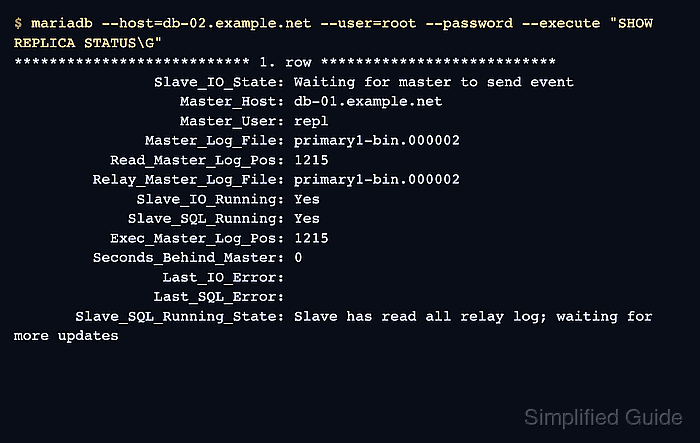
- Check that the replica receiver and applier threads are running.
$ mariadb --host=db-02.example.net --user=root --password --execute "SHOW REPLICA STATUS\G"
*************************** 1. row ***************************
                Slave_IO_State: Waiting for master to send event
                   Master_Host: db-01.example.net
               Master_Log_File: mysql-bin.000002
           Read_Master_Log_Pos: 1215
         Relay_Master_Log_File: mysql-bin.000002
              Slave_IO_Running: Yes
             Slave_SQL_Running: Yes
           Exec_Master_Log_Pos: 1215
         Seconds_Behind_Master: 0
                 Last_IO_Error:
                Last_SQL_Error:
       Slave_SQL_Running_State: Slave has read all relay log; waiting for more updates
MySQL shows the same checks with Source_* and Replica_* field names, including Replica_IO_Running, Replica_SQL_Running, and Seconds_Behind_Source.
- Insert a temporary probe row on the primary.
$ mariadb --host=db-01.example.net --user=root --password --execute "INSERT INTO appdb.customers VALUES (9001, 'Replication Probe');"
Use a table where a temporary row is safe, or use an application write that is already expected in the environment.
- Query the replica for the probe row.
$ mariadb --host=db-02.example.net --user=root --password --execute "SELECT * FROM appdb.customers WHERE id = 9001;"
id	name
9001	Replication Probe
The row appearing on the replica proves that the imported snapshot, binary log coordinates, connection credentials, and apply thread are working together.
- Remove the probe row from the primary after the verification.
$ mariadb --host=db-01.example.net --user=root --password --execute "DELETE FROM appdb.customers WHERE id = 9001;"
- Keep monitoring the replica after the first successful test.

Mohd Shakir Zakaria is a cloud architect with deep roots in software development and open-source advocacy. Certified in AWS, Red Hat, VMware, ITIL, and Linux, he specializes in designing and managing robust cloud and on-premises infrastructures.


