GTID replication replaces fragile binary log file and position tracking with transaction identifiers, so a replica can reconnect, fail over, and resume from the next missing transaction instead of from a manually recorded log file and byte offset.
Each committed change written to the binary log is tagged with a global transaction identifier that the replica records as executed. MySQL and MariaDB both support GTID-based replication, but they use different variables and different connection syntax. MySQL switches the channel to SOURCE_AUTO_POSITION=1, while MariaDB starts from gtid_slave_pos and uses MASTER_USE_GTID=slave_pos.
Sources need binary logging and every server needs a unique server_id value, but a normal replica only needs its own binary log when it will feed downstream replicas or keep promotion-ready local history. The GTID implementations are not compatible across MySQL and MariaDB, MySQL 8.4 defaults to row-based binary logging and deprecates changing binlog_format, and MySQL partial logical dumps from GTID-enabled servers need extra care because they can carry GTIDs for transactions outside the dumped schemas.
Related: How to configure MySQL or MariaDB replication
Related: How to monitor replication in MySQL or MariaDB
Tool: DB Replica Lag Catch-up Calculator
Methods to enable GTID replication in MySQL or MariaDB:
Steps to enable GTID replication in MySQL or MariaDB:
Enable GTID replication in MySQL
This method fits a MySQL source and replica that already contain the same data from the same full backup, clone, or snapshot. After both servers start with GTIDs enabled, the replica can switch to auto-positioning and resume from its executed GTID set instead of from a recorded log file and position.
For a brand-new replica, finish the seed restore before the GTID channel is started. On MySQL, avoid using a partial logical dump as the GTID seed unless the dump and GTID_PURGED handling are planned deliberately, because the server's full gtid_executed set can extend beyond the schemas included in the dump.
- Choose unique server_id values for the source and replica.
Example: source 101, replica 102.
- Create a GTID configuration file on the source host.
$ sudoedit /etc/mysql/conf.d/gtid.cnf
Common MySQL config paths include /etc/mysql/mysql.conf.d/mysqld.cnf on Debian or Ubuntu and /etc/my.cnf or /etc/my.cnf.d/ on RHEL-family systems.
- Add the source-side GTID settings under the [mysqld] section.
[mysqld]
server_id = 101
log_bin = mysql-bin
gtid_mode = ON
enforce_gtid_consistency = ON
In MySQL 8.4, binary logging is enabled by default and already uses row-based format. The binlog_format setting is deprecated there, so it is better not to add it unless an older server in the topology still requires an explicit row-based setting.
- Create a GTID configuration file on the replica host.
$ sudoedit /etc/mysql/conf.d/gtid.cnf
- Add the replica-side GTID settings under the [mysqld] section.
[mysqld]
server_id = 102
gtid_mode = ON
enforce_gtid_consistency = ON
relay_log_recovery = ON
skip_replica_start = ON
If the replica might later become a source or feed additional replicas, also enable log_bin plus log_replica_updates on the replica.
- Restart MySQL on both hosts.
$ sudo systemctl restart mysql
Some distributions use the mysqld systemd unit instead of mysql.
- Verify that GTIDs are enabled on the source.
$ mysql -u root -p -e "SHOW GLOBAL VARIABLES LIKE 'gtid_mode'; SHOW GLOBAL VARIABLES LIKE 'enforce_gtid_consistency';"
+---------------+-------+
| Variable_name | VALUE |
+---------------+-------+
| gtid_mode     | ON    |
+---------------+-------+
+--------------------------+-------+
| Variable_name            | VALUE |
+--------------------------+-------+
| enforce_gtid_consistency | ON    |
+--------------------------+-------+
- Create a replication user on the source.
$ mysql -u root -p -e "CREATE USER 'repl'@'192.0.2.11' IDENTIFIED BY 'StrongPass!23'; GRANT REPLICATION SLAVE ON *.* TO 'repl'@'192.0.2.11'; FLUSH PRIVILEGES;"
Use the replica host IP or a tight subnet instead of '%' when possible.
- Stop a reused replica and clear old replication state before applying a replacement seed.
$ mysql -u root -p -e "STOP REPLICA; RESET REPLICA ALL; RESET BINARY LOGS AND GTIDS;"
Run this only on a replica that is being rebuilt from a fresh seed. It deletes relay logs, clears connection metadata, and resets the local GTID history.
- Restore the replica from the same full backup, clone, or snapshot set as the source.
Auto-positioning works only when the replica starts from data that matches the source at the GTID state it is about to request.
For MySQL GTID provisioning, use a full-instance seed or another supported full backup method instead of a partial schema dump when GTID_PURGED is involved.
- Point the replica at the source using GTID auto-positioning.
$ mysql -u root -p -e "CHANGE REPLICATION SOURCE TO SOURCE_HOST='192.0.2.10', SOURCE_PORT=3306, SOURCE_USER='repl', SOURCE_PASSWORD='StrongPass!23', SOURCE_AUTO_POSITION=1, GET_SOURCE_PUBLIC_KEY=1; START REPLICA;"
If the replication user authenticates with caching_sha2_password and the channel is not using TLS, GET_SOURCE_PUBLIC_KEY=1 or SOURCE_PUBLIC_KEY_PATH is required for password exchange.
Older MySQL releases use CHANGE MASTER TO plus START SLAVE instead of the source and replica forms.
- Verify that the replica is receiving and applying GTID transactions.
$ mysql -u root -p -e "SHOW REPLICA STATUS\G"
*************************** 1. ROW ***************************
             Replica_IO_State: Waiting FOR SOURCE TO send event
                  Source_Host: 192.0.2.10
            Replica_IO_Running: Yes
           Replica_SQL_Running: Yes
                Auto_Position: 1
            Retrieved_Gtid_Set: a3f8d4c2-1111-2222-3333-444455556666:1-18
             Executed_Gtid_Set: a3f8d4c2-1111-2222-3333-444455556666:1-18
     Seconds_Behind_Source: 0
##### snipped #####
No in either running field usually means the source is unreachable, the credentials are wrong, or the replica does not actually match the source's GTID history.
- Create a small write on the source.
$ mysql -u root -p -e "CREATE DATABASE IF NOT EXISTS repl_test; CREATE TABLE IF NOT EXISTS repl_test.gtid_ping (id INT PRIMARY KEY AUTO_INCREMENT, created TIMESTAMP DEFAULT CURRENT_TIMESTAMP); INSERT INTO repl_test.gtid_ping () VALUES ();"
- Query the test row on the replica.
$ mysql -u root -p -e "SELECT * FROM repl_test.gtid_ping ORDER BY id DESC LIMIT 1;"
+----+---------------------+
| id | created             |
+----+---------------------+
|  1 | 2026-04-09 23:20:54 |
+----+---------------------+
Enable GTID replication in MariaDB
This method fits a MariaDB source and a new or rebuilt replica seeded from a logical dump and then advanced from the recorded GTID position. MariaDB keeps its own GTID state, so the replica does not use SOURCE_AUTO_POSITION or MySQL's GTID variables.
Most single-source MariaDB topologies can leave gtid_domain_id at the default 0 on both servers. The critical handoff is the source's gtid_current_pos copied into the replica's gtid_slave_pos after the seed import, followed by MASTER_USE_GTID=slave_pos on the replication channel.
- Choose unique server_id values for the source and replica.
Example: source 201, replica 202.
- Create a GTID configuration file on the source host.
$ sudoedit /etc/mysql/mariadb.conf.d/60-gtid.cnf
Common MariaDB server config paths include /etc/mysql/mariadb.conf.d/50-server.cnf on Debian or Ubuntu and /etc/my.cnf.d/ or /etc/my.cnf on RHEL-family systems.
- Add the source-side GTID settings under the [mysqld] section.
[mysqld]
server_id = 201
log_bin = mariadb-bin
binlog_format = ROW
gtid_strict_mode = ON
gtid_strict_mode is optional in MariaDB, but enabling it makes GTID ordering errors stop the replica immediately instead of drifting further.
- Create a GTID configuration file on the replica host.
$ sudoedit /etc/mysql/mariadb.conf.d/60-gtid.cnf
- Add the replica-side GTID settings under the [mysqld] section.
[mysqld]
server_id = 202
gtid_strict_mode = ON
read_only = ON
skip_slave_start = ON
In a normal single-source setup, leave gtid_domain_id at the default 0 instead of inventing a separate domain ID.
Leave replica-side log_bin disabled for this slave_pos seed workflow unless the seed import is deliberately run with session binary logging disabled. A logged import creates local replica GTIDs and can block the later SET GLOBAL gtid_slave_pos step.
- Restart MariaDB on both hosts.
$ sudo systemctl restart mariadb
- Verify GTID strict mode on the source.
$ mariadb -u root -p -e "SHOW GLOBAL VARIABLES LIKE 'gtid_strict_mode';"
+------------------+-------+
| Variable_name    | VALUE |
+------------------+-------+
| gtid_strict_mode | ON    |
+------------------+-------+
- Create a replication user on the source.
$ mariadb -u root -p -e "CREATE USER 'repl'@'192.0.2.21' IDENTIFIED BY 'StrongPass!23'; GRANT REPLICATION SLAVE ON *.* TO 'repl'@'192.0.2.21'; FLUSH PRIVILEGES;"
- Create a seed dump of the databases that should exist on the replica.
$ mariadb-dump -u root -p --databases appdb --single-transaction --routines --events --triggers > appdb-seed.sql
List additional database names after --databases as needed. Pause application writes or use a backup procedure that records the GTID position belonging to the same snapshot.
- Record the matching GTID position from the source.
$ mariadb -u root -p -e "SELECT @@GLOBAL.gtid_current_pos;"
+---------------------------+
| @@GLOBAL.gtid_current_pos |
+---------------------------+
| 0-201-6                   |
+---------------------------+
- Import the seed dump on the replica.
$ mariadb -u root -p < appdb-seed.sql
- Tell the replica which GTID position the imported dump represents.
$ mariadb -u root -p -e "SET GLOBAL gtid_slave_pos='0-201-6';"
Set gtid_slave_pos only after the replica data actually matches the imported source state. A wrong value makes the replica skip needed transactions or request transactions it already has.
- Configure the replica to follow the source using GTIDs and start replication.
$ mariadb -u root -p -e "CHANGE MASTER TO MASTER_HOST='192.0.2.20', MASTER_PORT=3306, MASTER_USER='repl', MASTER_PASSWORD='StrongPass!23', MASTER_USE_GTID=slave_pos; START REPLICA;"
Use MASTER_USE_GTID=slave_pos for a normal replica. That value tracks the GTIDs applied from the source rather than local binlog activity on the replica.
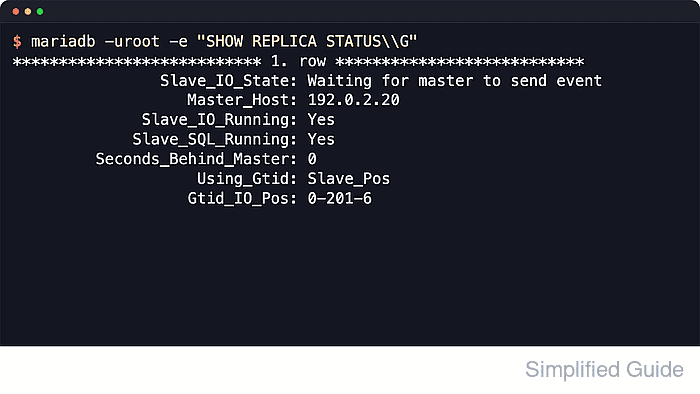
- Verify that the replica is healthy.
$ mariadb -u root -p -e "SHOW REPLICA STATUS\G"
*************************** 1. ROW ***************************
                Slave_IO_State: Waiting FOR master TO send event
                   Master_Host: 192.0.2.20
              Slave_IO_Running: Yes
             Slave_SQL_Running: Yes
         Seconds_Behind_Master: 0
                    Using_Gtid: Slave_Pos
                   Gtid_IO_Pos: 0-201-6
##### snipped #####
MariaDB still exposes many status fields with Slave_ names even when the command is SHOW REPLICA STATUS.
- Create a test row on the source.
$ mariadb -u root -p -e "INSERT INTO appdb.seed (note) VALUES ('after-start');"
- Query the replicated rows on the replica.
$ mariadb -u root -p -e "SELECT * FROM appdb.seed ORDER BY id;"
+----+--------------------+
| id | note               |
+----+--------------------+
|  1 | before-replication |
|  2 | after-START        |
+----+--------------------+

Mohd Shakir Zakaria is a cloud architect with deep roots in software development and open-source advocacy. Certified in AWS, Red Hat, VMware, ITIL, and Linux, he specializes in designing and managing robust cloud and on-premises infrastructures.


