Promoting a replica is a controlled failover, not just a command that changes labels. Writes must be fenced from the old primary, the chosen replica must finish applying its relay log, and only one server should accept application writes when the cutover ends.
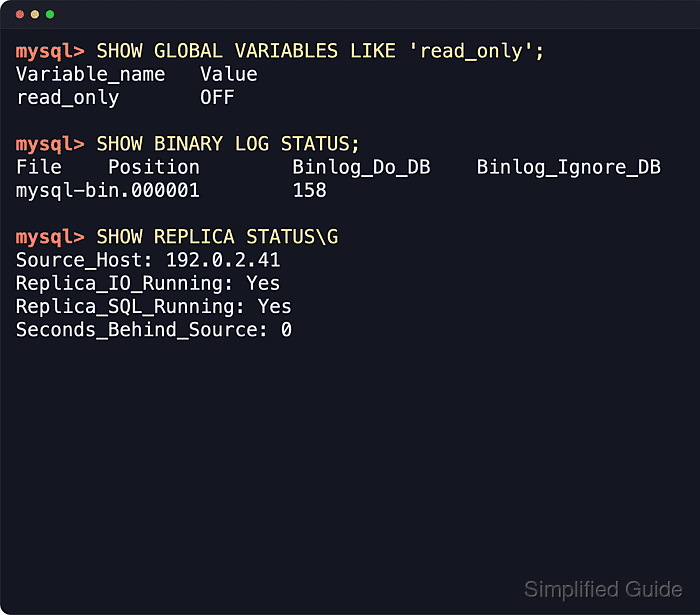
Standard replication replays changes from the primary binary log through an I/O thread and an SQL thread on the replica. The safe handoff is to stop new writes, stop only the candidate's I/O thread, confirm the SQL thread has applied every fetched event, then remove the old source connection before the server becomes writable.
Current MySQL uses SHOW REPLICA STATUS, STOP REPLICA, RESET REPLICA, and SHOW BINARY LOG STATUS. Current MariaDB accepts the replica terms too, but many status fields still use Master_ and Slave_ names, and older installations may still use SHOW SLAVE STATUS or RESET SLAVE ALL. Keep GTID or file-position replication consistent with the existing topology, and do not reset binary logs or GTID history during a normal promotion when any replica still needs that history.
Steps to promote a MySQL or MariaDB replica to primary:
- Choose the replica that will become the new write target, and confirm it is the most caught-up candidate.
Use the existing replication monitor page when several replicas are available. Related: How to check replication status in MySQL or MariaDB
Tool: Replication Backlog Time Calculator - Block the current primary on the writer proxy so applications can no longer reach it.
$ echo "set server mysql_writer/db-primary state maint; shutdown sessions server mysql_writer/db-primary" | sudo socat stdio /run/haproxy/admin.sock
This assumes HAProxy with a mysql_writer backend listing db-primary and db-replica, and the socat package installed. On a virtual IP, DNS name, or other proxy, remove the old primary there instead, and stop any application that connects straight to it. SQL read-only mode lowers risk, but privileged sessions can still bypass it. Related: How to configure HAProxy for high availability MySQL
- Put the current MySQL primary into read-only mode if it is still reachable.
$ mysql -u root -p -e "SET GLOBAL super_read_only = ON; SET GLOBAL read_only = ON;"
Enter password:
On MariaDB, use SET GLOBAL read_only = ON; and keep the external writer fence in place.
- Check the candidate replica before stopping any replication thread.
$ mysql -u root -p -e "SHOW REPLICA STATUS\G"
Enter password:
*************************** 1. row ***************************
Source_Host: db-primary.example.net
Replica_IO_Running: Yes
Replica_SQL_Running: Yes
Seconds_Behind_Source: 0
Last_IO_Error:
Last_SQL_Error:
Replica_SQL_Running_State: Replica has read all relay log; waiting for more updates
##### snipped #####
MariaDB output commonly shows Master_Host, Slave_IO_Running, Slave_SQL_Running, and Seconds_Behind_Master even when the command is SHOW REPLICA STATUS\G.
- Stop only the candidate's replication I/O thread so it stops fetching from the old primary.
$ mysql -u root -p -e "STOP REPLICA IO_THREAD;"
Enter password:
MariaDB and older MySQL syntax may use STOP SLAVE IO_THREAD;.
- Confirm the SQL thread has drained the relay log it already received.
$ mysql -u root -p -e "SHOW REPLICA STATUS\G"
Enter password:
*************************** 1. row ***************************
Replica_IO_Running: No
Replica_SQL_Running: Yes
Seconds_Behind_Source: NULL
Last_SQL_Error:
Replica_SQL_Running_State: Replica has read all relay log; waiting for more updates
##### snipped #####
Do not promote while Last_SQL_Error is non-empty or the SQL thread is still behind. The promoted server would be missing transactions that were already committed on the old primary.
- Stop replication completely on the candidate.
$ mysql -u root -p -e "STOP REPLICA;"
Enter password:
- Clear the candidate's saved source connection so it cannot reconnect to the former primary after a restart.
$ mysql -u root -p -e "RESET REPLICA ALL;"
Enter password:
RESET REPLICA ALL removes the saved source host, user, password, and channel metadata. On MariaDB or older MySQL, the equivalent syntax may be RESET SLAVE ALL;.
- Disable read-only mode on the promoted MySQL server.
$ mysql -u root -p -e "SET GLOBAL super_read_only = OFF; SET GLOBAL read_only = OFF;"
Enter password:
On MariaDB, use SET GLOBAL read_only = OFF;.
- Write a test row on the promoted server to prove it accepts changes.
$ mysql -u root -p -e "CREATE DATABASE sg_cutover; CREATE TABLE sg_cutover.events (id INT PRIMARY KEY, note VARCHAR(40)); INSERT INTO sg_cutover.events VALUES (1,'after promotion'); SELECT * FROM sg_cutover.events; DROP DATABASE sg_cutover;"
Enter password:
+----+-----------------+
| id | note            |
+----+-----------------+
|  1 | after promotion |
+----+-----------------+
The throwaway sg_cutover schema is dropped in the same command, so no business table is touched and nothing is left behind.
- Confirm the promoted server is still a binary-log source before other replicas follow it.
$ mysql -u root -p -e "SHOW BINARY LOG STATUS;"
Enter password:
+------------------+----------+--------------+------------------+-------------------+
| File             | Position | Binlog_Do_DB | Binlog_Ignore_DB | Executed_Gtid_Set |
+------------------+----------+--------------+------------------+-------------------+
| mysql-bin.000003 |  2999628 |              |                  | 915f...:1-10      |
+------------------+----------+--------------+------------------+-------------------+
MariaDB uses SHOW BINLOG STATUS; on current releases. Older references may call the same check SHOW MASTER STATUS;.
Do not run RESET BINARY LOGS AND GTIDS on MySQL or RESET MASTER on MariaDB as part of an ordinary promotion. Those statements start a new binary-log history and can break replicas that still need the promoted server's existing GTID or log-position history.
- Change the mysql_writer backend in /etc/haproxy/haproxy.cfg so the promoted server takes writes and the old primary stays disabled.
backend mysql_writer
    mode tcp
    server db-primary db-primary.example.net:3306 check disabled
    server db-replica db-replica.example.net:3306 check
Do not remove disabled from the old primary until it is rebuilt or re-seeded from the new primary. The maintenance state set earlier lasts only until the next reload, so a backend without this flag sends writes back to the old primary.
- Reload HAProxy to send writes to the promoted server.
$ sudo systemctl reload haproxy
- Connect through the writer endpoint with an application account to confirm it reaches the promoted server.
$ mysql -h db-writer.example.net -u app -p -e "SELECT @@hostname, @@read_only;"
Enter password:
+------------+-------------+
| @@hostname | @@read_only |
+------------+-------------+
| db-replica |           0 |
+------------+-------------+
- Reattach remaining replicas only after the new primary is verified.
Keep GTID replicas on GTID auto-positioning, or use the promoted server's current binary log file and position for file-position replicas. Related: How to enable GTID replication in MySQL or MariaDB
Related: How to configure MySQL or MariaDB replication