Checking database size in MySQL or MariaDB helps catch quiet storage growth before backups, replicas, or schema changes start taking longer than expected. Per-schema totals make it easier to see which application database is expanding and whether the growth is isolated or server-wide.
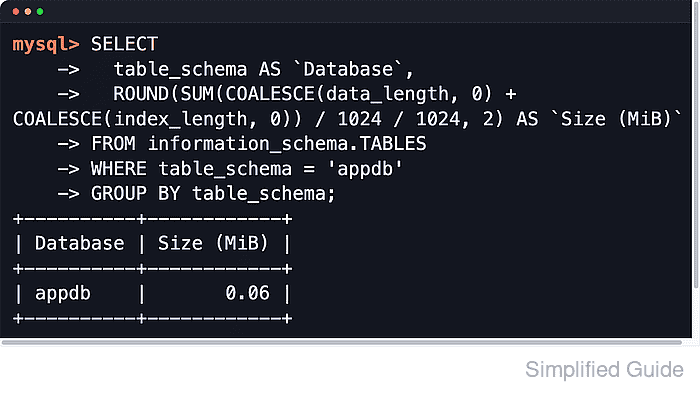
Both servers expose table metadata through INFORMATION_SCHEMA.TABLES. Summing DATA_LENGTH and INDEX_LENGTH across each TABLE_SCHEMA produces a practical database-size report based on the bytes allocated to table data and indexes, and the same metadata can be reused to break a schema down by its largest tables.
These totals are estimates, not a byte-for-byte filesystem audit. Results are limited to schemas visible to the connected account, TABLE_ROWS remains approximate for InnoDB, DATA_FREE can reflect tablespace-level free space rather than reclaimable space for one table, and MySQL can return cached INFORMATION_SCHEMA statistics for up to @@information_schema_stats_expiry seconds unless they are refreshed. Binary logs, redo or undo files, temporary files, and other server-side storage outside table data are also excluded.
Steps to check MySQL or MariaDB database size:
- Open a MySQL or MariaDB client session with an account that can inspect the target schemas.
$ mariadb --user=dbadmin --password
Enter password:
Welcome to the MariaDB monitor.  Commands end with ; or \g.
MariaDB [(none)]>
Use mysql on MySQL systems. The SQL queries are the same on both servers.
- List size by schema from INFORMATION_SCHEMA.TABLES.
MariaDB [(none)]> SELECT
    ->   table_schema AS `Database`,
    ->   ROUND(SUM(COALESCE(data_length, 0) + COALESCE(index_length, 0)) / 1024 / 1024, 2) AS `Size (MiB)`
    -> FROM information_schema.TABLES
    -> GROUP BY table_schema
    -> ORDER BY SUM(COALESCE(data_length, 0) + COALESCE(index_length, 0)) DESC;
+--------------------+------------+
| Database           | Size (MiB) |
+--------------------+------------+
| mysql              |       5.40 |
| information_schema |       0.20 |
| appdb              |       0.06 |
| sys                |       0.03 |
| reporting          |       0.02 |
| performance_schema |       0.00 |
+--------------------+------------+
These values reflect table and index space reported by the server, not every file under the data directory.
- Exclude common system schemas when reviewing application growth.
MariaDB [(none)]> SELECT -> table_schema AS `Database`, -> ROUND(SUM(COALESCE(data_length, 0) + COALESCE(index_length, 0)) / 1024 / 1024, 2) AS `Size (MiB)` -> FROM information_schema.TABLES -> WHERE table_schema NOT IN ('information_schema','mysql','performance_schema','sys') -> GROUP BY table_schema -> ORDER BY SUM(COALESCE(data_length, 0) + COALESCE(index_length, 0)) DESC; +-----------+------------+ | Database | Size (MiB) | +-----------+------------+ | appdb | 0.06 | | reporting | 0.02 | +-----------+------------+ - Show the total size for one schema.
MariaDB [(none)]> SELECT
    ->   table_schema AS `Database`,
    ->   ROUND(SUM(COALESCE(data_length, 0) + COALESCE(index_length, 0)) / 1024 / 1024, 2) AS `Size (MiB)`
    -> FROM information_schema.TABLES
    -> WHERE table_schema = 'appdb'
    -> GROUP BY table_schema;
+----------+------------+
| Database | Size (MiB) |
+----------+------------+
| appdb    |       0.06 |
+----------+------------+
Replace appdb with the schema name returned by SHOW DATABASES.
- List the largest tables inside a schema to find what is driving growth.
MariaDB [(none)]> SELECT
    ->   table_name AS `Table`,
    ->   engine AS `Engine`,
    ->   ROUND((COALESCE(data_length, 0) + COALESCE(index_length, 0)) / 1024 / 1024, 2) AS `Size (MiB)`,
    ->   table_rows AS `Rows (est.)`
    -> FROM information_schema.TABLES
    -> WHERE table_schema = 'appdb'
    -> ORDER BY (COALESCE(data_length, 0) + COALESCE(index_length, 0)) DESC
    -> LIMIT 10;
+-----------+--------+------------+-------------+
| Table     | Engine | Size (MiB) | Rows (est.) |
+-----------+--------+------------+-------------+
| orders    | InnoDB |       0.03 |           3 |
| customers | InnoDB |       0.03 |           3 |
+-----------+--------+------------+-------------+
TABLE_ROWS is often an estimate for InnoDB and should not be treated as an exact count.
- Split a schema into data, index, and free-space columns when a large table needs closer inspection.
MariaDB [(none)]> SELECT
    ->   table_name AS `Table`,
    ->   ROUND(COALESCE(data_length, 0) / 1024 / 1024, 2) AS `Data (MiB)`,
    ->   ROUND(COALESCE(index_length, 0) / 1024 / 1024, 2) AS `Index (MiB)`,
    ->   ROUND(COALESCE(data_free, 0) / 1024 / 1024, 2) AS `Free (MiB)`,
    ->   ROUND((COALESCE(data_length, 0) + COALESCE(index_length, 0)) / 1024 / 1024, 2) AS `Total (MiB)`
    -> FROM information_schema.TABLES
    -> WHERE table_schema = 'appdb'
    -> ORDER BY (COALESCE(data_length, 0) + COALESCE(index_length, 0)) DESC
    -> LIMIT 10;
+-----------+------------+-------------+------------+-------------+
| Table     | Data (MiB) | Index (MiB) | Free (MiB) | Total (MiB) |
+-----------+------------+-------------+------------+-------------+
| customers |       0.02 |        0.02 |       0.00 |        0.03 |
| orders    |       0.02 |        0.02 |       0.00 |        0.03 |
+-----------+------------+-------------+------------+-------------+
DATA_FREE can be tablespace-level free space, especially with shared InnoDB tablespaces, so it is not a guarantee that one table can reclaim that exact amount.
- Refresh table statistics when reported sizes look stale.
MariaDB [(none)]> ANALYZE TABLE appdb.orders;
+--------------+---------+----------+----------+
| Table        | Op      | Msg_type | Msg_text |
+--------------+---------+----------+----------+
| appdb.orders | analyze | status   | OK       |
+--------------+---------+----------+----------+
ANALYZE TABLE reads table metadata and can add I/O on large or busy systems.
On MySQL, run SET SESSION information_schema_stats_expiry = 0 before the size query when a one-off report must bypass cached metadata.
- Show the server data directory before comparing SQL totals to filesystem usage.
MariaDB [(none)]> SELECT @@datadir AS `Data directory`;
+-----------------+
| Data directory  |
+-----------------+
| /var/lib/mysql/ |
+-----------------+
Filesystem usage is usually higher because logs, temporary files, redo or undo data, and other server files are not included in per-schema totals.
- Exit the client session.
MariaDB [(none)]> EXIT
Bye

Mohd Shakir Zakaria is a cloud architect with deep roots in software development and open-source advocacy. Certified in AWS, Red Hat, VMware, ITIL, and Linux, he specializes in designing and managing robust cloud and on-premises infrastructures.


