Table-size checks in MySQL or MariaDB identify the tables driving storage growth before backups, replicas, schema changes, or retention jobs start taking longer than expected. A per-table report shows whether growth is concentrated in one busy table or spread across an entire application database.
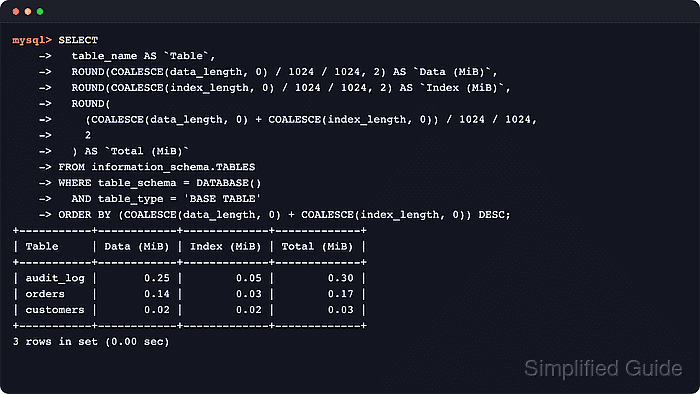
Both servers expose table-size metadata through INFORMATION_SCHEMA.TABLES. The DATA_LENGTH and INDEX_LENGTH columns report allocated table-data and index bytes, while SHOW TABLE STATUS exposes the same core fields for a quick table-by-table cross-check inside the SQL client.
The sample outputs were verified with a disposable MariaDB 11.8 database. These figures are estimates rather than a filesystem audit. InnoDB row counts are approximate, DATA_FREE can describe tablespace-level free space rather than bytes one table can immediately reclaim, and MySQL can cache INFORMATION_SCHEMA table statistics until the session bypasses or refreshes them.
Steps to check table size in MySQL or MariaDB:
- Open a MySQL or MariaDB client session on the target server.
$ mariadb --user=dbadmin --password
Enter password:
Welcome to the MariaDB monitor.  Commands end with ; or \g.
MariaDB [(none)]>
Use mysql on MySQL systems. The SQL queries in the steps are the same on both servers.
- Select the database that contains the table.
MariaDB [(none)]> USE appdb;
Database changed
MariaDB [appdb]> SELECT DATABASE();
+------------+
| DATABASE() |
+------------+
| appdb      |
+------------+
Replace appdb with the database to inspect so the later queries can use DATABASE().
- Show the size breakdown for one table from INFORMATION_SCHEMA.TABLES.
MariaDB [appdb]> SELECT
    ->   table_schema AS `Database`,
    ->   table_name AS `Table`,
    ->   engine AS `Engine`,
    ->   table_rows AS `Rows (est.)`,
    ->   ROUND(COALESCE(data_length, 0) / 1024 / 1024, 2) AS `Data (MiB)`,
    ->   ROUND(COALESCE(index_length, 0) / 1024 / 1024, 2) AS `Index (MiB)`,
    ->   ROUND((COALESCE(data_length, 0) + COALESCE(index_length, 0)) / 1024 / 1024, 2) AS `Total (MiB)`,
    ->   ROUND(COALESCE(data_free, 0) / 1024 / 1024, 2) AS `Free (MiB)`
    -> FROM information_schema.TABLES
    -> WHERE table_schema = DATABASE()
    ->   AND table_name = 'orders'
    ->   AND table_type = 'BASE TABLE';
+----------+--------+--------+-------------+------------+-------------+-------------+------------+
| Database | Table  | Engine | Rows (est.) | Data (MiB) | Index (MiB) | Total (MiB) | Free (MiB) |
+----------+--------+--------+-------------+------------+-------------+-------------+------------+
| appdb    | orders | InnoDB |        4953 |       0.48 |        0.30 |        0.78 |       0.00 |
+----------+--------+--------+-------------+------------+-------------+-------------+------------+
1 row in set (0.00 sec)
Replace orders with the table name to inspect. The TABLE_TYPE = 'BASE TABLE' filter keeps views out of the size report, and Rows (est.) is approximate for InnoDB.
- Rank tables in the current database by total allocated size.
MariaDB [appdb]> SELECT
    ->   table_name AS `Table`,
    ->   ROUND(COALESCE(data_length, 0) / 1024 / 1024, 2) AS `Data (MiB)`,
    ->   ROUND(COALESCE(index_length, 0) / 1024 / 1024, 2) AS `Index (MiB)`,
    ->   ROUND((COALESCE(data_length, 0) + COALESCE(index_length, 0)) / 1024 / 1024, 2) AS `Total (MiB)`
    -> FROM information_schema.TABLES
    -> WHERE table_schema = DATABASE()
    ->   AND table_type = 'BASE TABLE'
    -> ORDER BY (COALESCE(data_length, 0) + COALESCE(index_length, 0)) DESC;
+-----------+------------+-------------+-------------+
| Table     | Data (MiB) | Index (MiB) | Total (MiB) |
+-----------+------------+-------------+-------------+
| audit_log |       3.52 |        0.63 |        4.14 |
| orders    |       0.48 |        0.30 |        0.78 |
| customers |       0.17 |        0.11 |        0.28 |
+-----------+------------+-------------+-------------+
3 rows in set (0.00 sec)
This ranking reflects allocated table and index space reported by the storage engine, not every file under the data directory.
- Find the largest application tables across non-system databases.
MariaDB [appdb]> SELECT
    ->   table_schema AS `Database`,
    ->   table_name AS `Table`,
    ->   ROUND((COALESCE(data_length, 0) + COALESCE(index_length, 0)) / 1024 / 1024, 2) AS `Total (MiB)`
    -> FROM information_schema.TABLES
    -> WHERE table_schema NOT IN ('mysql', 'information_schema', 'performance_schema', 'sys')
    ->   AND table_type = 'BASE TABLE'
    -> ORDER BY (COALESCE(data_length, 0) + COALESCE(index_length, 0)) DESC
    -> LIMIT 10;
+----------+-----------+-------------+
| Database | Table     | Total (MiB) |
+----------+-----------+-------------+
| appdb    | audit_log |        4.14 |
| appdb    | orders    |        0.78 |
| appdb    | customers |        0.28 |
+----------+-----------+-------------+
3 rows in set (0.00 sec)
Use this server-wide query when the biggest application tables need to be found without mixing in system schemas.
- Refresh table metadata before rerunning the size query when the values look stale.
MariaDB [appdb]> ANALYZE TABLE orders;
+--------------+---------+----------+----------+
| Table        | Op      | Msg_type | Msg_text |
+--------------+---------+----------+----------+
| appdb.orders | analyze | status   | OK       |
+--------------+---------+----------+----------+
1 row in set (0.00 sec)
ANALYZE TABLE can add I/O on large or busy tables. Run it during a low-traffic window when possible.
On MySQL, run SET SESSION information_schema_stats_expiry = 0 before the size query when a one-off report must bypass cached INFORMATION_SCHEMA table statistics. MariaDB does not use that variable.
- Cross-check the reported bytes with SHOW TABLE STATUS.
MariaDB [appdb]> SHOW TABLE STATUS LIKE 'orders'\G
*************************** 1. row ***************************
           Name: orders
         Engine: InnoDB
        Version: 10
     Row_format: Dynamic
           Rows: 4953
 Avg_row_length: 102
    Data_length: 507904
Max_data_length: 0
   Index_length: 311296
      Data_free: 0
 Auto_increment: 8192
    Create_time: 2026-06-07 05:18:41
    Update_time: 2026-06-07 05:18:41
     Check_time: NULL
      Collation: utf8mb4_uca1400_ai_ci
       Checksum: NULL
 Create_options:
        Comment:
Max_index_length: 0
      Temporary: N
1 row in set (0.00 sec)
SHOW TABLE STATUS exposes the same core size fields in bytes. MariaDB may show extra trailing columns, but Data_length, Index_length, and Data_free map to the same storage figures.
- Exit the client session.
MariaDB [appdb]> EXIT
Bye

Mohd Shakir Zakaria is a cloud architect with deep roots in software development and open-source advocacy. Certified in AWS, Red Hat, VMware, ITIL, and Linux, he specializes in designing and managing robust cloud and on-premises infrastructures.


