Before restoring a dump, granting access, or pointing an application at a schema, list the databases from the same account that will perform the work. The result shows which MySQL or MariaDB schemas that account can actually see, which prevents a missing privilege or wrong connection target from looking like an absent database.
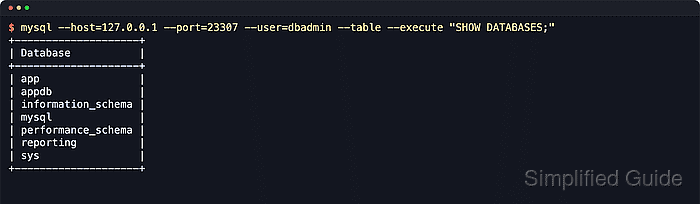
SHOW DATABASES and SHOW SCHEMAS ask the server for database names and accept optional LIKE and WHERE filters. The list can include system schemas such as information_schema, mysql, performance_schema, and sys alongside application schemas, so filter only after checking that the full list looks like the expected server.
Current MariaDB packages commonly ship mariadb and mariadb-show rather than the older mysql and mysqlshow compatibility names, while MySQL systems typically use the mysql client. Remote listings still depend on the correct host, port, authentication method, and TLS policy, and a server started with --skip-show-database limits SHOW DATABASES to accounts with the global SHOW DATABASES privilege.
Steps to list databases in MySQL or MariaDB:
- Open a terminal session that can reach the database server with an account allowed to inspect the target schemas.
The examples use mariadb, which is the current MariaDB client name. Replace it with mysql on MySQL systems. Add --host=db.example.net and --port=3306 when connecting to a remote server.
- List the databases visible to the connected account.
$ mariadb --user=dbadmin --table --execute "SHOW DATABASES"
+--------------------+
| Database           |
+--------------------+
| app                |
| appdb              |
| information_schema |
| mysql              |
| performance_schema |
| reporting          |
| sys                |
+--------------------+
Add --password when the account requires interactive authentication, but avoid --password=secret because credentials can leak through process listings and shell history.
- Use SHOW SCHEMAS when the local convention prefers the schema term.
$ mariadb --user=dbadmin --table --execute "SHOW SCHEMAS"
+--------------------+
| Database           |
+--------------------+
| app                |
| appdb              |
| information_schema |
| mysql              |
| performance_schema |
| reporting          |
| sys                |
+--------------------+
SHOW SCHEMAS is a synonym for SHOW DATABASES in MySQL and MariaDB.
- Filter database names with LIKE when you need only a prefix or pattern match.
$ mariadb --user=dbadmin --table --execute "SHOW DATABASES LIKE 'app%'"
+-----------------+
| Database (app%) |
+-----------------+
| app             |
| appdb           |
+-----------------+
In LIKE patterns, '%' matches any length and '_' matches a single character.
- Exclude common system schemas with a WHERE clause when you need only application databases.
$ mariadb --user=dbadmin --table --execute "SHOW DATABASES WHERE \`Database\` NOT IN ('information_schema','mysql','performance_schema','sys')"
+-----------+
| Database  |
+-----------+
| app       |
| appdb     |
| reporting |
+-----------+
The backslashes before the SQL identifier quotes keep the shell from treating them as command substitution. Inside an interactive SQL prompt, write the identifier as `Database` without the backslashes.
- Check whether one exact database name is present before using it in scripts or application settings.
$ mariadb --user=dbadmin --table --execute "SHOW DATABASES LIKE 'reporting'"
+----------------------+
| Database (reporting) |
+----------------------+
| reporting            |
+----------------------+
An empty result means the schema name is absent or the account cannot see it.
- Use mariadb-show when you only need a quick inventory outside the SQL client.
$ mariadb-show --user=dbadmin
+--------------------+
|     Databases      |
+--------------------+
| app                |
| appdb              |
| information_schema |
| mysql              |
| performance_schema |
| reporting          |
| sys                |
+--------------------+
Use mysqlshow on MySQL systems. For exact-name checks or LIKE and WHERE filtering, stay with SHOW DATABASES inside the SQL client.

Mohd Shakir Zakaria is a cloud architect with deep roots in software development and open-source advocacy. Certified in AWS, Red Hat, VMware, ITIL, and Linux, he specializes in designing and managing robust cloud and on-premises infrastructures.


