A time-series chart can have accurate points and still be difficult to read when its x-axis uses dense or ambiguous dates. Matplotlib separates tick placement from tick text, so the chart can keep real date values while displaying labels suited to the reporting interval.
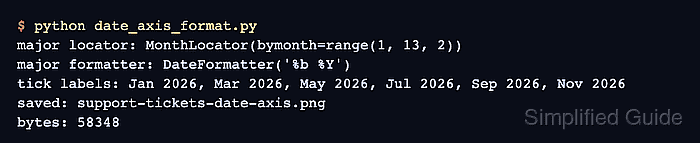
The object-oriented API attaches both choices to ax.xaxis. A MonthLocator selects the months that receive ticks, while a DateFormatter turns those tick values into abbreviated month and four-digit year labels.
The sample covers one calendar year with a fixed two-month tick interval. For date ranges that vary at runtime, AutoDateLocator with ConciseDateFormatter can adapt the spacing, but an explicit monthly locator keeps a recurring annual report predictable.
Steps to format a Matplotlib date axis:
- Create date_axis_format.py with the imports and monthly support data.
- date_axis_format.py
from datetime import datetime
from pathlib import Path

import matplotlib.dates as mdates
import matplotlib.pyplot as plt


months = [datetime(2026, month, 1) for month in range(1, 13)]
tickets_closed = [42, 45, 47, 51, 55, 58, 63, 61, 66, 70, 74, 79]
- Add the figure and line-series setup below the data definitions.
fig, ax = plt.subplots(figsize=(7, 4), layout="constrained")
ax.plot(months, tickets_closed, marker="o", linewidth=2)
ax.set_title("Support tickets closed by month")
ax.set_xlabel("Month closed")
ax.set_ylabel("Tickets closed")
ax.grid(True, axis="y", alpha=0.3)
ax.set_xlim(months[0], months[-1])
- Configure the monthly tick labels below the plot setup.
locator = mdates.MonthLocator(bymonth=range(1, 13, 2))
ax.xaxis.set_major_locator(locator)
ax.xaxis.set_major_formatter(mdates.DateFormatter("%b %Y"))
ax.tick_params(axis="x", rotation=30)
%b produces the abbreviated month name, and %Y produces the four-digit year.
- Complete date_axis_format.py with the final output block.
fig.canvas.draw()
tick_labels = [label.get_text() for label in ax.get_xticklabels() if label.get_text()]

output = Path("support-tickets-date-axis.png")
fig.savefig(output, dpi=160)

print(f"formatted tick labels: {', '.join(tick_labels)}")
print(f"saved chart: {output}")

plt.close(fig)
- Verify date_axis_format.py against the completed source.
- date_axis_format.py
from datetime import datetime
from pathlib import Path

import matplotlib.dates as mdates
import matplotlib.pyplot as plt


months = [datetime(2026, month, 1) for month in range(1, 13)]
tickets_closed = [42, 45, 47, 51, 55, 58, 63, 61, 66, 70, 74, 79]

fig, ax = plt.subplots(figsize=(7, 4), layout="constrained")
ax.plot(months, tickets_closed, marker="o", linewidth=2)
ax.set_title("Support tickets closed by month")
ax.set_xlabel("Month closed")
ax.set_ylabel("Tickets closed")
ax.grid(True, axis="y", alpha=0.3)
ax.set_xlim(months[0], months[-1])

locator = mdates.MonthLocator(bymonth=range(1, 13, 2))
ax.xaxis.set_major_locator(locator)
ax.xaxis.set_major_formatter(mdates.DateFormatter("%b %Y"))
ax.tick_params(axis="x", rotation=30)

fig.canvas.draw()
tick_labels = [label.get_text() for label in ax.get_xticklabels() if label.get_text()]

output = Path("support-tickets-date-axis.png")
fig.savefig(output, dpi=160)

print(f"formatted tick labels: {', '.join(tick_labels)}")
print(f"saved chart: {output}")

plt.close(fig)
- Run the completed script from the directory containing date_axis_format.py.
$ python3 date_axis_format.py
formatted tick labels: Jan 2026, Mar 2026, May 2026, Jul 2026, Sep 2026, Nov 2026
saved chart: support-tickets-date-axis.png
- Inspect support-tickets-date-axis.png for alternating month labels from Jan 2026 through Nov 2026.
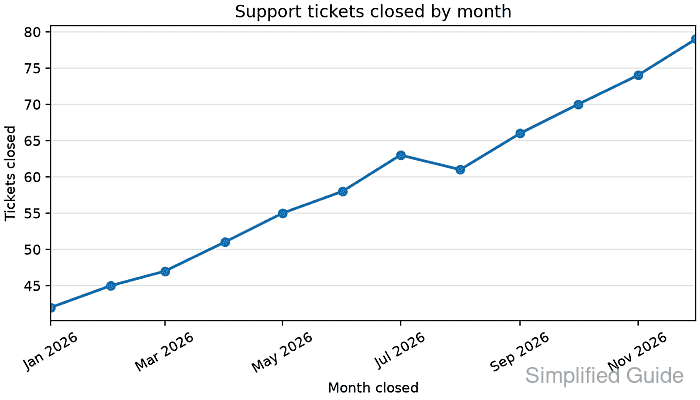
The plotted x-values remain datetime objects; the locator changes tick positions, and the formatter changes only their displayed text.

Mohd Shakir Zakaria is a cloud architect with deep roots in software development and open-source advocacy. Certified in AWS, Red Hat, VMware, ITIL, and Linux, he specializes in designing and managing robust cloud and on-premises infrastructures.


