Crowded Matplotlib figures usually fail at the spacing layer rather than the data layer. Long tick labels, subplot titles, axis labels, legends, and colorbars all compete for the same canvas area, so a plot that works as one panel can become cramped when it moves into a report-sized grid.

Matplotlib figures can use layout engines that reserve space for Axes decorations before the figure is drawn. For new or editable figures, layout=“constrained” is the first choice because it handles subplots, colorbars, and nested layouts better than the older tight_layout() adjustment.
Use one layout engine per figure. Calling tight_layout() after enabling constrained layout disables constrained layout, and manual subplots_adjust() values can fight the layout engine when both try to move the same Axes.
Related: How to create subplots in Matplotlib
Related: How to set figure size in Matplotlib
Related: How to format tick labels in Matplotlib
Steps to fix overlapping Matplotlib labels:
- Open the plotting script that creates the cramped figure.
- Enable constrained layout when the figure or subplot grid is created.
fig, axs = plt.subplots(2, 2, figsize=(8.6, 5.4), layout="constrained")
Set layout=“constrained” before adding Axes content so Matplotlib can reserve room for labels, titles, legends, and colorbars during the draw. For a simple older figure that cannot be changed at creation time, use fig.tight_layout(pad=1.2) before saving instead of mixing both layout systems.
- Keep plot decorations attached to the Figure and Axes objects.
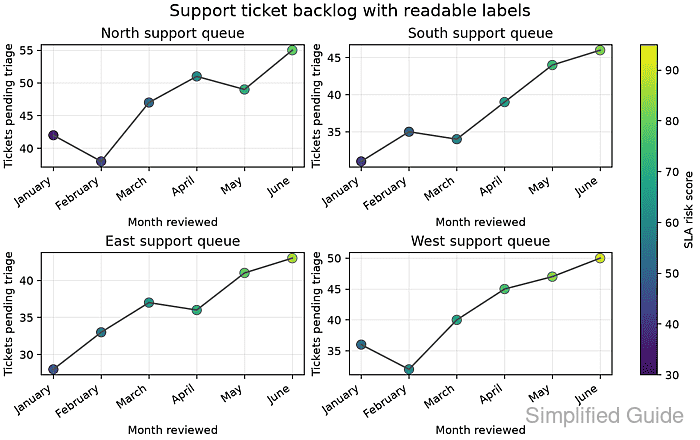
fig.suptitle("Support ticket backlog with readable labels")
ax.set_xlabel("Month reviewed")
ax.set_ylabel("Tickets pending triage")
fig.colorbar(points, ax=axs, label="SLA risk score")
Layout engines measure normal Matplotlib artists. Absolute text positions, manually placed Axes, and annotations outside the figure area may still require a larger figsize or explicit margins.
- Save a compact layout test file to confirm the spacing behavior.
- layout_fix_overlap.py
from pathlib import Path

import numpy as np
import matplotlib.pyplot as plt


output = Path("layout-fix-overlap.png")

months = np.arange(1, 7)
month_labels = [
    "January",
    "February",
    "March",
    "April",
    "May",
    "June",
]

regions = {
    "North support queue": [42, 38, 47, 51, 49, 55],
    "South support queue": [31, 35, 34, 39, 44, 46],
    "East support queue": [28, 33, 37, 36, 41, 43],
    "West support queue": [36, 32, 40, 45, 47, 50],
}

fig, axs = plt.subplots(2, 2, figsize=(8.6, 5.4), layout="constrained")
fig.suptitle("Support ticket backlog with readable labels", fontsize=15)

last_points = None
for index, (ax, (region, tickets)) in enumerate(zip(axs.flat, regions.items())):
    risk_score = np.linspace(35 + index * 6, 78 + index * 4, len(months))
    last_points = ax.scatter(
        months,
        tickets,
        c=risk_score,
        cmap="viridis",
        vmin=30,
        vmax=95,
        s=72,
        edgecolor="black",
        linewidth=0.4,
    )
    ax.plot(months, tickets, color="0.30", linewidth=1.4)
    ax.set_title(region)
    ax.set_xlabel("Month reviewed")
    ax.set_ylabel("Tickets pending triage")
    ax.set_xticks(months, month_labels, rotation=35, ha="right")
    ax.grid(True, alpha=0.25)

fig.colorbar(last_points, ax=axs, label="SLA risk score")
fig.savefig(output, dpi=160)

engine = fig.get_layout_engine()
print(f"layout engine: {engine.__class__.__name__}")
print(f"saved: {output.name}")
- Run the script and confirm constrained layout is active.
$ python layout_fix_overlap.py
layout engine: ConstrainedLayoutEngine
saved: layout-fix-overlap.png
- Open the saved image and verify the titles, tick labels, axis labels, and colorbar have separate space.

Mohd Shakir Zakaria is a cloud architect with deep roots in software development and open-source advocacy. Certified in AWS, Red Hat, VMware, ITIL, and Linux, he specializes in designing and managing robust cloud and on-premises infrastructures.


