Mastodon relies on outbound email for account confirmation, password resets, moderation notices, and server announcements. When the SMTP relay is missing or mismatched, the web application can appear healthy while new users and locked-out accounts never receive the messages they need.
In a source install, mail settings are environment variables in /home/mastodon/live/.env.production, and the Rails web and Sidekiq processes read them when they start. The common production path uses authenticated SMTP on port 587 with STARTTLS, a verified sender address, and provider-issued credentials rather than a personal mailbox password.
Use the exact host, port, authentication method, and TLS mode from the mail provider. Port 465 is SMTPS rather than STARTTLS, so do not mix SMTP_TLS=true with a forced STARTTLS setting unless the provider explicitly documents that combination. A working setup sends a direct Rails mail test and then delivers a normal account email through the background queue.
Related: How to install Mastodon from source
Related: How to install Mastodon with Docker
Related: How to configure a Mastodon domain
Related: How to create a Mastodon admin user
Steps to configure Mastodon SMTP email:
- Open a login shell as the mastodon system user.
$ sudo -iu mastodon
- Change to the Mastodon application directory.
$ cd /home/mastodon/live
- Back up the production environment file.
$ cp .env.production .env.production.before-smtp
- Open the production environment file.
$ vi .env.production
- Set the SMTP relay variables for the mail provider.
SMTP_DELIVERY_METHOD=smtp
SMTP_SERVER=smtp.example.net
SMTP_PORT=587
SMTP_LOGIN=mastodon@example.net
SMTP_PASSWORD=SMTP_PROVIDER_SECRET
SMTP_AUTH_METHOD=plain
SMTP_DOMAIN=social.example.com
SMTP_FROM_ADDRESS=notifications@social.example.com
SMTP_OPENSSL_VERIFY_MODE=peer
SMTP_ENABLE_STARTTLS=always
Use a provider-specific SMTP password or token in SMTP_PASSWORD. If the provider requires port 465, use its SMTPS settings such as SMTP_TLS=true or SMTP_SSL=true instead of forcing SMTP_ENABLE_STARTTLS=always.
Mastodon 4.4 and later can use optional BULK_SMTP_* variables for announcements and terms-of-service mail. Leave them unset when the same relay should handle all outgoing email.
- Check the sender DNS for the domain in SMTP_FROM_ADDRESS.
The relay can accept SMTP authentication while receivers still distrust the sender domain. Review SPF and related sender DNS before opening registrations.
Tool: SPF Validation Report - Confirm that Rails loads the non-secret SMTP settings.
$ RAILS_ENV=production bin/rails runner 'settings = ActionMailer::Base.smtp_settings; puts "#{settings[:address]}:#{settings[:port]} #{settings[:authentication] || "none"}"'
smtp.example.net:587 plain
The output should show the relay host, port, and authentication method without printing SMTP_PASSWORD.
- Return to the sudo-capable shell.
$ exit
- Restart the Rails processes that send or queue email.
$ sudo systemctl restart mastodon-web mastodon-sidekiq
The mastodon-streaming service does not send email. For Docker Compose installs, restart or recreate the web and sidekiq services after editing the same variables in the Compose environment file.
- Confirm that the restarted services are active.
$ sudo systemctl is-active mastodon-web mastodon-sidekiq
active
active
- Open the Mastodon shell again.
$ sudo -iu mastodon
- Change to the Mastodon application directory.
$ cd /home/mastodon/live
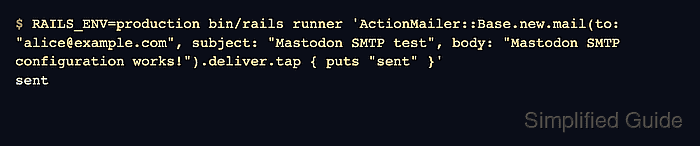
- Send a direct Rails mail test through the configured relay.
$ RAILS_ENV=production bin/rails runner 'ActionMailer::Base.new.mail(to: "alice@example.com", subject: "Mastodon SMTP test", body: "Mastodon SMTP configuration works!").deliver.tap { puts "sent" }'
sent
Replace alice@example.com with an address that can receive the test message. A failed authentication, certificate, or relay policy usually raises an exception instead of printing sent.
- Request a password reset for the same local account.
https://social.example.com/auth/password/new
A password reset uses the normal Mastodon mail path instead of only a hand-written Rails message. Use a test account or an administrator account that can safely receive a reset email.
- Return to the sudo-capable shell.
$ exit
- Check the Sidekiq journal for the password-reset mail job.
$ sudo journalctl -u mastodon-sidekiq --since "10 minutes ago"
Jun 27 10:25:16 social mastodon-sidekiq[18421]: [ActiveJob] [ActionMailer::MailDeliveryJob] Performed ActionMailer::MailDeliveryJob
Jun 27 10:25:16 social mastodon-sidekiq[18421]: [ActiveJob] [ActionMailer::MailDeliveryJob] Sent mail to alice@example.com
If the journal shows authentication, certificate, timeout, or relay-denied errors, fix the provider setting in /home/mastodon/live/.env.production and restart mastodon-web and mastodon-sidekiq before testing again.

Mohd Shakir Zakaria is a cloud architect with deep roots in software development and open-source advocacy. Certified in AWS, Red Hat, VMware, ITIL, and Linux, he specializes in designing and managing robust cloud and on-premises infrastructures.


