A LlamaIndex workflow normally runs only inside the Python application that imports it. workflow_as_mcp wraps that workflow in a Model Context Protocol (MCP) server, so an AI application or other MCP client can discover it as a tool and call it without knowing its steps.
The wrapper reads the tool's contract from the workflow itself. The docstring becomes the description a client shows, the fields of a custom StartEvent become the input schema, and the final StopEvent result comes back as the tool's reply, so the workflow class needs no MCP code.
A server on the default stdio transport opens no network port, because the client starts it as a local process with the client's own permissions. Whatever connects to the server can run the workflow with any input the schema accepts, so expose only workflows that are safe for that caller. A small ticket lookup with no model or API key stands in for your own workflow, which replaces it through the import, tool name and arguments.
Steps to expose a LlamaIndex workflow as an MCP server:
- Install the LlamaIndex MCP package in your project's virtual environment.
An environment on mcp 1.x moves to 2.x, which removes mcp.server.fastmcp, so any FastMCP server in that environment stops importing until it moves to MCPServer.
Related: MCP Python SDK migration guide$ python -m pip install --upgrade llama-index-tools-mcp
Tested with llama-index-tools-mcp 0.6.0, mcp 2.3.0 and llama-index-workflows 2.26.1 on Python 3.12, 3.13 and 3.14.
Related: How to install LlamaIndex with pip
Related: Activate a Python virtual environment - Create a file named ticket_workflow.py in your project directory using your text editor.
- ticket_workflow.py
from pydantic import Field
from workflows import Workflow, step
from workflows.events import StartEvent, StopEvent


class TicketRequest(StartEvent):
    ticket_id: str = Field(
        description="Ticket ID, such as SR-431",
    )
TicketRequest defines the input a client must send, and the Field description reaches the client inside the schema. For a workflow whose step takes the plain StartEvent, workflow_as_mcp raises a ValueError unless you pass a start_event_model.
- Add the TicketWorkflow class at the end of ticket_workflow.py.
class TicketWorkflow(Workflow):
    """Return the approval state of a ticket."""

    @step
    async def lookup(self, ev: TicketRequest) -> StopEvent:
        approvals = {"SR-431": "approved"}
        state = approvals.get(ev.ticket_id, "not found")
        return StopEvent(result=f"{ev.ticket_id}: {state}")
Unless you pass workflow_description, the docstring is the tool description a client receives, and a class without one publishes an empty description.
- Save ticket_workflow.py.
- Create a file named ticket_server.py beside ticket_workflow.py using your text editor.
- ticket_server.py
from llama_index.tools.mcp.utils import workflow_as_mcp

from ticket_workflow import TicketWorkflow

mcp = workflow_as_mcp(
    TicketWorkflow(),
    workflow_name="lookup_ticket",
)

if __name__ == "__main__":
    mcp.run()
workflow_as_mcp finds TicketRequest from the step signature. workflow_name replaces the default tool name, the class name, with an action a client can present. For your own workflow, change the import, the class and workflow_name.
mcp.run() uses stdio, which carries the protocol over standard output. A print() in a workflow step lands on that channel and makes the client log a JSON validation traceback, so send such messages to sys.stderr.When a client connects by URL instead, mcp.run(“streamable-http”) serves http://127.0.0.1:8000/mcp with no authentication, so any process that reaches the port can run the workflow. Keep it on the loopback address unless an authenticating proxy sits in front of it.
- Save ticket_server.py.
- Create a file named ticket_client.py beside ticket_server.py using your text editor.
- ticket_client.py
import asyncio
import json

from llama_index.tools.mcp import BasicMCPClient


async def main() -> None:
    client = BasicMCPClient("python", args=["ticket_server.py"])
    listing = await client.list_tools()
    for tool in listing.tools:
        print(f"tool: {tool.name}")
        print(tool.description)
        print(json.dumps(tool.input_schema, indent=2))


if __name__ == "__main__":
    asyncio.run(main())
BasicMCPClient starts ticket_server.py itself over stdio, so the server does not need its own terminal.
- Save ticket_client.py.
- Run the client from your project directory to list the server's tools.
$ python ticket_client.py
tool: lookup_ticket
Return the approval state of a ticket.
{
  "properties": {
    "run_args": {
      "$ref": "#/$defs/TicketRequest"
    }
  },
  "required": [
    "run_args"
  ],
  "type": "object",
  "$defs": {
    "TicketRequest": {
      "properties": {
        "ticket_id": {
##### snipped #####
The start event's fields sit under one required run_args argument. The client starts the server with a relative path, so run it from the directory that holds ticket_server.py.
- Open ticket_client.py in your text editor.
- Insert the following lines inside main() after the for loop, keeping the four-space indent.
    result = await client.call_tool(
        "lookup_ticket",
        {"run_args": {"ticket_id": "SR-431"}},
    )
    print(f"result: {result.content[0].text}")
The ticket ID is nested under run_args to match the schema. Sending it at the top level returns a Field required tool error.
- Save ticket_client.py.
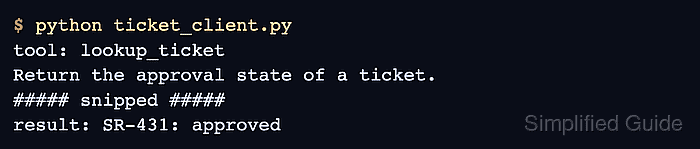
- Run the client to verify the workflow result through the MCP server.
$ python ticket_client.py
tool: lookup_ticket
Return the approval state of a ticket.
##### snipped #####
result: SR-431: approved
The result line is the value the workflow returned in its StopEvent. A workflow that ends in a custom StopEvent subclass, such as BriefResult from How to build a workflow in LlamaIndex, returns its fields as JSON text instead.
To connect another stdio client, give it the full paths of the virtual environment's python and ticket_server.py as its server command.
Related: How to add a local MCP server to Claude Code