An HTTP model service can spend inference capacity on any client that can reach its listener. An API key on the llama.cpp server requires clients to authenticate before using protected API routes.
The server can read its key from a private file, keeping the secret out of startup arguments and shell history. Clients send the same key in an Authorization header, while the health endpoint stays public for readiness checks.
Browser access also depends on CORS, which controls which website can read a cross-origin response. An explicit allowed origin complements authentication, but does not prevent command-line clients from making requests or encrypt traffic; the listener remains on loopback here.
Steps to set an API key for the llama.cpp server:
- Refresh the APT package index on Ubuntu or Debian.
$ sudo apt-get update
The shell commands assume a working CMake source build on Linux, with the terminal in the llama.cpp checkout. The server command uses ../models/chat-model.gguf; replace that path with your existing local chat GGUF file. Hugging Face model downloads are also supported by llama.cpp.
- Install curl and OpenSSL for HTTP requests and key generation.
$ sudo apt-get install --assume-yes curl openssl
These command-line programs are separate prerequisites from the build dependencies. The remaining commands run as your regular user.
- Create a private directory for the server key.
$ install -d -m 700 "$HOME/.config/llama.cpp"
- Generate a random key in an owner-only file.
$ (umask 077
  set -o noclobber
  openssl rand -hex 32 > "$HOME/.config/llama.cpp/api-key")
The subshell creates a mode-600 file and refuses to overwrite an existing key. If the file already contains your server key, reuse it instead. The server accepts one key per line; the generated file contains one key. Its contents must stay private.
- Stop the existing foreground llama-server process with Ctrl+C.
Stopping the server interrupts active requests. Clients will need the new key once authentication is enabled; the previous launch command remains available for recovery if the replacement fails to start.
- Start the server with the key file, your local model path, and your browser application's allowed origin.
$ ./build/bin/llama-server -m ../models/chat-model.gguf \
  --alias local-chat --ctx-size 2048 --host 127.0.0.1 --port 8080 \
  --api-key-file "$HOME/.config/llama.cpp/api-key" \
  --cors-origins http://localhost:3000 --cors-headers Authorization,Content-Type
##### snipped #####
0.00.595.253 I srv  server_run_i: model loaded
0.00.595.264 I srv  server_on_li: listening on http://127.0.0.1:8080
The model path refers to your existing GGUF file. If your application has a different origin, replace http://localhost:3000 with its exact scheme, hostname, and port, without a trailing slash. A single explicit origin avoids the default policy that allows any origin. The model alias local-chat identifies the loaded model, and 2048 bounds its context memory. The key file is loaded at startup, so key changes require a restart. This terminal stays occupied by the server.
An API key does not encrypt HTTP. Remote access requires encrypted transport and network restrictions before changing the loopback bind; sharing the key with browser code also makes it available to that browser's user.
- Check the public health endpoint from a second terminal.
$ curl --silent --show-error --write-out '\nHTTP %{http_code}\n' \
  http://127.0.0.1:8080/health
{"status":"ok"}
HTTP 200
The second terminal uses the same user account. HTTP 503 during model loading means the server is not ready yet. HTTP 200 here proves readiness, not authentication, because health deliberately requires no key.
- Confirm that the model-list endpoint rejects a request without a key.
$ curl --silent --show-error --write-out '\nHTTP %{http_code}\n' \
  http://127.0.0.1:8080/v1/models
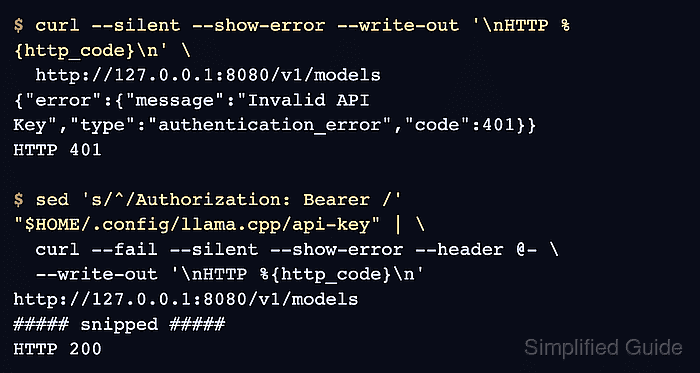
{"error":{"message":"Invalid API Key","type":"authentication_error","code":401}}
HTTP 401
A model list with HTTP 200 here means the running server is not enforcing the key. The request intentionally omits --fail so curl displays the authentication error body.
- Confirm that an incorrect key is rejected.
$ curl --silent --show-error --write-out '\nHTTP %{http_code}\n' \
  --header 'Authorization: Bearer wrong-key' \
  http://127.0.0.1:8080/v1/models
{"error":{"message":"Invalid API Key","type":"authentication_error","code":401}}
HTTP 401
- Check the preflight response with your allowed browser origin in the Origin header.
$ curl --silent --show-error --include --request OPTIONS \
  --header 'Origin: http://localhost:3000' \
  --header 'Access-Control-Request-Method: GET' \
  --header 'Access-Control-Request-Headers: Authorization' \
  http://127.0.0.1:8080/v1/models
HTTP/1.1 200 OK
##### snipped #####
Access-Control-Allow-Origin: http://localhost:3000
Access-Control-Allow-Credentials: true
Access-Control-Allow-Methods: GET, POST, DELETE, OPTIONS
Access-Control-Allow-Headers: Authorization,Content-Type
##### snipped #####
The Origin value matches the application origin used at startup. A preflight needs no key. The startup setting names Authorization explicitly because a wildcard allowed-header value does not cover that header. The actual API request still needs authentication.
- Compare the preflight response for an unrelated origin.
$ curl --silent --show-error --include --request OPTIONS \
  --header 'Origin: https://unrelated.example' \
  --header 'Access-Control-Request-Method: GET' \
  --header 'Access-Control-Request-Headers: Authorization' \
  http://127.0.0.1:8080/v1/models
HTTP/1.1 200 OK
##### snipped #####
Access-Control-Allow-Origin: http://localhost:3000
Access-Control-Allow-Credentials: true
Access-Control-Allow-Methods: GET, POST, DELETE, OPTIONS
Access-Control-Allow-Headers: Authorization,Content-Type
##### snipped #####
The returned origin stays fixed rather than reflecting https://unrelated.example. That mismatch prevents the unrelated browser page from reading the response. curl does not enforce browser CORS rules, so a 200 preflight response is expected here.
- Request the model list with the configured key supplied through standard input. Example output:
$ sed 's/^/Authorization: Bearer /' "$HOME/.config/llama.cpp/api-key" | \
  curl --fail --silent --show-error --header @- \
  --write-out '\nHTTP %{http_code}\n' http://127.0.0.1:8080/v1/models
{"models":[{"name":"local-chat","model":"local-chat","modified_at":"","size":"","digest":"","type":"model","description":"","tags":[""],"capabilities":["completion"],"parameters":"","details":{"parent_model":"","format":"gguf","family":"","families":[""],"parameter_size":"","quantization_level":""}}],"object":"list","data":[{"id":"local-chat","aliases":["local-chat"],"tags":[],"object":"model","architecture":{"input_modalities":["text"],"output_modalities":["text"]},"created":1794423387,"owned_by":"llamacpp","meta":{"vocab_type":2,"n_vocab":151936,"n_ctx":2048,"n_ctx_train":32768,"n_embd":896,"n_params":630167424,"size":485452288,"ftype":"Q4_K - Medium"}}]}
HTTP 200
The response must include "object":"list" and a data entry with "id":"local-chat". A 401 means the client key does not match the server's loaded key. The pipe keeps the real key out of process arguments and terminal output; --fail makes a rejected request exit nonzero.