Long conversations need memory beyond the model weights because each token leaves attention keys and values in the KV cache. In llama.cpp, quantizing the KV cache reduces that memory footprint while leaving the GGUF model file unchanged.
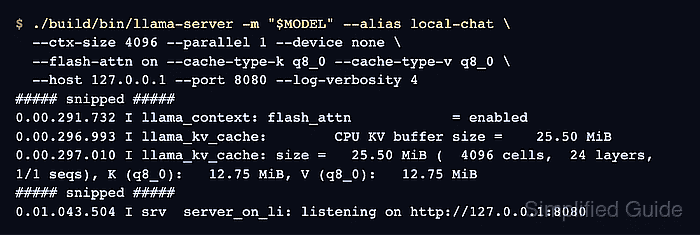
Keys and values have separate runtime precision settings. The q8_0 format stores both more compactly than f16, leaving memory available for a larger context; the saving depends on the model architecture and allocated context size. A CPU allocation reports system memory rather than GPU memory.
Cache precision can affect response quality as well as memory use. Aggressive formats such as q4_0 can substantially degrade tool calling, so a successful short chat reply does not establish accuracy on longer conversations or tool requests.
Steps to quantize the KV cache in llama.cpp:
- Install curl and jq on the Ubuntu or Debian machine that runs llama-server.
$ sudo apt-get install --assume-yes curl jq
Tested with llama.cpp commit cb44fdb on Ubuntu 26.04. A recent CMake source build supplies build/bin/llama-server and its HTTPS support. The shell commands run from that llama.cpp source directory. The build guide refreshes the APT package index and installs the compiler dependencies; curl sends HTTP requests and jq displays the assistant message from the JSON response.
- Set MODEL to your local chat model's GGUF path.
$ MODEL=../models/chat-model.gguf
The memory comparison uses Qwen2.5-0.5B-Instruct Q4_K_M, downloaded as chat-model.gguf in a models directory beside the source checkout. Model-weight quantization remains Q4_K_M throughout.
- Start a CPU baseline with f16 keys and values.
$ ./build/bin/llama-server -m "$MODEL" --alias local-chat \
  --ctx-size 4096 --parallel 1 --device none \
  --flash-attn on --cache-type-k f16 --cache-type-v f16 \
  --host 127.0.0.1 --port 8080 --log-verbosity 4
--parallel 1 fixes the comparison at one request slot, and --ctx-size 4096 fixes its token capacity. Flash Attention stays enabled in both launches so cache precision is the setting being compared. --device none keeps the model on the CPU, and --log-verbosity 4 exposes cache allocation details in current builds. The listener accepts connections only from this machine and has no API-key protection. The warning about CORS and a missing API key reflects that unauthenticated listener. This Qwen file can also warn about overriding an end-of-sequence control-token type; that metadata warning does not prevent loading or inference.
- Record the baseline KV buffer size from the startup log. Example output:
##### snipped #####
0.00.366.106 I llama_kv_cache:        CPU KV buffer size =    48.00 MiB
0.00.366.127 I llama_kv_cache: size =   48.00 MiB (  4096 cells,  24 layers,  1/1 seqs), K (f16):   24.00 MiB, V (f16):   24.00 MiB
##### snipped #####
The relevant lines name the KV buffer and K (f16) and V (f16) allocations. Model-weight and compute buffers are separate allocations, so their sizes do not measure the KV-cache saving. Stopping this test server interrupts any active request.
- Stop the baseline server with Ctrl+C in its terminal.
The GGUF file remains unchanged.
- Restart the same model with q8_0 keys and values.
$ ./build/bin/llama-server -m "$MODEL" --alias local-chat \
  --ctx-size 4096 --parallel 1 --device none \
  --flash-attn on --cache-type-k q8_0 --cache-type-v q8_0 \
  --host 127.0.0.1 --port 8080 --log-verbosity 4
--cache-type-k and --cache-type-v select key and value precision. Quantized values require Flash Attention; support also depends on the model and backend. A startup error or disabled Flash Attention means this combination is unavailable. Returning both cache types to f16 reverses the change.
Related: llama-server options - Confirm the startup log shows q8_0 for both caches and a smaller KV buffer. Example output:
##### snipped #####
0.00.296.993 I llama_kv_cache:        CPU KV buffer size =    25.50 MiB
0.00.297.010 I llama_kv_cache: size =   25.50 MiB (  4096 cells,  24 layers,  1/1 seqs), K (q8_0):   12.75 MiB, V (q8_0):   12.75 MiB
##### snipped #####
For this model, the allocation falls from 48.00 MiB to 25.50 MiB, a saving of about 47%. The model file, context size and request-slot count must match the baseline. The buffer comparison measures allocated cache memory, not total process memory or generation speed.
- Send a chat prompt from a second terminal after the quantized server reports that it is listening. Example output:
$ curl --fail --silent --show-error \
  http://127.0.0.1:8080/v1/chat/completions \
  --header "Content-Type: application/json" \
  --data '{"model":"local-chat","messages":[{"role":"user","content":"What is two plus two?"}],"max_tokens":32,"temperature":0}' | jq --exit-status '.choices[0].message'
{
  "role": "assistant",
  "content": "Two plus two is four."
}
A nonempty content string with role set to assistant shows that inference still works with the smaller cache. Reply wording varies. Production use also needs representative long prompts and, for tool-using applications, the same tool requests compared against f16. Upstream warns that aggressive KV quantization can harm tool calling.
Related: How to call the llama.cpp chat completions API