Local model performance depends on the model file, quantization, backend, batch size, thread count, and GPU offload available on the machine. llama.cpp includes llama-bench so those factors can be measured with the same inference engine used by llama-cli and llama-server.
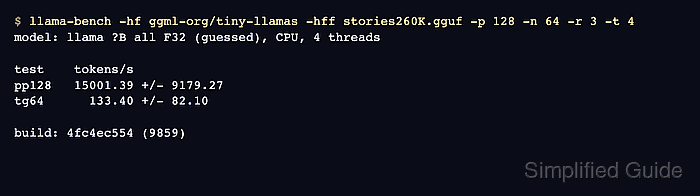
llama-bench runs prompt-processing tests, text-generation tests, or both. Prompt processing appears as names such as pp128 and measures how fast the model consumes an input prompt, while text generation appears as names such as tg64 and measures token output speed.
Comparisons need the same model, build, backend, and flags apart from the setting being tested. The throughput shown here is one run with a small test model on shared CPUs, rather than a hardware ranking or a production-capacity estimate. Representative results need the GGUF model and workload planned for actual use.
Steps to run a llama.cpp benchmark:
- Check that the local GGUF model file is readable.
$ ls -l models/chat-model.gguf
-r--r--r-- 1 root root 491400032 Oct 27 23:48 models/chat-model.gguf
The benchmark needs llama-bench on the command path and an existing local GGUF. If your GGUF is elsewhere, its path replaces models/chat-model.gguf throughout. The CSV check also needs Python 3. A source build can produce the benchmark with cmake –build build –target llama-bench –parallel 2.
Related: How to run a Hugging Face GGUF model with llama.cpp
Related: How to build llama.cpp from source with CMake - Run a CPU benchmark with two threads.
$ llama-bench -m models/chat-model.gguf -p 128 -n 64 -r 3 -t 2 -ngl 0
| model                          |       size |     params | backend    | threads |            test |                  t/s |
| ------------------------------ | ---------: | ---------: | ---------- | ------: | --------------: | -------------------: |
| qwen2 1B Q4_K - Medium         | 462.96 MiB |   630.17 M | CPU        |       2 |           pp128 |         68.11 ± 2.76 |
| qwen2 1B Q4_K - Medium         | 462.96 MiB |   630.17 M | CPU        |       2 |            tg64 |         14.16 ± 2.56 |

build: 7aca0d2ea (11913)
-p 128 selects 128 prompt tokens, -n 64 selects 64 generated tokens, and -r 3 repeats each test three times. -ngl 0 keeps model layers on the CPU. This run used a small Qwen2.5-0.5B-Instruct Q4_K_M model; another model or machine will produce different timings.
- Identify the pp128 and tg64 rows in the result table.
pp128 is prompt processing for 128 prompt tokens. tg64 is text generation for 64 generated tokens. The t/s column reports mean tokens per second followed by the standard deviation across repetitions. Higher throughput is meaningful only under matching conditions. These measurements exclude tokenization and sampling time, so they do not measure complete chat-response latency.
- Compare one-thread and two-thread runs with the other options unchanged.
$ llama-bench -m models/chat-model.gguf -p 128 -n 64 -r 3 -t 1,2 -ngl 0
| model                          |       size |     params | backend    | threads |            test |                  t/s |
| ------------------------------ | ---------: | ---------: | ---------- | ------: | --------------: | -------------------: |
| qwen2 1B Q4_K - Medium         | 462.96 MiB |   630.17 M | CPU        |       1 |           pp128 |         21.21 ± 4.00 |
| qwen2 1B Q4_K - Medium         | 462.96 MiB |   630.17 M | CPU        |       1 |            tg64 |          7.92 ± 1.27 |
| qwen2 1B Q4_K - Medium         | 462.96 MiB |   630.17 M | CPU        |       2 |           pp128 |        58.20 ± 11.85 |
| qwen2 1B Q4_K - Medium         | 462.96 MiB |   630.17 M | CPU        |       2 |            tg64 |         12.19 ± 0.91 |

build: 7aca0d2ea (11913)
Comma-separated values ask llama-bench to run each selected value. Each thread count should have one pp128 row and one tg64 row. Other active workloads can change the timings; a small difference or a large standard deviation does not establish a reliable improvement.
- Save the thread comparison as CSV.
The redirection overwrites an existing llama-bench.csv in the current directory. Choose a new filename if an earlier result must be kept.
$ llama-bench -m models/chat-model.gguf -p 128 -n 64 -r 3 -t 1,2 -ngl 0 -o csv > llama-bench.csv
The CSV export runs the tests again, so its timings can differ from the earlier terminal table. It records named fields including build_commit, build_number, backends, model_filename, n_threads, n_prompt, n_gen, and avg_ts. Supported stdout formats include md, csv, json, jsonl, and sql.
- Save the CSV check as check-benchmark.py.
- check-benchmark.py
import csv
with open("llama-bench.csv", newline="") as f:
    rows = list(csv.DictReader(f))
expected = {("1", "128", "0"), ("1", "0", "64"),
            ("2", "128", "0"), ("2", "0", "64")}
actual = {(r["n_threads"], r["n_prompt"], r["n_gen"]) for r in rows}
assert len(rows) == 4 and actual == expected, "Missing or extra tests"
assert all(float(r["avg_ts"]) > 0 for r in rows), "Invalid throughput"
print("model:", rows[0]["model_filename"])
print("build:", rows[0]["build_number"], rows[0]["build_commit"], "backend:", rows[0]["backends"])
print("threads prompt generated tokens/s")
for r in rows:
    print(r["n_threads"], r["n_prompt"], r["n_gen"], r["avg_ts"])
The check reads column names rather than fixed column positions.
- Verify that the saved CSV contains both tests for each thread count.
$ python3 check-benchmark.py
model: models/chat-model.gguf
build: 11913 7aca0d2ea backend: CPU
threads prompt generated tokens/s
1 128 0 30.907862
1 0 64 8.906942
2 128 0 35.308377
2 0 64 8.651970
A prompt-processing row has n_prompt=128 and n_gen=0; a text-generation row has n_prompt=0 and n_gen=64. The check fails if a row is missing, an extra test appears, or throughput is not positive. llama-bench.csv remains available for later comparisons.
Do not compare archived results if the model file, quantization, build, backend, prompt size, generation count, or GPU-offload setting changed unexpectedly.