Local inference in llama.cpp needs memory for both model weights and token generation. The GPU-layer setting controls model-weight offload; those weights must fit alongside the runtime's KV cache and compute buffers.
A smaller layer count keeps more of the main model on the CPU in system RAM, which can relieve GPU memory pressure at the cost of generation speed. A GPU-enabled build and a visible accelerator are necessary for offloading; on Apple Silicon, CPU and GPU allocations share physical memory.
The layer setting is read when llama-server or llama-cli starts. A running process keeps its existing allocation, so a different flag or environment value takes effect only on a new launch. Restarting an existing server interrupts its in-flight requests.
Steps to set llama.cpp GPU offload layers:
- Confirm the installed server binary exposes the current GPU-layer options.
$ llama-server --help
##### snipped #####
-ngl,  --gpu-layers, --n-gpu-layers N   max. number of layers to store in VRAM, either an exact number,
                                        'auto', or 'all' (default: auto)
                                        (env: LLAMA_ARG_N_GPU_LAYERS)
##### snipped #####
The same options apply to llama-cli. If these options are missing, an updated build with the target GPU backend is needed.
Related: How to build llama.cpp from source with CMake - List the offload devices visible to llama.cpp.
$ llama-server --list-devices
Available devices:
  MTL0: Apple M1 Max (53084 MiB, 53083 MiB free)
  BLAS: Accelerate (0 MiB, 0 MiB free)
Device names and available memory vary by host. An empty list or only CPU/BLAS entries provides no GPU for model-layer offload. A GPU build, working driver, and device access are prerequisites.
- Stop an existing foreground test server with Ctrl+C before each replacement launch.
The launches in the next step are alternatives. Only one server can use the same address and port at a time.
- Start one server with the chosen GPU-layer count.
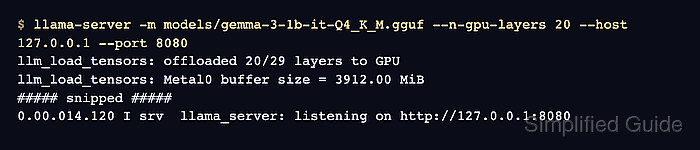
$ llama-server -m models/gemma-3-1b-it-Q4_K_M.gguf --n-gpu-layers 20 --ctx-size 2048 --verbosity 4 --host 127.0.0.1 --port 8080
The model path must name an existing local .gguf file. The count 20 is a starting value for this model, not a memory guarantee. A smaller model may have fewer offloadable layers. --verbosity 4 exposes the model-placement logs in current builds. The fixed 2048-token context keeps that memory allocation bounded while tuning layers.
Related: How to set context size in llama.cppA smaller positive count keeps more layers on the CPU. --n-gpu-layers 0 keeps the main model's layers on the CPU in system RAM; it does not disable every possible GPU allocation. auto is the default and lets the runtime fit the offload to available memory. all requests all offloadable layers, which can fail if the model and other runtime allocations do not fit. If a GPU allocation fails, a lower count or a smaller context may be needed before the next launch.
Alternative launch on a POSIX shell, instead of the command above, with the environment value applied before startup:
$ env LLAMA_ARG_N_GPU_LAYERS=12 llama-server -m models/gemma-3-1b-it-Q4_K_M.gguf --ctx-size 2048 --verbosity 4 --host 127.0.0.1 --port 8080
An explicit --n-gpu-layers argument overrides LLAMA_ARG_N_GPU_LAYERS. Exporting a value after a server has started cannot change that process.
Multimodal projector placement is separate, controlled by --mmproj-offload or --no-mmproj-offload when a projector is loaded. The zero-layer setting alone does not put the projector on the CPU. KV-cache placement has its own --kv-offload and --no-kv-offload controls, and context size changes its memory demand. GPU-layer counts do not configure an SSD-offload tier; disk loading and memory mapping are separate from layer placement.
- Confirm the actual offload count in the server's startup output.
##### snipped #####
0.01.098.924 I load_tensors: offloaded 20/27 layers to GPU
##### snipped #####
0.01.472.054 I srv  server_on_li: listening on http://127.0.0.1:8080
##### snipped #####
This run used the explicit 20-layer launch on Metal. The environment alternative reported 12/27; zero reported 0/27. The denominator depends on the model and can include its output layer. A requested count alone does not prove GPU offload occurred.
- Complete an inference request from another terminal while the server remains running.
$ curl -fsS http://127.0.0.1:8080/v1/chat/completions \
  -H 'Content-Type: application/json' \
  -d '{"messages":[{"role":"user","content":"Reply with one short greeting."}],"max_tokens":32,"temperature":0}' | python3 -m json.tool
{
    "choices": [
        {
            "finish_reason": "stop",
            "index": 0,
            "message": {
                "role": "assistant",
                "content": "Hello!"
            }
        }
    ],
##### snipped #####
    "usage": {
        "completion_tokens": 3,
        "prompt_tokens": 15,
        "total_tokens": 18,
##### snipped #####
}
A nonempty reply and a completed request show that generation works with the layer placement reported at startup. The reply and token counts vary by model. A health response alone does not exercise generation; a connection error, HTTP error, or empty reply leaves inference unconfirmed.