A LangChain agent treats each invoke() call as a new conversation unless something restores the earlier messages, so a follow-up such as “What is my name?” reaches the model with no context behind it. Short-term memory saves the messages of each conversation and loads them again on the next call, which lets the agent recall an earlier turn without the application resending the history.
A checkpointer passed to create_agent provides that memory. It stores the agent's message state under the thread_id supplied with each call, so calls that share an ID continue one conversation and a new ID starts with an empty history. Isolation between users therefore depends on the application giving each conversation its own ID.
InMemorySaver is the simplest checkpointer because it needs no database, but it keeps threads in the memory of one Python process and loses them when that process exits. Conversations that must survive a restart need a database-backed checkpointer, and facts that must follow a user across different threads belong in long-term memory rather than a checkpoint.
Steps to add short-term memory to a LangChain agent:
- Install the current LangChain release in the active project environment.
$ python -m pip install --upgrade langchain
LangChain requires Python 3.10 or newer. Its dependencies include langgraph-checkpoint, the package that provides InMemorySaver. Tested with LangChain 1.4.9 on Python 3.12 on Linux.
Related: How to install LangChain with pip - Create memory_agent.py in your project folder with the imports for the agent, a local model, and the checkpointer.
- memory_agent.py
import re

from langchain.agents import create_agent
from langchain.messages import AIMessage
from langchain_core.language_models.chat_models import (
    BaseChatModel,
)
from langchain_core.outputs import ChatGeneration, ChatResult
from langgraph.checkpoint.memory import InMemorySaver
- Add a model below the imports that can answer only from the messages it receives.
class RecallModel(BaseChatModel):
    @property
    def _llm_type(self) -> str:
        return "recall-model"

    def _generate(self, messages, stop=None, **kwargs):
        user_text = " ".join(
            m.text for m in messages if m.type == "human"
        )
        found = re.search(r"My name is (\w+)", user_text)
        if found:
            reply = f"Your name is {found.group(1)}."
        else:
            reply = "I do not know your name."
        message = AIMessage(content=reply)
        generation = ChatGeneration(message=message)
        return ChatResult(generations=[generation])
RecallModel stands in for a provider model so the program runs without an API key. It joins the user messages sent to it on that call and keeps nothing between calls, so a reply naming the user shows that the earlier turn reached the model.
- Add the agent below the model with an InMemorySaver as its checkpointer.
agent = create_agent(
    model=RecallModel(),
    tools=[],
    checkpointer=InMemorySaver(),
)
For an existing agent, add the same checkpointer argument and keep its model and tools. A new InMemorySaver starts empty, so an agent rebuilt with a new saver inside a request handler loses the thread on every call.
- Add two turns below the agent that send the same thread_id.
first_chat = {"configurable": {"thread_id": "chat-1001"}}
first_turn = {"role": "user", "content": "My name is Ada."}
question = {"role": "user", "content": "What is my name?"}

agent.invoke({"messages": [first_turn]}, first_chat)
recalled = agent.invoke({"messages": [question]}, first_chat)
print("Same thread:", recalled["messages"][-1].text)
Each call sends only the new message because the checkpointer restores the earlier ones. A call with no thread_id raises ValueError once a checkpointer is attached.
- Add the same question below the two turns with a different thread_id.
second_chat = {"configurable": {"thread_id": "chat-1002"}}

isolated = agent.invoke({"messages": [question]}, second_chat)
print("Other thread:", isolated["messages"][-1].text)
- Add a printout of the messages saved for the first conversation at the end of the file.
saved = agent.get_state(first_chat)

print("Saved in chat-1001:")
for message in saved.values["messages"]:
    print(f"  {message.type}: {message.text}")
The whole saved thread goes to the model on every call, so token use rises as a conversation grows. LangChain documents message trimming and summarization for long threads.
- Save memory_agent.py.
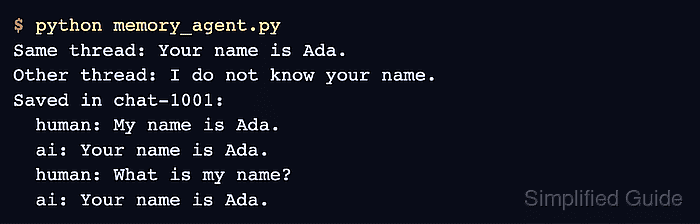
- Run memory_agent.py to confirm that the first thread recalls the name and the second thread does not.
$ python memory_agent.py
Same thread: Your name is Ada.
Other thread: I do not know your name.
Saved in chat-1001:
  human: My name is Ada.
  ai: Your name is Ada.
  human: What is my name?
  ai: Your name is Ada.
Both threads use the same agent and the same question, so the different replies come only from the saved messages. The four saved lines are the two turns held in chat-1001, ready for the next call in that thread.