Pretrained vision networks already contain feature detectors learned from large image collections. A smaller classifier can reuse those features for a related image task instead of learning every visual pattern from an empty set of weights.
Each MobileNetV2 input is a three-channel image batch that passes through mobilenet_v2.preprocess_input() before feature extraction. The compact arrays used here exercise the complete training path, while a real classification run needs labeled images in the 0-255 pixel range.
The classifier head learns first while the pretrained base stays frozen. Fine-tuning begins only after that phase, uses a lower learning rate, and keeps the base call in inference mode so its batch-normalization statistics are not replaced by a small task dataset.
Steps to run transfer learning in Keras:
- Create run_transfer_learning.py with the runtime setup plus labeled image arrays.
- run_transfer_learning.py
import os

os.environ["KERAS_BACKEND"] = "jax"

import keras
import numpy as np
from keras import layers

keras.utils.set_random_seed(23)

image_shape = (96, 96, 3)
num_classes = 2
rng = np.random.default_rng(23)
x_train = rng.uniform(0, 255, size=(8, *image_shape)).astype("float32")
y_train = np.array([0, 1, 0, 1, 0, 1, 0, 1], dtype="int32")
x_val = rng.uniform(0, 255, size=(4, *image_shape)).astype("float32")
y_val = np.array([0, 1, 0, 1], dtype="int32")
The backend selection must match an installed project backend and precede the Keras import.
- Append the frozen ImageNet-pretrained MobileNetV2 feature extractor to run_transfer_learning.py.
base_model = keras.applications.MobileNetV2(
    input_shape=image_shape,
    include_top=False,
    weights="imagenet",
    pooling="avg",
)
base_model.trainable = False
The first run downloads the MobileNetV2 weights to the Keras cache. Setting include_top=False removes the original ImageNet classifier while retaining its feature layers.
- Append the two-class classifier head to run_transfer_learning.py.
inputs = keras.Input(shape=image_shape, name="image")
x = keras.applications.mobilenet_v2.preprocess_input(inputs)
x = base_model(x, training=False)
x = layers.Dropout(0.2)(x)
outputs = layers.Dense(num_classes, activation="softmax", name="class_probs")(x)
model = keras.Model(inputs, outputs, name="mobilenet_transfer_demo")
Passing training=False keeps the base model's batch-normalization layers in inference mode during both training phases.
- Append the frozen-head training phase to run_transfer_learning.py.
model.compile(
    optimizer=keras.optimizers.Adam(learning_rate=0.001),
    loss=keras.losses.SparseCategoricalCrossentropy(),
    metrics=[keras.metrics.SparseCategoricalAccuracy(name="accuracy")],
)
model.fit(
    x_train,
    y_train,
    validation_data=(x_val, y_val),
    epochs=1,
    batch_size=4,
    verbose=0,
)
frozen_trainable_weights = len(model.trainable_weights)
A real dataset needs enough frozen-head epochs to reach convergence before fine-tuning begins.
- Append the low-rate fine-tuning phase to run_transfer_learning.py.
base_model.trainable = True
for layer in base_model.layers[:-20]:
    layer.trainable = False

model.compile(
    optimizer=keras.optimizers.Adam(learning_rate=0.0001),
    loss=keras.losses.SparseCategoricalCrossentropy(),
    metrics=[keras.metrics.SparseCategoricalAccuracy(name="accuracy")],
)
model.fit(
    x_train,
    y_train,
    validation_data=(x_val, y_val),
    epochs=1,
    batch_size=4,
    verbose=0,
)
fine_tune_trainable_weights = len(model.trainable_weights)
Recompilation is required after changing trainable flags. Validation metrics expose overfitting when too many layers are unfrozen or the fine-tuning learning rate is too high.
- Append the saved-model verification to run_transfer_learning.py.
model.save("transfer-learning-demo.keras")
reloaded_model = keras.models.load_model("transfer-learning-demo.keras")
probabilities = np.asarray(reloaded_model.predict(x_val[:1], verbose=0))[0]

print(f"backend: {keras.backend.backend()}")
print(f"base model: {base_model.name}")
print(f"frozen trainable weights: {frozen_trainable_weights}")
print(f"fine-tune trainable weights: {fine_tune_trainable_weights}")
print(f"reloaded probabilities: [{probabilities[0]:.4f}, {probabilities[1]:.4f}]")
print(f"probability sum: {probabilities.sum():.4f}")
print("saved model: transfer-learning-demo.keras")
Related: How to save and load a Keras model
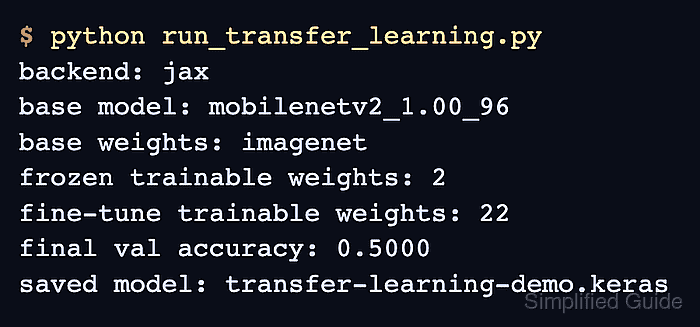
- Run run_transfer_learning.py from its containing directory.
$ python run_transfer_learning.py
backend: jax
base model: mobilenetv2_1.00_96
frozen trainable weights: 2
fine-tune trainable weights: 22
reloaded probabilities: [0.5078, 0.4922]
probability sum: 1.0000
saved model: transfer-learning-demo.keras
The increased trainable-weight count confirms that only the selected top base layers joined fine-tuning, while the reloaded probability sum confirms that the saved classifier still returns a normalized two-class prediction.

Mohd Shakir Zakaria is a cloud architect with deep roots in software development and open-source advocacy. Certified in AWS, Red Hat, VMware, ITIL, and Linux, he specializes in designing and managing robust cloud and on-premises infrastructures.


