TensorFlow input pipelines keep batching, shuffling, and prefetching close to the data source before a model sees a batch. A Keras model can train from a tf.data.Dataset directly when the TensorFlow backend is active, so the dataset pipeline feeds fit(), evaluate(), and predict() without converting batches to NumPy arrays.
Standalone Keras chooses its backend at process startup. A script that combines TensorFlow datasets with Keras layers should set KERAS_BACKEND before the first import keras statement, and the Python environment still needs both keras and tensorflow installed.
Training and validation datasets must yield features, labels pairs whose shapes match the model input and loss target. Prediction uses a feature-only dataset, and shuffling belongs in the tf.data pipeline instead of the fit() call because Keras receives already prepared dataset batches.
Steps to train a Keras model with a tf.data dataset:
- Create train_tfdata_dataset.py with backend selection, imports, and sample tensors.
- train_tfdata_dataset.py
import os

os.environ["KERAS_BACKEND"] = "tensorflow"
os.environ["TF_CPP_MIN_LOG_LEVEL"] = "2"

import keras
import tensorflow as tf


keras.utils.set_random_seed(31)

features = tf.constant(
    [
        [0.0, 0.0, 0.1],
        [0.0, 1.0, 0.3],
        [1.0, 0.0, 0.6],
        [1.0, 1.0, 0.9],
        [0.2, 0.8, 0.4],
        [0.8, 0.2, 0.7],
        [0.3, 0.4, 0.2],
        [0.9, 0.7, 0.8],
    ],
    dtype=tf.float32,
)
labels = tf.constant(
    [[0.0], [1.0], [1.0], [0.0], [1.0], [1.0], [0.0], [0.0]],
    dtype=tf.float32,
)
Set KERAS_BACKEND before importing Keras. Use tensorflow for a tf.data.Dataset training path.
Related: How to set the Keras backend
Related: How to install Keras with pip - Add batched tf.data pipelines for training, validation, and prediction.
base_dataset = tf.data.Dataset.from_tensor_slices((features, labels))
train_dataset = (
    base_dataset.shuffle(buffer_size=8, seed=31, reshuffle_each_iteration=False)
    .batch(4)
    .prefetch(tf.data.AUTOTUNE)
)
validation_dataset = base_dataset.batch(4).prefetch(tf.data.AUTOTUNE)
prediction_dataset = tf.data.Dataset.from_tensor_slices(features[:4]).batch(2)
The fixed seed and reshuffle_each_iteration=False keep the short training output reproducible. Use reshuffling for normal model training when deterministic sample output is not required.
- Define and compile a model that matches the dataset feature and label shapes.
model = keras.Sequential(
    [
        keras.layers.Input(shape=(3,)),
        keras.layers.Dense(8, activation="relu"),
        keras.layers.Dense(1, activation="sigmoid"),
    ]
)
model.compile(
    optimizer=keras.optimizers.Adam(learning_rate=0.05),
    loss=keras.losses.BinaryCrossentropy(),
    metrics=[keras.metrics.BinaryAccuracy(name="accuracy")],
)
The final dense layer returns one probability per row, matching the label tensor shape batch, 1.
Related: How to compile a model in Keras - Train the model with the training dataset and validation dataset.
history = model.fit(
    train_dataset,
    validation_data=validation_dataset,
    epochs=2,
    shuffle=False,
    verbose=2,
)
Pass shuffle=False to fit() when the input is already a tf.data.Dataset. Put shuffle() in the dataset pipeline so the input order is controlled before Keras receives each batch.
- Evaluate the trained model and run prediction on a feature-only dataset.
metrics = model.evaluate(validation_dataset, verbose=0, return_dict=True)
predictions = model.predict(prediction_dataset, verbose=0)
Use datasets that yield features, labels for fit() and evaluate(). Use a dataset that yields only features for predict().
- Print the dataset shape, training, evaluation, and prediction evidence.
train_feature_spec, train_label_spec = train_dataset.element_spec
prediction_feature_spec = prediction_dataset.element_spec

print(f"backend: {keras.config.backend()}")
print(f"train features: shape={train_feature_spec.shape}, dtype={train_feature_spec.dtype.name}")
print(f"train labels: shape={train_label_spec.shape}, dtype={train_label_spec.dtype.name}")
print(
    f"prediction features: shape={prediction_feature_spec.shape}, "
    f"dtype={prediction_feature_spec.dtype.name}"
)
print("history keys:", ", ".join(sorted(history.history.keys())))
print(
    "evaluation:",
    {name: round(float(value), 4) for name, value in metrics.items()},
)
print(f"prediction shape: {predictions.shape}")
print("prediction sample:", [round(float(value), 4) for value in predictions[:3, 0]])
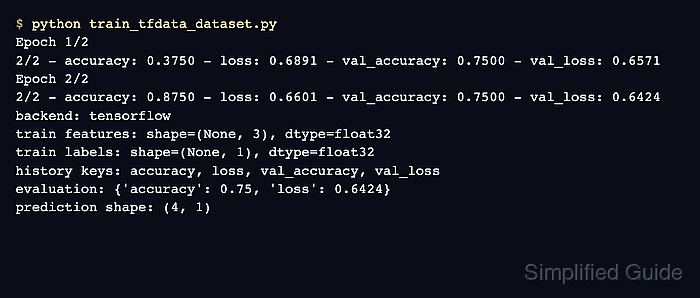
- Run the script and confirm that training, evaluation, and prediction all consume datasets.
$ python train_tfdata_dataset.py
Epoch 1/2
2/2 - accuracy: 0.3750 - loss: 0.6891 - val_accuracy: 0.7500 - val_loss: 0.6571
Epoch 2/2
2/2 - accuracy: 0.8750 - loss: 0.6601 - val_accuracy: 0.7500 - val_loss: 0.6424
backend: tensorflow
train features: shape=(None, 3), dtype=float32
train labels: shape=(None, 1), dtype=float32
prediction features: shape=(None, 3), dtype=float32
history keys: accuracy, loss, val_accuracy, val_loss
evaluation: {'accuracy': 0.75, 'loss': 0.6424}
prediction shape: (4, 1)
prediction sample: [0.4628, 0.5859, 0.4799]

Mohd Shakir Zakaria is a cloud architect with deep roots in software development and open-source advocacy. Certified in AWS, Red Hat, VMware, ITIL, and Linux, he specializes in designing and managing robust cloud and on-premises infrastructures.


