Batch inference turns a saved model into a repeatable scoring job for files, queues, and scheduled data feeds. A dependable batch run must keep each input identifier attached to its prediction so downstream systems can trace every score back to the source row.
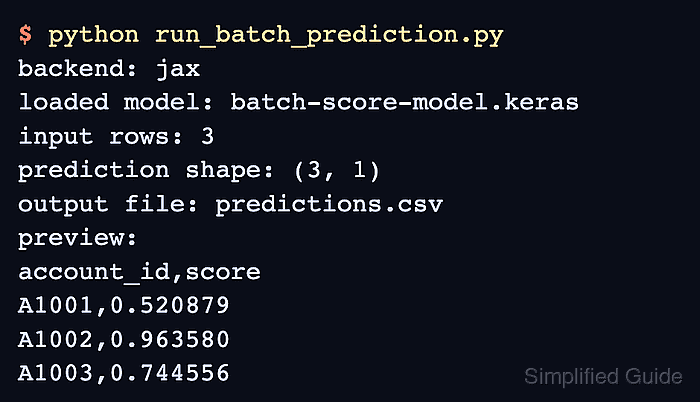
The Keras model.predict() method slices an in-memory array into computational batches and returns a NumPy array in input order. The batch_size value controls how many rows are processed at once; it does not change the number of returned predictions.
The sample uses the JAX backend, a saved binary classifier named risk-score.keras, and three numeric feature columns. The model must expect those features in the same order, while the CSV loader and a separate verification program protect row count, identifier order, and the score range.
Steps to run batch prediction in Keras:
- Prepare input_batch.csv with one identifier and the three features expected by the saved model.
- input_batch.csv
account_id,feature_a,feature_b,feature_c
A1001,0.12,0.44,0.20
A1002,0.80,0.70,0.65
A1003,0.35,0.50,0.55
A1004,0.90,0.20,0.10
- Create batch_predict.py with the backend, imports, artifact paths, and saved-model loader.
- batch_predict.py
import csv
import os
from pathlib import Path

os.environ["KERAS_BACKEND"] = "jax"

import keras
import numpy as np


MODEL_PATH = Path("risk-score.keras")
INPUT_PATH = Path("input_batch.csv")
OUTPUT_PATH = Path("predictions.csv")
ID_COLUMN = "account_id"
FEATURE_COLUMNS = ("feature_a", "feature_b", "feature_c")

model = keras.saving.load_model(MODEL_PATH, compile=False)
This sample selects the JAX backend before importing Keras. Loading with compile=False skips training configuration that prediction does not need.
Related: How to save and load a Keras model - Append the exact CSV schema check and nonempty row loader below the model loader.
- batch_predict.py
with INPUT_PATH.open(newline="") as handle:
    reader = csv.DictReader(handle)
    expected_columns = [ID_COLUMN, *FEATURE_COLUMNS]
    if reader.fieldnames != expected_columns:
        raise ValueError(f"Expected CSV columns: {expected_columns}")
    input_rows = list(reader)

if not input_rows:
    raise ValueError("The input CSV has no data rows")
- Add the identifier list and float32 feature matrix below the row loader.
- batch_predict.py
account_ids = [row[ID_COLUMN] for row in input_rows]
feature_values = np.asarray(
    [[float(row[column]) for column in FEATURE_COLUMNS] for row in input_rows],
    dtype="float32",
)
The saved model expects FEATURE_COLUMNS in its training order. Rearranged numeric columns can produce plausible but incorrect scores.
- Append the batched prediction call and row-count guard below the feature matrix.
- batch_predict.py
prediction_array = model.predict(feature_values, batch_size=2, verbose=0)
prediction_scores = np.asarray(prediction_array).reshape(-1)

if len(prediction_scores) != len(account_ids):
    raise RuntimeError("Prediction count does not match the input row count")
Array input defaults to a batch_size of 32 when the value is omitted. Larger batches require more accelerator or system memory.
- Append the prediction CSV writer and printed summary below the row-count guard.
- batch_predict.py
with OUTPUT_PATH.open("w", newline="") as handle:
    writer = csv.writer(handle)
    writer.writerow([ID_COLUMN, "score"])
    for account_id, score in zip(account_ids, prediction_scores):
        writer.writerow([account_id, f"{score:.6f}"])

print(f"Model: {MODEL_PATH}")
print(f"Input rows: {len(input_rows)}")
print(f"Prediction shape: {prediction_array.shape}")
print(f"Output: {OUTPUT_PATH}")
- Run the completed batch program beside risk-score.keras and input_batch.csv.
$ python batch_predict.py
Model: risk-score.keras
Input rows: 4
Prediction shape: (4, 1)
Output: predictions.csv
- Create verify_predictions.py for identifier-order and score-range validation.
- verify_predictions.py
import csv
from pathlib import Path


INPUT_PATH = Path("input_batch.csv")
OUTPUT_PATH = Path("predictions.csv")

with INPUT_PATH.open(newline="") as handle:
    input_rows = list(csv.DictReader(handle))

with OUTPUT_PATH.open(newline="") as handle:
    prediction_rows = list(csv.DictReader(handle))

input_ids = [row["account_id"] for row in input_rows]
prediction_ids = [row["account_id"] for row in prediction_rows]
scores = [float(row["score"]) for row in prediction_rows]

ids_preserved = prediction_ids == input_ids
scores_in_range = all(0.0 <= score <= 1.0 for score in scores)

if not ids_preserved:
    raise RuntimeError("Prediction IDs do not match the input row order")
if not scores_in_range:
    raise RuntimeError("One or more prediction scores are outside [0, 1]")

print(f"Input rows: {len(input_rows)}")
print(f"Prediction rows: {len(prediction_rows)}")
print(f"IDs preserved: {ids_preserved}")
print(f"Scores within [0, 1]: {scores_in_range}")
- Verify the saved prediction file against the original input batch.
$ python verify_predictions.py
Input rows: 4
Prediction rows: 4
IDs preserved: True
Scores within [0, 1]: True

Mohd Shakir Zakaria is a cloud architect with deep roots in software development and open-source advocacy. Certified in AWS, Red Hat, VMware, ITIL, and Linux, he specializes in designing and managing robust cloud and on-premises infrastructures.


