Mobile and edge applications need an inference artifact that can run outside a Python training project. LiteRT uses .tflite files, and Keras can export a trained model directly with the TensorFlow backend.
The export contains the inference graph and weights, rather than the training state needed to resume optimization. Keeping the original .keras model makes it possible to compare predictions from both formats on the same preprocessed input.
Conversion depends on the model's operations and the runtime that will execute them. TensorFlow-backed export can include Flex operators, which the newer LiteRT Android runtime does not support; a successful Python inference check does not establish compatibility with a phone or accelerator.
Steps to export a Keras model to LiteRT:
- Check that
python3reports Python 3.11, 3.12, or 3.13.$ python3 --version Python 3.12.16
TensorFlow 2.21 ships wheels for Python 3.10 to 3.13 and Keras 3.15 requires Python 3.11 or newer. Tested with Python 3.11, 3.12, and 3.13 on Linux.
On Python 3.14, including the default
python3on Ubuntu 26.04, the install below stops withNo matching distribution found for tensorflow==2.21.0. A Python 3.12 environment from How to create a Conda environment for TensorFlow replaces the two virtual environment steps below on those systems. - Change to the directory that holds your trained
.kerasmodel, using your own path in place of~/models.$ cd ~/models
The script reads the model and writes
model.tflitein this directory. If you do not have a trained model yet, How to save and load a Keras model savescredit-risk-score.keras, the four-feature model used as the example here, unless you run that guide's final removal step. - Create a dedicated virtual environment named
litert-env.$ python3 -m venv litert-env
Do not reuse a training environment that holds Keras 2, because the pinned install below upgrades it to Keras 3, a major version change.
Related: How to migrate Keras 2 code to Keras 3
Related: How to create a virtual environment in Python - Activate the virtual environment in the current shell.
$ source litert-env/bin/activate
(litert-env) $
- Install the export and inference packages in the active environment.
(litert-env) $ python -m pip install "keras==3.15.1" \
  "tensorflow==2.21.0" "ai-edge-litert==2.3.0"
tensorflowsupplies the export backend andai-edge-litertsupplies the interpreter.
Related: How to install TensorFlow with pip - Create a file named
export_litert.pyin your model directory using your text editor, with your model's file name in place ofcredit-risk-score.keras.- export_litert.py
import os
os.environ["KERAS_BACKEND"] = "tensorflow"

from pathlib import Path
import keras
import numpy as np
from ai_edge_litert.interpreter import Interpreter

model = keras.saving.load_model(
    "credit-risk-score.keras", compile=False
)
compile=Falseskips training configuration when loading. Backend selection happens before importing Keras in the new Python process. A model saved under another backend loads here, as the JAX-trained example does. Loading an untrusted model can execute unsafe content, especially when custom code is involved, so a savedLambdalayer stops at this call until you handle it.
Related: How to fix the Lambda layer safe mode error in Keras - Add one preprocessed input from your model at the end of
export_litert.py, replacing the example values insample.sample = np.array([[0.25, 0.60, 0.35, 0.45]], dtype="float32") expected = model(sample, training=False).numpy() print("Keras input:", model.input_shape, sample.dtype)
The script expects a model with one float32 input and one output tensor.
sampleneeds the shape inmodel.input_shapewith a batch size of 1 and the same scaling or encoding used in training. A wrong feature count stops at theexpectedline with anexpected axis -1shape error. - Append the LiteRT export call at the end of
export_litert.py.model.export("model.tflite", format="litert") print("Exported bytes:", Path("model.tflite").stat().st_size)
Exporting writes
model.tflitein the current directory and replaces an existing file with that name. This leaves your.kerasfile intact. The TensorFlow converter allows both built-in LiteRT operations and selected TensorFlow operations by default; a file that needs Flex requires a compatible runtime. An operation outside that set fails at this call withCould not translate MLIR to FlatBuffer.
Related: Keras LiteRT export documentation - Append the interpreter setup at the end of
export_litert.py.interpreter = Interpreter(model_path="model.tflite") interpreter.allocate_tensors() input_info = interpreter.get_input_details()[0] output_info = interpreter.get_output_details()[0] print("LiteRT input:", input_info["shape"], input_info["dtype"].__name__) print("LiteRT output:", output_info["shape"], output_info["dtype"].__name__)
Tensor allocation prepares the model for inference. The input metadata should match the shape and dtype of
sample; the output dimensions depend on your model.ai-edge-litertdoes not run Flex, so a model that uses it, such as a defaultLSTMorGRUlayer, stops atallocate_tensors()with aSelect TensorFlow op(s)error. The PyTorch backend route in the Keras LiteRT documentation does not generate Flex operators. - Append the prediction comparison at the end of
export_litert.py.interpreter.set_tensor(input_info["index"], sample) interpreter.invoke() actual = interpreter.get_tensor(output_info["index"]) print("Keras prediction:", expected) print("LiteRT prediction:", actual) np.testing.assert_allclose( actual, expected, rtol=1e-5, atol=1e-6 ) print("Predictions match (rtol=1e-5, atol=1e-6).")
Both calls receive the same float32 row, with Keras in inference mode. The assertion permits an absolute difference of
1e-6plus1e-5times the magnitude of each Keras value. It raisesAssertionErrorwhen the predictions fall outside that tolerance. This checks conversion agreement, not the trained model's accuracy. - Save
export_litert.pyin your model directory. - Run
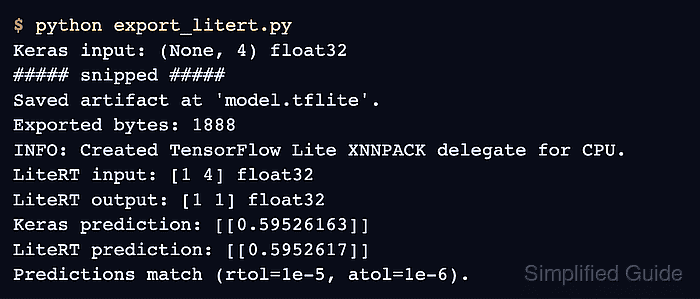
export_litert.pyfrom your model directory to compare the exported model with Keras.(litert-env) $ python export_litert.py Keras input: (None, 4) float32 ##### snipped ##### Saved artifact at 'model.tflite'. Exported bytes: 1888 INFO: Created TensorFlow Lite XNNPACK delegate for CPU. LiteRT input: [1 4] float32 LiteRT output: [1 1] float32 Keras prediction: [[0.59526163]] LiteRT prediction: [[0.5952617]] Predictions match (rtol=1e-5, atol=1e-6).
The byte count, output dimensions, and prediction values vary with the saved model.
model.tfliteremains available for deployment after a completed run. TensorFlow startup and logging lines, such asWARNING: All log messages before absl::InitializeLog(), are harmless. A traceback, shape or dtype error, missing operator, or failed comparison means the export has not passed this inference check.