A JMeter load test should fail in a small validation pass before it fails during an approved load window. Running the saved .jmx plan with one user and one loop catches broken plan loading, missing runtime values, failed assertions, and sampler errors while the target traffic is still tiny.
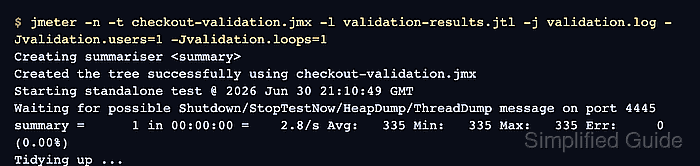
The preflight run uses JMeter non-GUI mode so it exercises the same test plan file that a CI job or load runner will start. If the plan reads user and loop counts from __P() properties, command-line -J overrides can reduce the validation run without changing the main test plan.
Treat process status, result rows, and run log as separate acceptance checks. A zero shell status means the engine completed, the .jtl file shows sampler and assertion success, and validation.log exposes load-time errors such as missing files, script exceptions, or plugin problems.
Steps to validate a JMeter test plan before a load test:
- Save a validation copy of the test plan.
checkout-validation.jmx
Keep the original load profile unchanged until the validation copy loads, runs, and records successful samples.
- Set the validation copy to accept low-scale command-line properties.
Number of Threads (users): ${__P(validation.users,1)}
Loop Count: ${__P(validation.loops,1)}
If the full plan already reads thread and loop counts from other __P() property names, use those names instead of adding new ones.
- Keep the samplers, extractors, data files, and assertions active.
Replace a large CSV or input set with one approved row when needed, but do not disable the components that should catch broken correlation, missing variables, or bad responses.
Related: How to add a response assertion in JMeter - Choose fresh output paths for the validation run.
Test plan: checkout-validation.jmx
Result file: validation-results.jtl
Log file: validation.log
- Run the test plan in JMeter non-GUI mode with one user and one loop.
$ jmeter -n -t checkout-validation.jmx -l validation-results.jtl -j validation.log -Jvalidation.users=1 -Jvalidation.loops=1
Creating summariser <summary>
Created the tree successfully using checkout-validation.jmx
Starting standalone test @ 2026 Jun 30 21:10:49 GMT
Waiting for possible Shutdown/StopTestNow/HeapDump/ThreadDump message on port 4445
summary =      1 in 00:00:00 =    2.8/s Avg:   335 Min:   335 Max:   335 Err:     0 (0.00%)
Tidying up ...
... end of run
-n selects non-GUI mode, -t names the plan, -l writes sample results, -j writes the run log, and each -J option sets a JMeter property for this run.
Related: How to run a JMeter test from the command line - Check the JMeter process exit status.
$ echo $?
0
A zero status confirms that the engine finished without a startup failure or abort. Failed samplers still need the result-file check.
- Inspect the saved .jtl result file.
$ cat validation-results.jtl
timeStamp,elapsed,label,responseCode,responseMessage,threadName,dataType,success,failureMessage,bytes,sentBytes,grpThreads,allThreads,URL,Latency,IdleTime,Connect
1782853849309,335,GET checkout status,200,OK,Checkout validation users 1-1,text,true,,48,0,1,1,null,0,0,0
The success column should be true for every validation sample, and failureMessage should be empty. A false row means a sampler, assertion, extractor, variable, or target response must be fixed before load increases.
Related: How to configure JMeter JTL result columns - Review validation.log for plan-loading and runtime errors.
$ cat validation.log
##### snipped #####
2026-06-30 21:10:49,083 INFO o.a.j.s.SaveService: Loading file: checkout-validation.jmx
2026-06-30 21:10:49,304 INFO o.a.j.e.StandardJMeterEngine: Starting 1 threads for group Checkout validation users.
2026-06-30 21:10:49,308 INFO o.a.j.t.JMeterThread: Thread started: Checkout validation users 1-1
2026-06-30 21:10:49,646 INFO o.a.j.t.JMeterThread: Thread finished: Checkout validation users 1-1
2026-06-30 21:10:49,648 INFO o.a.j.r.Summariser: summary =      1 in 00:00:00 =    2.8/s Avg:   335 Min:   335 Max:   335 Err:     0 (0.00%)
Fix any missing file, script exception, plugin error, unresolved variable, or ERROR line, then rerun the same validation pass until the summary and result file both show zero errors.

Mohd Shakir Zakaria is a cloud architect with deep roots in software development and open-source advocacy. Certified in AWS, Red Hat, VMware, ITIL, and Linux, he specializes in designing and managing robust cloud and on-premises infrastructures.


