A JMeter load test can receive HTTP 200 responses that still contain the wrong page, an error payload, or a missing business field. A Response Assertion turns that response expectation into a sample-level pass or fail signal, so bad content is visible in the result file instead of being counted as successful traffic.
The assertion runs after a sampler in its scope. Placing it as a child of one sampler limits the check to that sampler, while placing it higher in the tree applies it to every sampler in the same scope.
Use a validation copy with one accepted response and one controlled mismatch before increasing thread counts. The accepted row should stay success=true, and the mismatch row should fail with the custom message, which proves the field, matching rule, and pattern are active.
Steps to add a JMeter Response Assertion:
- Open a validation copy of the .jmx test plan in the JMeter GUI.
- Select the sampler that receives the response to check.
- Add Response Assertion from Add → Assertions → Response Assertion.
- Name the assertion for the condition it enforces.
Name: Response body contains ready status
- Keep Apply to set to Main sample only.
Use a wider assertion scope only when the same check must apply to every sampler in that branch.
- Set Field to Test to Text Response.
Text Response checks the response body without HTTP headers. Use Response Code for a status such as 200, Response Message for text such as OK, or Response Headers when the header block is the contract.
- Leave Ignore status cleared for a normal successful-response check.
Select Ignore status only when the assertion should evaluate a response that JMeter would already mark unsuccessful, such as an expected 404 or 500 response. It can clear previous assertion failures, so it should not be enabled casually.
- Set Pattern Matching Rules to Substring.
Substring and Equals use plain case-sensitive text. Contains and Matches use Perl5-style regular expressions without slash delimiters.
- Add the expected response fragment to Patterns to Test.
Patterns to Test: "status":"ready"
- Set a custom failure message that names the broken contract.
Custom failure message: order status was not ready
- Apply the same assertion to a controlled mismatch in the validation copy.
Matching response: {"order":{"id":"A100","status":"ready"}}
Mismatching response: {"order":{"id":"A101","status":"queued"}}
A mock endpoint, disposable fixture, or JSR223 sampler can supply the mismatch. Remove the artificial failure branch after the assertion behavior is proven.
- Save the validation copy of the test plan.
response-assertion-add.jmx
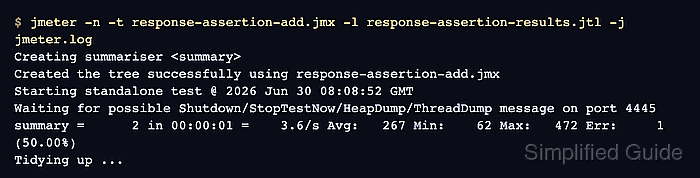
- Run a one-user non-GUI validation pass.
$ jmeter -n -t response-assertion-add.jmx -l response-assertion-results.jtl -j jmeter.log
Creating summariser <summary>
Created the tree successfully using response-assertion-add.jmx
Starting standalone test @ 2026 Jun 30 08:08:52 GMT
Waiting for possible Shutdown/StopTestNow/HeapDump/ThreadDump message on port 4445
summary =      2 in 00:00:01 =    3.6/s Avg:   267 Min:    62 Max:   472 Err:     1 (50.00%)
Tidying up ...
... end of run
The one error is expected in this validation copy because the mismatch sampler proves that the assertion fails bad content. Use the GUI to create or debug the test plan, then use non-GUI mode for validation and load runs.
Related: How to run a JMeter test from the command line - Check the result file for the passing row and assertion failure message.
$ cat response-assertion-results.jtl
timeStamp,elapsed,label,responseCode,responseMessage,threadName,dataType,success,failureMessage,bytes,sentBytes,grpThreads,allThreads,URL,Latency,IdleTime,Connect
1782806932223,472,GET order status matching response,200,OK,Assertion validation users 1-1,text,true,,40,0,1,1,null,0,0,0
1782806932696,62,GET order status mismatching response,200,OK,Assertion validation users 1-1,text,false,order status was not ready,41,0,1,1,null,0,0,0
- Keep the assertion under the real sampler and remove the controlled mismatch.
After cleanup, a one-user smoke run against the accepted response should show success=true for the asserted sampler. A success=false row with the custom message means the response body no longer contains the expected fragment.

Mohd Shakir Zakaria is a cloud architect with deep roots in software development and open-source advocacy. Certified in AWS, Red Hat, VMware, ITIL, and Linux, he specializes in designing and managing robust cloud and on-premises infrastructures.


