An HTTP test plan gives JMeter a repeatable tree for sending web requests with controlled users and saved results. It is the starting point for page-load smoke tests, staging checks, and small baseline runs before a wider browser-recorded scenario is worth maintaining.
The plan uses a Thread Group for virtual users, HTTP Request Defaults for the shared protocol, host, and port, and one HTTP Request sampler for the page path. Keeping the target host in defaults makes later samplers inherit the same web server fields while their labels stay focused on the request being measured.
Start against a disposable or explicitly approved endpoint and keep the first run small. The result file should show the expected sample count, HTTP response code 200, success=true rows, and matching target-side access entries before users, loops, or duration increase.
Steps to create a JMeter HTTP test plan:
- Open the JMeter GUI and create a new test plan.
- Name the test plan for the web page smoke test.
Name: HTTP page smoke test
- Add a Thread Group under the test plan.
Name: HTTP smoke users
Number of Threads (users): 2
Ramp-up period (seconds): 1
Loop Count: 2
Keep the first plan small enough to inspect every sample. Raise the user count, loop count, or duration only after the smoke run proves the request shape and result capture.
Related: How to configure a thread group in JMeter - Add HTTP Request Defaults under the same Thread Group from Add → Config Element → HTTP Request Defaults.
- Set the shared target fields.
Name: HTTP target defaults
Protocol: http
Server Name or IP: web.example.test
Port Number: 18080
Use a staging, local, or load-test endpoint owned by the test window. Do not point early smoke plans at a production page without approval and rate limits.
Related: How to configure HTTP Request Defaults in JMeter - Add an HTTP Request sampler under the Thread Group from Add → Sampler → HTTP Request.
- Configure the page request.
Name: GET /catalog.html
Method: GET
Protocol: (blank)
Server Name or IP: (blank)
Port Number: (blank)
Path: /catalog.html
Blank protocol, server, and port fields inherit from HTTP Request Defaults. Put only the page path on this sampler unless this request must use a different target.
- Save the test plan.
http-test-plan.jmx
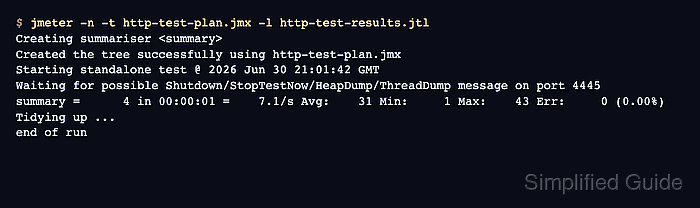
- Run a small non-GUI smoke test and write a fresh result file.
$ jmeter -n -t http-test-plan.jmx -l http-test-results.jtl
Creating summariser <summary>
Created the tree successfully using http-test-plan.jmx
Starting standalone test @ 2026 Jun 30 21:01:42 GMT
Waiting for possible Shutdown/StopTestNow/HeapDump/ThreadDump message on port 4445
summary =      4 in 00:00:01 =    7.1/s Avg:    31 Min:     1 Max:    43 Err:     0 (0.00%)
Tidying up ...
... end of run
-n starts non-GUI mode, -t names the saved plan, and -l writes the .jtl result file.
Related: How to run a JMeter test from the command line - Check the result file for four successful samples.
$ cat http-test-results.jtl
timeStamp,elapsed,label,responseCode,responseMessage,threadName,dataType,success,failureMessage,bytes,sentBytes,grpThreads,allThreads,URL,Latency,IdleTime,Connect
1782853302172,43,GET /catalog.html,200,OK,HTTP smoke users 1-1,text,true,,298,137,1,1,http://web.example.test:18080/catalog.html,41,0,10
1782853302217,42,GET /catalog.html,200,OK,HTTP smoke users 1-1,text,true,,298,137,1,1,http://web.example.test:18080/catalog.html,42,0,0
1782853302633,1,GET /catalog.html,200,OK,HTTP smoke users 1-2,text,true,,298,137,1,1,http://web.example.test:18080/catalog.html,1,0,0
1782853302635,41,GET /catalog.html,200,OK,HTTP smoke users 1-2,text,true,,298,137,1,1,http://web.example.test:18080/catalog.html,41,0,0
The URL column confirms that the sampler inherited the protocol, server, and port from HTTP Request Defaults. Add a Response Assertion when the page body must contain a specific status, heading, or text fragment.
Related: How to add a response assertion in JMeter - Check the target server log or request inspector.
$ cat http-server.log
127.0.0.1 - - [30/Jun/2026:21:01:42 +0000] "GET /catalog.html HTTP/1.1" 200 -
127.0.0.1 - - [30/Jun/2026:21:01:42 +0000] "GET /catalog.html HTTP/1.1" 200 -
127.0.0.1 - - [30/Jun/2026:21:01:42 +0000] "GET /catalog.html HTTP/1.1" 200 -
127.0.0.1 - - [30/Jun/2026:21:01:42 +0000] "GET /catalog.html HTTP/1.1" 200 -
The server-side receipt confirms that JMeter sent four GET requests to the intended page, not only that the local result file was created.

Mohd Shakir Zakaria is a cloud architect with deep roots in software development and open-source advocacy. Certified in AWS, Red Hat, VMware, ITIL, and Linux, he specializes in designing and managing robust cloud and on-premises infrastructures.


