JMeter out-of-memory errors mean the Java process driving the client ran out of heap while loading a plan, retaining sample data, executing scripts, or collecting responses. The failure can look like a stopped load test, a stalled GUI, or a java.lang.OutOfMemoryError: Java heap space entry in jmeter.log even when the shell command returns normally.
Start with the JMeter client process rather than the target application. Confirm the heap limit that the JVM actually used, remove visual listeners from the load-run copy, keep load execution in CLI mode, and rerun with a heap value that still leaves memory for Java metaspace, the operating system, and other runner jobs.
A corrected run should print a normal summary, log the larger Max memory value, and write .jtl rows with successful samples. If the error returns after visual listeners are removed and a reasonable heap is set, reduce response retention, lower the client-side thread count, or distribute the test across load engines.
Steps to troubleshoot JMeter out of memory errors:
- Open the log from the failed JMeter run.
$ cat jmeter.log
2026-06-30 07:08:47,874 INFO o.a.j.JMeter: Version 5.6.3
2026-06-30 07:08:47,874 INFO o.a.j.JMeter: java.version=21.0.11
2026-06-30 07:08:47,875 INFO o.a.j.JMeter: Max memory     =33554432
##### snipped #####
2026-06-30 07:08:49,017 ERROR o.a.j.JMeter: Uncaught exception in thread Thread[#38,Checkout Thread Group 1-1,5,main]
java.lang.OutOfMemoryError: Java heap space
	at Script1.run(Script1.groovy:2) ~[?:?]
##### snipped #####
2026-06-30 07:08:49,024 INFO o.a.j.r.Summariser: summary =      0 in 00:00:00 = ******/s Avg:     0 Min: 9223372036854775807 Max: -9223372036854775808 Err:     0 (0.00%)
Max memory is logged in bytes. 33554432 is 32 MiB, which is enough to reproduce the failure signal but too small for most real load runs.
- Disable visual listeners in the load-run copy of the test plan.
View Results Tree, View Results in Table, Graph Results, and similar listeners can retain sample details in the client process during a load test.
- Keep the rerun in JMeter CLI mode with a fresh result file and log file.
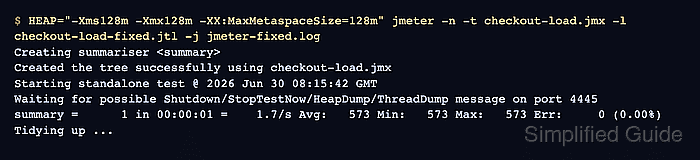
-n selects CLI mode, -t names the test plan, -l writes sample rows, and -j writes the log used for memory checks.
Related: How to run a JMeter test from the command line - Rerun the plan with HEAP scoped to the JMeter process.
$ HEAP="-Xms128m -Xmx128m -XX:MaxMetaspaceSize=128m" jmeter -n -t checkout-load.jmx -l checkout-load-fixed.jtl -j jmeter-fixed.log
Creating summariser <summary>
Created the tree successfully using checkout-load.jmx
Starting standalone test @ 2026 Jun 30 07:08:51 GMT
Waiting for possible Shutdown/StopTestNow/HeapDump/ThreadDump message on port 4445
summary =      1 in 00:00:01 =    1.6/s Avg:   612 Min:   612 Max:   612 Err:     0 (0.00%)
Tidying up ...
... end of run
A small heap keeps the smoke check easy to verify. For a real load run, choose -Xmx from observed pressure and keep it below the runner memory.
Related: How to set the JMeter heap size - Check the fixed log for the larger heap and completed thread.
$ cat jmeter-fixed.log
2026-06-30 07:08:51,059 INFO o.a.j.JMeter: Version 5.6.3
2026-06-30 07:08:51,059 INFO o.a.j.JMeter: java.version=21.0.11
2026-06-30 07:08:51,060 INFO o.a.j.JMeter: Max memory     =134217728
##### snipped #####
2026-06-30 07:08:52,237 INFO o.a.j.t.JMeterThread: Thread is done: Checkout Thread Group 1-1
2026-06-30 07:08:52,240 INFO o.a.j.r.Summariser: summary =      1 in 00:00:01 =    1.6/s Avg:   612 Min:   612 Max:   612 Err:     0 (0.00%)
134217728 bytes is 128 MiB. If the value does not match HEAP, remove duplicate memory options from wrapper scripts, JVM_ARGS, CI variables, or shell startup files used by the runner.
- Confirm that the fixed result file contains successful samples.
$ cat checkout-load-fixed.jtl
timeStamp,elapsed,label,responseCode,responseMessage,threadName,dataType,success,failureMessage,bytes,sentBytes,grpThreads,allThreads,URL,Latency,IdleTime,Connect
1782803331624,612,Checkout response,200,OK,Checkout Thread Group 1-1,text,true,,50331648,0,1,1,null,0,0,0
The success column should contain true for the fixed smoke run. Any false row means the memory failure is gone, but sampler, assertion, or target-system errors still need review.

Mohd Shakir Zakaria is a cloud architect with deep roots in software development and open-source advocacy. Certified in AWS, Red Hat, VMware, ITIL, and Linux, he specializes in designing and managing robust cloud and on-premises infrastructures.


