JMS tests in JMeter depend on the broker client libraries, the JNDI connection settings, and a destination name that the broker can resolve. A small queue plan that publishes one message and reads it back proves those moving parts before the same sampler path is used for a larger asynchronous workload.
JMeter provides JMS Publisher and JMS Subscriber samplers, but it does not include a JMS provider implementation jar. The broker vendor's client jars must be on the JMeter classpath before the GUI or CLI runner can create connections.
A one-thread plan with one text message, one queue, and one response assertion is enough for the first run. A successful .jtl file should contain a passed publisher row and a passed subscriber row, which means JMeter sent the message, received it from the queue, and checked the payload.
Steps to create a JMeter JMS test plan:
- Add the JMS provider client jar to JMeter before opening the plan.
Provider jar: activemq-all-5.18.6.jar
JMeter library path: $JMETER_HOME/lib/activemq-all-5.18.6.jar
Use the client jars that match the target broker. JMeter must be restarted after new jars are placed in $JMETER_HOME/lib so the sampler classpath includes them.
Related: How to check the Java runtime for JMeter - Choose the broker and destination values for the first queue smoke test.
JNDI Initial Context Factory: org.apache.activemq.jndi.ActiveMQInitialContextFactory
Provider URL: vm:(broker:(vm://localhost)?persistent=false)
Connection Factory: ConnectionFactory
Destination: dynamicQueues/orders.loadtest
Those ActiveMQ values create a disposable in-JVM broker for a local smoke run. For a shared broker, replace Provider URL with the broker endpoint, such as tcp://broker.example.net:61616, and use the destination naming pattern from that broker.
- Open the test plan in the JMeter GUI.
- Add a Thread Group for the queue smoke test.
Name: JMS smoke users
Number of Threads: 1
Ramp-up period: 1
Loop Count: 1
Action to be taken after a Sampler error: Stop Thread
Keep the first JMS run to one thread and one loop so connection, destination, and payload errors appear before load is added.
Related: How to configure a thread group in JMeter - Add a JMS Publisher sampler under the Thread Group.
Menu path: Add -> Sampler -> JMS Publisher
Name: Publish order event
- Set the publisher connection fields.
use JNDI properties file: unchecked
JNDI Initial Context Factory: org.apache.activemq.jndi.ActiveMQInitialContextFactory
Provider URL: vm:(broker:(vm://localhost)?persistent=false)
Connection Factory: ConnectionFactory
Destination: dynamicQueues/orders.loadtest
Setup: At startup
Authentication: Not required
Do not save real broker passwords directly in a .jmx file. JMeter stores sampler passwords unencrypted, so pass credentials through properties when the broker requires authentication.
Related: How to override JMeter properties from the command line - Set the publisher message fields.
Number of samples to aggregate: 1 Message source: Text area Message type: Text Message Text area: {"orderId":"SG-1001","event":"created"} Priority: 4 Use non-persistent delivery mode?: checked - Add a JMS Subscriber sampler after the publisher in the same Thread Group.
Menu path: Add -> Sampler -> JMS Subscriber
Name: Read order event
- Set the subscriber connection fields to the same queue.
use JNDI properties file: unchecked
JNDI Initial Context Factory: org.apache.activemq.jndi.ActiveMQInitialContextFactory
Provider URL: vm:(broker:(vm://localhost)?persistent=false)
Connection Factory: ConnectionFactory
Destination: dynamicQueues/orders.loadtest
Setup: At startup
Authentication: Not required
The destination must match the publisher destination exactly. For queue smoke tests, use MessageConsumer.receive() so the sampler reads only when the step runs.
- Set the subscriber receive fields.
Number of samples to aggregate: 1
Save response: checked
Timeout: 5000
Client: MessageConsumer.receive()
- Add a Response Assertion under the JMS Subscriber sampler.
Name: Assert JMS payload
Field to Test: Text Response
Pattern Matching Rules: Contains
Patterns to Test: SG-1001
The assertion turns a missing or wrong message body into a failed subscriber row instead of only proving that a message was received.
- Save the test plan.
jms-smoke.jmx
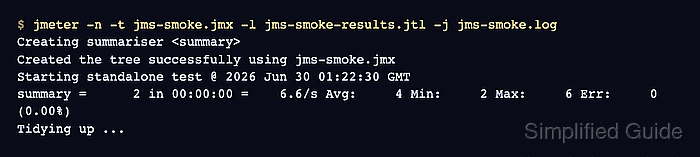
- Run the saved JMS test plan in CLI mode.
$ jmeter -n -t jms-smoke.jmx -l jms-smoke-results.jtl -j jms-smoke.log
Creating summariser <summary>
Created the tree successfully using jms-smoke.jmx
Starting standalone test @ 2026 Jun 30 01:22:30 GMT
Waiting for possible Shutdown/StopTestNow/HeapDump/ThreadDump message on port 4445
summary =      2 in 00:00:00 =    6.6/s Avg:     4 Min:     2 Max:     6 Err:     0 (0.00%)
Tidying up ...
... end of run
-n runs the saved plan without the GUI, -t selects the .jmx file, -l writes sample results, and -j writes the run log.
Related: How to run a JMeter test from the command line - Check the .jtl result file for successful publisher and subscriber rows.
$ cat jms-smoke-results.jtl
timeStamp,elapsed,label,responseCode,responseMessage,threadName,dataType,success,failureMessage,bytes,sentBytes,grpThreads,allThreads,URL,Latency,IdleTime,Connect
1782782550339,2,Publish order event,200,1 messages published,JMS smoke users 1-1,,true,,0,0,1,1,null,0,0,0
1782782550343,6,Read order event,200,1 message(s) received successfully of 1 expected,JMS smoke users 1-1,text,true,,39,0,1,1,null,0,0,0
The success column should show true for both rows. A bad provider URL, missing client jar, wrong destination name, timeout, or failed response assertion changes the affected row to false and writes details to the run log.

Mohd Shakir Zakaria is a cloud architect with deep roots in software development and open-source advocacy. Certified in AWS, Red Hat, VMware, ITIL, and Linux, he specializes in designing and managing robust cloud and on-premises infrastructures.


