A JMeter test plan can keep one reviewed .jmx file while changing hosts, user counts, labels, and run-time switches at launch. Command-line properties are useful in CI jobs and smoke runs where editing the plan for each environment would make changes harder to audit.
JMeter properties are different from thread variables. Fields that should read a CLI value must use property-aware expressions such as ${__P(target.host,api.dev.example.net)}, while run-level settings such as SaveService options can be loaded as normal properties before the test starts.
Keep safe defaults in the plan and pass environment-specific values from a small property file or -J flags. A validation run can load baseline values with -q and place specific -J overrides after that option so the result file shows the values used for that run.
Steps to override JMeter properties from the command line:
- Open a validation copy of the .jmx test plan in the JMeter GUI.
- Replace run-specific literals with property functions in the fields that should change per run.
HTTP Request Server Name or IP: ${__P(target.host,api.dev.example.net)}
Thread Group Number of Threads: ${__P(users,1)}
Sampler name: ${__P(results.label,checkout-smoke)}
__P(name,default) reads a JMeter property named name and uses the default value when the property is not supplied.
- Add temporary result visibility to the validation copy.
User Defined Variables:
target_host=${__P(target.host,api.dev.example.net)}
users=${__P(users,1)}
run_label=${__P(results.label,checkout-smoke)}
Use temporary variables, a Debug Sampler, or a short JSR223 Sampler only for a small validation run. The values should appear in stdout, the .jtl file, or the debug response so the override can be checked directly.
Related: How to add a Debug Sampler in JMeter - Save the validation copy of the test plan.
property-override.jmx
- Create smoke.properties for the validation run.
target.host=api.dev.example.net
users=2
results.label=checkout-baseline
sample_variables=target_host,users,run_label
sample_variables adds the listed JMeter variables as extra .jtl columns. Keep it for validation output only unless the result pipeline needs those columns.
Related: How to configure JMeter JTL result columns - Run the plan with the property file and command-line overrides.
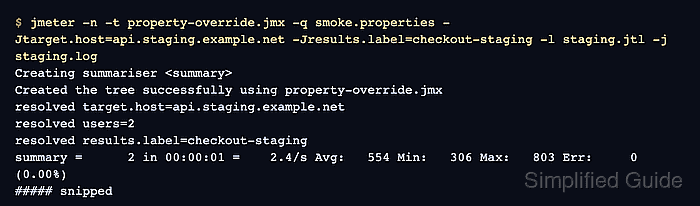
$ jmeter -n -t property-override.jmx -q smoke.properties -Jtarget.host=api.staging.example.net -Jresults.label=checkout-staging -l staging.jtl -j staging.log
Creating summariser <summary>
Created the tree successfully using property-override.jmx
resolved target.host=api.staging.example.net
resolved users=2
resolved results.label=checkout-staging
##### snipped #####
summary =      2 in 00:00:01 =    2.4/s Avg:   554 Min:   306 Max:   803 Err:     0 (0.00%)
Tidying up ...
... end of run
The property file supplies users=2. Place -Jtarget.host and -Jresults.label after -q smoke.properties when those CLI values should win for the run. For distributed runs, review remote property handling separately.
Related: How to run a distributed JMeter test - Check the result file for the resolved values.
$ cat staging.jtl
timeStamp,elapsed,label,responseCode,responseMessage,threadName,dataType,success,failureMessage,bytes,sentBytes,grpThreads,allThreads,URL,Latency,IdleTime,Connect,"target_host","users","run_label"
1782804308500,803,checkout-staging,200,OK,Property override users 1-1,text,true,,75,0,2,2,null,0,0,0,api.staging.example.net,2,checkout-staging
1782804308997,306,checkout-staging,200,OK,Property override users 1-2,text,true,,75,0,2,2,null,0,0,0,api.staging.example.net,2,checkout-staging
The two rows match users=2, the label matches the -Jresults.label override, and the target_host column matches the -Jtarget.host override.
- Remove temporary validation visibility before the load run.
Keep the reusable property expressions and run-specific property file, but remove temporary Debug Sampler elements, stdout print logic, and sample_variables unless the production result format intentionally includes those extra columns.

Mohd Shakir Zakaria is a cloud architect with deep roots in software development and open-source advocacy. Certified in AWS, Red Hat, VMware, ITIL, and Linux, he specializes in designing and managing robust cloud and on-premises infrastructures.


