Web pages often need structured data from an API before rendering account details, product rows, dashboard cards, or other dynamic content. The browser Fetch API returns a Response object first, so JSON loading should treat the HTTP response and the body parse as separate outcomes.
A small async helper keeps that boundary visible. It requests JSON with fetch(), rejects non-2xx responses with response.ok, checks for a JSON media type, and lets response.json() turn the body into a JavaScript value.
A same-origin profile.json file keeps the first request local while the browser still loads it through HTTP. Use the same helper with a real api/profile route when that route returns JSON and the page is allowed by the site's same-origin or CORS policy.
Steps to fetch JSON with JavaScript:
- Create a strict JSON response file for the local request.
- profile.json
{
  "name": "Ada Lovelace",
  "role": "admin"
}
The payload must be strict JSON; comments, trailing commas, and malformed strings reach the catch branch when response.json() parses the body.
Tool: JSON Validator - Add a visible target and load the JavaScript module.
- Create the browser module that fetches and renders the JSON.
- app.js
async function readJsonResponse(response) {
  if (!response.ok) {
    throw new Error(`Request failed with ${response.status}`);
  }

  const contentType = response.headers.get("content-type") || "";
  const isJson =
    contentType.includes("application/json") || contentType.includes("+json");

  if (!isJson) {
    throw new TypeError("Expected a JSON response");
  }

  return response.json();
}

async function fetchJson(url) {
  const response = await fetch(url, {
    headers: { Accept: "application/json" },
  });

  return readJsonResponse(response);
}

const output = document.querySelector("#profile-output");

try {
  const profile = await fetchJson("profile.json");
  output.textContent = `${profile.name} (${profile.role})`;
} catch (error) {
  output.textContent = `Could not load profile: ${error.message}`;
}
response.json() reads the response body once. If the app needs the raw body for error logging, read response.text() in that error path instead of parsing the same body twice.
- Start a local HTTP server from the directory that holds the three files.
$ python3 -m http.server 8000
Serving HTTP on :: port 8000 (http://[::]:8000/) ...
Do not test the browser page from a file:// URL; local file loading and CORS checks do not match normal HTTP delivery.
- Open the page through the local server and confirm the parsed profile appears.
http://localhost:8000/
Ada Lovelace (admin)
- Save a smoke-test script for the helper's success, HTTP error, and malformed JSON branches.
- verify-fetch-json.mjs
async function readJsonResponse(response) {
  if (!response.ok) {
    throw new Error(`Request failed with ${response.status}`);
  }

  const contentType = response.headers.get("content-type") || "";
  const isJson =
    contentType.includes("application/json") || contentType.includes("+json");

  if (!isJson) {
    throw new TypeError("Expected a JSON response");
  }

  return response.json();
}

async function fetchJson(url) {
  const response = await fetch(url, {
    headers: { Accept: "application/json" },
  });

  return readJsonResponse(response);
}

const profileUrl = `data:application/json,${encodeURIComponent(
  JSON.stringify({ name: "Ada Lovelace", role: "admin" }),
)}`;

const profile = await fetchJson(profileUrl);
console.log(`Fetched profile: ${profile.name} (${profile.role})`);

try {
  await readJsonResponse(
    new Response("Not found", {
      status: 404,
      headers: { "content-type": "application/json" },
    }),
  );
} catch (error) {
  console.log(`HTTP error: ${error.message}`);
}

try {
  await readJsonResponse(
    new Response("{", {
      headers: { "content-type": "application/json" },
    }),
  );
} catch (error) {
  console.log(`Broken JSON: ${error.name}`);
}
The data: URL keeps the success case local; the Response fixtures exercise the same response-checking function without depending on a third-party API.
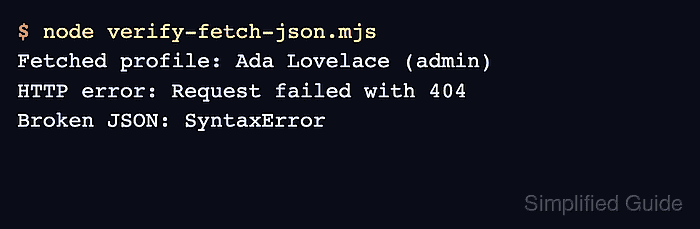
- Run the smoke test.
$ node verify-fetch-json.mjs
Fetched profile: Ada Lovelace (admin)
HTTP error: Request failed with 404
Broken JSON: SyntaxError

Mohd Shakir Zakaria is a cloud architect with deep roots in software development and open-source advocacy. Certified in AWS, Red Hat, VMware, ITIL, and Linux, he specializes in designing and managing robust cloud and on-premises infrastructures.


