Public SSH listeners often receive repeated connection attempts even when key authentication and strong account policy are already in place. An iptables rate-limit rule can slow repeated new connections from the same source before they reach sshd, while leaving established sessions alone.
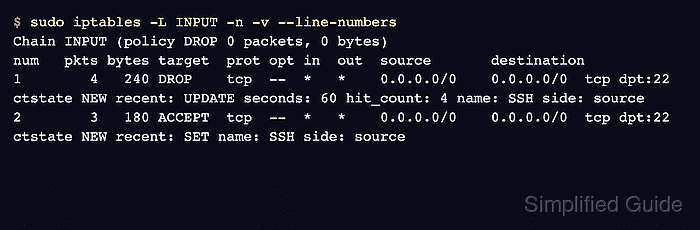
The recent match keeps a runtime list of source addresses and timestamps. A first rule drops sources that have already reached the hit threshold during the time window, and a following rule records new SSH attempts that are still below the threshold.
Use this as a host-level throttle, not as the only SSH defense. Keep a console or existing remote session open while testing, place allow rules for trusted management sources before the rate-limit rules when needed, and save the ruleset only after a new login still succeeds.
Steps to rate limit SSH with iptables:
- Confirm the current INPUT order before adding SSH limits.
$ sudo iptables --list INPUT --line-numbers --numeric --verbose
Chain INPUT (policy DROP 0 packets, 0 bytes)
num   pkts bytes target     prot opt in     out     source               destination
1        0     0 ACCEPT     all  --  *      *       0.0.0.0/0            0.0.0.0/0            ctstate RELATED,ESTABLISHED
2        0     0 ACCEPT     all  --  lo     *       0.0.0.0/0            0.0.0.0/0
Place trusted source allows and established-connection rules before rate-limit drops. Related: How to allow an IP address with iptables
Related: How to allow established connections with iptables - Add the over-limit drop rule for new SSH attempts.
$ sudo iptables -A INPUT -p tcp --dport 22 -m conntrack --ctstate NEW -m recent --update --seconds 60 --hitcount 4 --name SSH --rsource -j DROP
The example drops the fourth and later new connection attempt from the same source within 60 seconds. Adjust the window and hit count for the host's normal login pattern.
- Add the rule that records and accepts allowed new SSH attempts.
$ sudo iptables -A INPUT -p tcp --dport 22 -m conntrack --ctstate NEW -m recent --set --name SSH --rsource -j ACCEPT
The DROP rule must appear before the SET rule. Otherwise every new attempt can be accepted before the rate-limit decision is reached.
- Confirm the two recent rules appear in the correct order.
$ sudo iptables -S INPUT
-P INPUT DROP
-A INPUT -m conntrack --ctstate RELATED,ESTABLISHED -j ACCEPT
-A INPUT -i lo -j ACCEPT
-A INPUT -p tcp -m tcp --dport 22 -m conntrack --ctstate NEW -m recent --update --seconds 60 --hitcount 4 --name SSH --mask 255.255.255.255 --rsource -j DROP
-A INPUT -p tcp -m tcp --dport 22 -m conntrack --ctstate NEW -m recent --set --name SSH --mask 255.255.255.255 --rsource -j ACCEPT
- Open a new SSH session from a trusted client.
$ ssh admin@server.example.com
Welcome to Ubuntu 26.04 LTS
If the new login fails, keep the existing session open and remove the two recent rules by exact match before saving anything.
- Generate repeated test attempts from the same client.
$ nc -vz -w 1 server.example.com 22
Connection to server.example.com 22 port [tcp/ssh] succeeded!
$ nc -vz -w 1 server.example.com 22
Connection to server.example.com 22 port [tcp/ssh] succeeded!
$ nc -vz -w 1 server.example.com 22
Connection to server.example.com 22 port [tcp/ssh] succeeded!
$ nc -vz -w 1 server.example.com 22
nc: connect to server.example.com port 22 (tcp) timed out: Operation now in progress
The exact visible failure depends on the client and network path. With DROP, over-limit attempts usually time out instead of receiving an immediate reset.
- Check counters on both SSH rate-limit rules.
$ sudo iptables --list INPUT --line-numbers --numeric --verbose --exact
Chain INPUT (policy DROP 0 packets, 0 bytes)
num      pkts      bytes target     prot opt in     out     source               destination
3           1        60 DROP       tcp  --  *      *       0.0.0.0/0            0.0.0.0/0            tcp dpt:22 ctstate NEW recent: UPDATE seconds: 60 hit_count: 4 name: SSH side: source
4           3       180 ACCEPT     tcp  --  *      *       0.0.0.0/0            0.0.0.0/0            tcp dpt:22 ctstate NEW recent: SET name: SSH side: source
The accept counter should increase for early attempts, and the drop counter should increase after the threshold is reached.
- Save the runtime rules after a new login and counter check pass.
$ sudo netfilter-persistent save
run-parts: executing /usr/share/netfilter-persistent/plugins.d/15-ip4tables save
Do not save a rate limit that blocks trusted administration paths. Delete or reorder the runtime rules first, then retest.
Related: How to save iptables rules permanently

Mohd Shakir Zakaria is a cloud architect with deep roots in software development and open-source advocacy. Certified in AWS, Red Hat, VMware, ITIL, and Linux, he specializes in designing and managing robust cloud and on-premises infrastructures.


