A source allow rule is useful when a Linux host already filters inbound traffic and one trusted workstation, monitoring node, or upstream system needs to reach a local service. The rule must appear before the rule or chain policy that would otherwise drop the packet, so rule order matters as much as the address itself.
In the filter table, INPUT handles packets addressed to services on the local host. The --source match restricts a rule to one IP address or CIDR, and the example below also narrows the exception to one TCP destination port instead of accepting every packet from that source.
Runtime iptables changes can disappear on reboot and can conflict with firewalld, UFW, native nftables, or another firewall manager. Keep an existing console or second remote session open before changing management access, and verify the rule with a real connection plus packet counters before saving it permanently.
Steps to allow a source IP address with iptables:
- List the current INPUT chain with line numbers and counters.
$ sudo iptables --list INPUT --line-numbers --numeric --verbose
Chain INPUT (policy DROP 0 packets, 0 bytes)
num   pkts bytes target     prot opt in     out     source               destination
1        0     0 ACCEPT     all  --  lo     *       0.0.0.0/0            0.0.0.0/0
2        0     0 ACCEPT     all  --  *      *       0.0.0.0/0            0.0.0.0/0            ctstate RELATED,ESTABLISHED
The example policy already drops unmatched inbound packets. If the chain has an explicit DROP or REJECT rule instead, insert the source allow rule before that line.
- Confirm the trusted source address and service port.
Use a numeric IP address or CIDR, not a hostname. iptables resolves hostnames only when the rule is added, and later DNS changes do not update the stored rule.
Keep the exception as narrow as the service allows. Remove the protocol and destination-port match only when the source should reach every local service on the host.
- Insert the source allow rule at the selected position.
$ sudo iptables --insert INPUT 3 --source 203.0.113.44 --protocol tcp --match tcp --destination-port 8080 --match comment --comment "allow trusted source" --jump ACCEPT
Use ip6tables for an IPv6 source address. IPv4 iptables rules do not allow IPv6 traffic.
- List the INPUT chain again to confirm rule order.
$ sudo iptables --list INPUT --line-numbers --numeric --verbose
Chain INPUT (policy DROP 0 packets, 0 bytes)
num   pkts bytes target     prot opt in     out     source               destination
1        0     0 ACCEPT     all  --  lo     *       0.0.0.0/0            0.0.0.0/0
2        0     0 ACCEPT     all  --  *      *       0.0.0.0/0            0.0.0.0/0            ctstate RELATED,ESTABLISHED
3        0     0 ACCEPT     tcp  --  *      *       203.0.113.44        0.0.0.0/0            tcp dpt:8080 /* allow trusted source */
- Test the service from the allowed source address.
$ nc -vz -w 2 server.example.net 8080
Connection to server.example.net 8080 port [tcp/http-alt] succeeded!
Run this check from the workstation, monitoring node, or upstream system represented by the source address in the rule.
- Test the service from another source when the policy should still filter other clients.
$ nc -vz -w 2 server.example.net 8080
nc: connect to server.example.net port 8080 (tcp) timed out: Operation timed out
A timeout or rejection from another source confirms the allow rule did not open the service to every client.
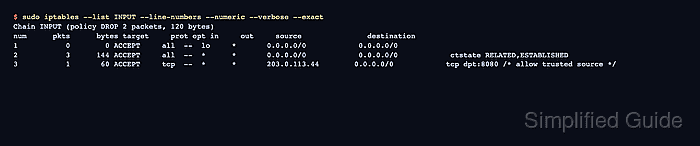
- Check exact counters after the connection tests.
$ sudo iptables --list INPUT --line-numbers --numeric --verbose --exact
Chain INPUT (policy DROP 2 packets, 120 bytes)
num      pkts      bytes target     prot opt in     out     source               destination
1           0        0 ACCEPT     all  --  lo     *       0.0.0.0/0            0.0.0.0/0
2           3      144 ACCEPT     all  --  *      *       0.0.0.0/0            0.0.0.0/0            ctstate RELATED,ESTABLISHED
3           1       60 ACCEPT     tcp  --  *      *       203.0.113.44        0.0.0.0/0            tcp dpt:8080 /* allow trusted source */
The packet counter on the source allow rule should increase after the allowed client connects.
- Save the rule after the source test passes.
$ sudo netfilter-persistent save
run-parts: executing /usr/share/netfilter-persistent/plugins.d/15-ip4tables save
run-parts: executing /usr/share/netfilter-persistent/plugins.d/25-ip6tables save
On Debian and Ubuntu, iptables-persistent provides netfilter-persistent. Use the firewall manager that owns durable policy on other platforms.

Mohd Shakir Zakaria is a cloud architect with deep roots in software development and open-source advocacy. Certified in AWS, Red Hat, VMware, ITIL, and Linux, he specializes in designing and managing robust cloud and on-premises infrastructures.


