Loopback traffic lets local clients reach services bound to 127.0.0.1 on the same Linux host. A restrictive iptables ruleset can block those packets when INPUT or OUTPUT drops by default without an explicit lo allow rule, causing local health checks, agents, proxies, and database clients to fail even though no external network path is involved.
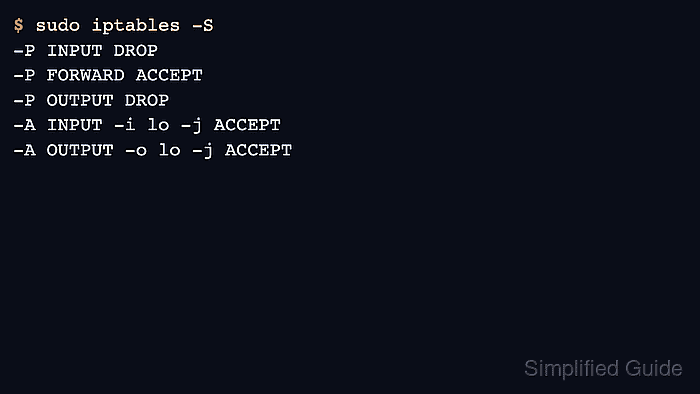
In the filter table, packets generated by local processes leave through OUTPUT, and packets delivered to local sockets return through INPUT. The -i lo match belongs on INPUT, while -o lo belongs on OUTPUT; allowing only one direction can still break a local TCP connection when the opposite chain has a DROP policy.
Insert the loopback rules near the top of the IPv4 ruleset before broader drop rules, then save them only after a local connection test and counter check confirm the rule is being used. Use the matching ip6tables commands when the host has an IPv6 ruleset for ::1.
Related: How to list iptables rules with counters
Related: How to set a default iptables chain policy
Related: How to save iptables rules permanently
Tool: iptables Rule Generator
Steps to allow loopback traffic with iptables:
- List the current INPUT and OUTPUT policies before changing the rule order.
$ sudo iptables -S INPUT
-P INPUT DROP
-A INPUT -m conntrack --ctstate RELATED,ESTABLISHED -j ACCEPT
-A INPUT -p tcp -m tcp --dport 22 -j ACCEPT
$ sudo iptables -S OUTPUT
-P OUTPUT DROP
Loopback traffic uses both chains when a local client connects to a local service. A default ACCEPT policy may already allow it, but an explicit lo rule keeps the behavior clear when the policy later changes to DROP.
- Insert the loopback allow rules before broader drop rules.
$ sudo iptables -I INPUT 1 -i lo -j ACCEPT
$ sudo iptables -I OUTPUT 1 -o lo -j ACCEPT
-i lo matches packets received through the loopback interface, and -o lo matches packets sent through it. The rule target ACCEPT lets matching packets continue to the local socket instead of reaching the chain policy or a later drop rule.
- Confirm the rules appear above other INPUT and OUTPUT matches.
$ sudo iptables -S
-P INPUT DROP
-P FORWARD ACCEPT
-P OUTPUT DROP
-A INPUT -i lo -j ACCEPT
-A INPUT -m conntrack --ctstate RELATED,ESTABLISHED -j ACCEPT
-A INPUT -p tcp -m tcp --dport 22 -j ACCEPT
-A OUTPUT -o lo -j ACCEPT
If an existing lo rule appears below a broad DROP or REJECT rule, move it above that rule instead of adding a duplicate below the block.
- Add the equivalent IPv6 loopback rules when ip6tables is used on the host.
$ sudo ip6tables -I INPUT 1 -i lo -j ACCEPT
$ sudo ip6tables -I OUTPUT 1 -o lo -j ACCEPT
Skip this step only when IPv6 is disabled or managed by a separate firewall tool. A host that filters IPv6 separately can still block ::1 even when the IPv4 iptables loopback rules are present.
- Start a temporary service bound only to 127.0.0.1 when no existing loopback service is available for testing.
$ python3 -m http.server 8080 --bind 127.0.0.1
Serving HTTP on 127.0.0.1 port 8080 (http://127.0.0.1:8080/) ...
Leave this command running and use a second terminal for the next checks. An existing local service such as a database health endpoint or admin socket can be used instead.
- Request the local service through loopback.
$ curl -sI http://127.0.0.1:8080
HTTP/1.0 200 OK
Server: SimpleHTTP/0.6 Python/3.14.4
Date: Sat, 06 Jun 2026 01:30:37 GMT
Content-type: text/html; charset=utf-8
Content-Length: 946
A successful response from 127.0.0.1 proves local client traffic can traverse the loopback path. A timeout after adding the rules usually means one direction is still blocked, the rule is below a broader drop, or the service is not listening on loopback.
- Check packet counters for the loopback rules after the local request.
$ sudo iptables -L INPUT -v -n
Chain INPUT (policy DROP 0 packets, 0 bytes)
 pkts bytes target     prot opt in     out     source               destination
   10   770 ACCEPT     all  --  lo     *       0.0.0.0/0            0.0.0.0/0
$ sudo iptables -L OUTPUT -v -n
Chain OUTPUT (policy DROP 0 packets, 0 bytes)
 pkts bytes target     prot opt in     out     source               destination
   10   770 ACCEPT     all  --  *      lo      0.0.0.0/0            0.0.0.0/0
The packet counts do not need to match the example exactly. They only need to increase after loopback traffic is generated.
- Save the verified ruleset with the persistence method used by the system.
Runtime iptables rules disappear after reboot unless they are saved by a persistence service, boot script, or configuration management. Save only after the local service test and counter check succeed. Related: How to save iptables rules permanently

Mohd Shakir Zakaria is a cloud architect with deep roots in software development and open-source advocacy. Certified in AWS, Red Hat, VMware, ITIL, and Linux, he specializes in designing and managing robust cloud and on-premises infrastructures.


