Logging dropped packets with iptables is useful when a blocked service looks like a network outage and counters alone do not show which client, port, or interface hit the rule. A logging rule should collect that evidence without changing the firewall decision that already drops or rejects the packet.
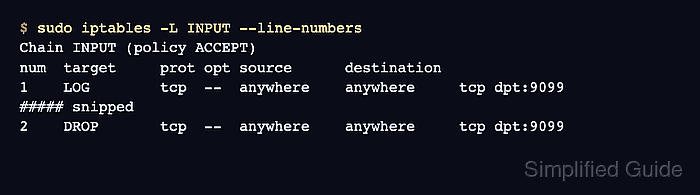
The LOG target writes matching packet details to the kernel log and then rule traversal continues. Place it immediately before the existing DROP or REJECT rule, or at the end of a built-in chain that already has a DROP policy, so the next rule or policy still blocks the packet.
The examples below log IPv4 TCP packets for port 9099 in the INPUT chain. Replace the port, protocol, interface, and source match with the traffic being investigated, keep the prefix short and recognizable, and add the equivalent ip6tables rule when the same service is reachable over IPv6.
Steps to log dropped packets with iptables:
- List the chain with line numbers and counters, then identify the rule or policy that drops the traffic.
$ sudo iptables -L INPUT -n -v --line-numbers
Chain INPUT (policy ACCEPT 0 packets, 0 bytes)
num   pkts bytes target     prot opt in     out     source               destination
1        0     0 DROP       tcp  --  *      *       0.0.0.0/0            0.0.0.0/0            tcp dpt:9099
If the chain policy is DROP and there is no explicit drop rule, append the LOG rule at the end of the chain instead of inserting it before a rule number. Related: How to set a default iptables chain policy
- Insert a rate-limited LOG rule immediately before the matching DROP or REJECT rule.
$ sudo iptables -I INPUT 1 -p tcp --dport 9099 -m limit --limit 3/min --limit-burst 2 -j LOG --log-prefix 'IPT_DROP ' --log-level 4
The limit match prevents repeated blocked packets from filling the kernel log. The LOG prefix can be up to 29 characters and should leave room for a trailing space.
- Confirm that the LOG rule appears before the final blocking rule.
$ sudo iptables -L INPUT --line-numbers
Chain INPUT (policy ACCEPT)
num  target     prot opt source      destination
1    LOG        tcp  --  anywhere    anywhere     tcp dpt:9099 limit: avg 3/min burst 2 LOG flags 0 level 4 prefix "IPT_DROP "
2    DROP       tcp  --  anywhere    anywhere     tcp dpt:9099
If the DROP or REJECT rule appears before the LOG rule, packets stop there and no log entry is created.
- Repeat one controlled connection attempt from the affected client path.
$ nc -vz -w 1 192.0.2.10 9099
nc: connect to 192.0.2.10 port 9099 (tcp) timed out: Operation now in progress
Use the same client, source network, and protocol that produced the original failure. A local test may not traverse the same interface or chain as remote traffic.
- Check the kernel log for the prefix.
$ sudo journalctl -k -g 'IPT_DROP '
Jun 06 21:18:44 server kernel: IPT_DROP IN=eth0 OUT= MAC=52:54:00:00:00:01 SRC=192.0.2.55 DST=192.0.2.10 LEN=60 TOS=0x00 PREC=0x00 TTL=64 PROTO=TCP SPT=42718 DPT=9099 SYN
On systems that write kernel messages to syslog files instead of the systemd journal, search the kernel log file used by the distribution, such as /var/log/kern.log or /var/log/messages.
- Confirm that both the LOG rule and the blocking rule counters increased.
$ sudo iptables -L INPUT -n -v --line-numbers
Chain INPUT (policy ACCEPT 0 packets, 0 bytes)
num   pkts bytes target     prot opt in     out     source               destination
1        1    60 LOG        tcp  --  *      *       0.0.0.0/0            0.0.0.0/0            tcp dpt:9099 limit: avg 3/min burst 2 LOG flags 0 level 4 prefix "IPT_DROP "
2        1    60 DROP       tcp  --  *      *       0.0.0.0/0            0.0.0.0/0            tcp dpt:9099
The LOG counter proves the packet reached the logging rule. The following DROP or REJECT counter proves the packet was still blocked after logging.
- Remove the temporary LOG rule when the evidence has been collected.
$ sudo iptables -D INPUT 1
List the chain again before deleting by number if other rules may have changed. Rule numbers shift after insertions and deletions.
- Save the rule only when ongoing logging is intentional.
Runtime iptables changes usually disappear after reboot or firewall reload. Keep rate limits in place and save persistent rules only after confirming the log volume is acceptable. Related: How to save iptables rules permanently

Mohd Shakir Zakaria is a cloud architect with deep roots in software development and open-source advocacy. Certified in AWS, Red Hat, VMware, ITIL, and Linux, he specializes in designing and managing robust cloud and on-premises infrastructures.


