Troubleshooting InfluxDB line protocol writes starts with the response from the write request. InfluxDB 3 Core rejects points when the request body cannot be parsed or when a point conflicts with the table schema that already exists in the database.
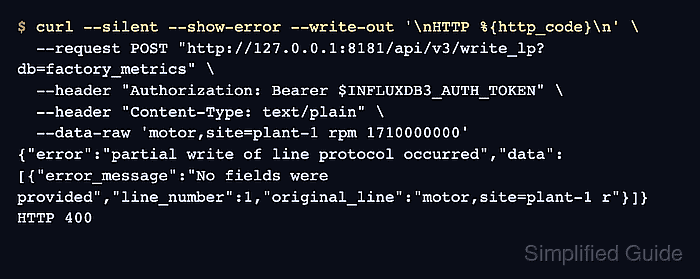
The native InfluxDB 3 write endpoint is /api/v3/write_lp. It returns HTTP 204 when all points are ingested, and it returns an error body when syntax, authorization, database, payload, or schema problems block a write.
A failed line protocol write should be debugged against the same database and endpoint used by the application or agent. Keep the original line intact until the error is identified, then change one layer at a time so syntax fixes do not hide field type or timestamp problems.
Steps to troubleshoot InfluxDB line protocol writes:
- Set the InfluxDB 3 Core token for the current terminal.
$ export INFLUXDB3_AUTH_TOKEN='AUTH_TOKEN'
Use a token that can write to the target database. Do not paste real tokens into shared transcripts, screenshots, issue comments, or committed scripts.
- Replay the rejected line through the native write endpoint.
$ curl --silent --show-error --write-out '\nHTTP %{http_code}\n' \
  --request POST "http://127.0.0.1:8181/api/v3/write_lp?db=factory_metrics" \
  --header "Authorization: Bearer $INFLUXDB3_AUTH_TOKEN" \
  --header "Content-Type: text/plain" \
  --data-raw 'motor,site=plant-1 rpm 1710000000'
{"error":"partial write of line protocol occurred","data":[{"error_message":"No fields were provided","line_number":1,"original_line":"motor,site=plant-1 r"}]}
HTTP 400
HTTP 400 with an error_message points to the rejected line. HTTP 401 points to the token or authorization header, and HTTP 404 points to the database or endpoint name.
- Fix the field set syntax reported by the response.
$ curl --silent --show-error --write-out '\nHTTP %{http_code}\n' \
  --request POST "http://127.0.0.1:8181/api/v3/write_lp?db=factory_metrics" \
  --header "Authorization: Bearer $INFLUXDB3_AUTH_TOKEN" \
  --header "Content-Type: text/plain" \
  --data-raw 'motor,site=plant-1 rpm=720i 1710000000'

HTTP 204
A point needs a table name, at least one field assignment, and optional tags and timestamp. Integer field values use a trailing i, string field values use double quotes, and tag values are never quoted.
- Query the table to confirm the corrected point was written.
$ influxdb3 query --database factory_metrics 'SELECT site, rpm FROM motor'
+---------+-----+
| site    | rpm |
+---------+-----+
| plant-1 | 720 |
+---------+-----+
- Replay the syntactically valid line when the response mentions a column type.
$ curl --silent --show-error --write-out '\nHTTP %{http_code}\n' \
  --request POST "http://127.0.0.1:8181/api/v3/write_lp?db=factory_metrics" \
  --header "Authorization: Bearer $INFLUXDB3_AUTH_TOKEN" \
  --header "Content-Type: text/plain" \
  --data-raw 'motor,site=plant-1 rpm="fast" 1710000001'
{"error":"partial write of line protocol occurred","data":[{"error_message":"invalid column type for column 'rpm', expected iox::column_type::field::integer, got iox::column_type::field::string","line_number":1,"original_line":"motor,site=plant-1 r"}]}
HTTP 400
The first accepted write sets the field type for a table column. A later point that writes the same field as another type is rejected instead of changing the existing column.
- List the stored column types for the target table.
$ influxdb3 query --database factory_metrics "SELECT column_name, data_type FROM information_schema.columns WHERE table_name = 'motor'"
+-------------+-------------------------+
| column_name | data_type               |
+-------------+-------------------------+
| rpm         | Int64                   |
| site        | Dictionary(Int32, Utf8) |
| time        | Timestamp(ns)           |
+-------------+-------------------------+
- Rewrite the rejected point with the stored field type.
$ curl --silent --show-error --write-out '\nHTTP %{http_code}\n' \
  --request POST "http://127.0.0.1:8181/api/v3/write_lp?db=factory_metrics" \
  --header "Authorization: Bearer $INFLUXDB3_AUTH_TOKEN" \
  --header "Content-Type: text/plain" \
  --data-raw 'motor,site=plant-1 rpm=730i 1710000001'

HTTP 204
If the failing line uses Unix timestamps in seconds, milliseconds, or microseconds, keep the timestamp precision aligned with the endpoint or client option. The native v3 endpoint can auto-detect common timestamp magnitudes, while v1 and v2 compatibility endpoints rely on their precision parameter.
- Query the table again to confirm both accepted points are present.
$ influxdb3 query --database factory_metrics 'SELECT site, rpm FROM motor ORDER BY time'
+---------+-----+
| site    | rpm |
+---------+-----+
| plant-1 | 720 |
| plant-1 | 730 |
+---------+-----+

Mohd Shakir Zakaria is a cloud architect with deep roots in software development and open-source advocacy. Certified in AWS, Red Hat, VMware, ITIL, and Linux, he specializes in designing and managing robust cloud and on-premises infrastructures.


