An InfluxDB 3 Core Last Value Cache keeps the newest field values for each selected key combination in memory. Create one when dashboards, status pages, or application checks need the latest sensor reading without repeatedly scanning recent rows.
The influxdb3 create last_cache command associates one cache with one table. Key columns identify the series inside the cache, while value columns are the fields or tags returned through the cache query.
A disposable database named factory_metrics keeps the cache data away from production tables. Values written after cache creation appear through the last_cache() SQL function immediately, and InfluxQL does not support that cache function.
Steps to create an InfluxDB 3 Core Last Value Cache:
- Set the admin token for the current terminal session.
$ export INFLUXDB3_AUTH_TOKEN='AUTH_TOKEN'
Use an InfluxDB 3 Core admin token. Do not paste a real token into shared transcripts, screenshots, or shell history.
- Create a disposable database for the cache example.
$ influxdb3 create database --token "$INFLUXDB3_AUTH_TOKEN" factory_metrics
Database "factory_metrics" created successfully
Use an existing database and table in production. The sample database keeps the cache example isolated.
Related: How to create an InfluxDB 3 Core database - Write a sample point to create the temperature table and columns.
$ influxdb3 write --token "$INFLUXDB3_AUTH_TOKEN" --database factory_metrics 'temperature,site=plant-1,sensor=line-a temperature=22.4,humidity=41.2'
648ms: 1 request (1.54 requests/sec), 1 lines (2 lines/s), 69B (106B/s)
site and sensor are tags because they appear before the first space in line protocol. temperature and humidity are fields that the LVC can return as value columns.
Related: How to write line protocol with the influxdb3 CLI - Create the Last Value Cache for the table.
$ influxdb3 create last_cache --token "$INFLUXDB3_AUTH_TOKEN" --database factory_metrics --table temperature --key-columns site,sensor --value-columns temperature,humidity --count 2 --ttl 1h temperature_last
new cache created: {
  "catalog_batch": {
    "Database": {
##### snipped #####
          "CreateLastCache": {
            "table": "temperature",
            "name": "temperature_last",
##### snipped #####
            "count": 2,
            "ttl": 3600
##### snipped #####
  "sequence_number": 7
}
The site,sensor key separates latest values by location and sensor. --count 2 keeps up to two recent rows per key combination, and --ttl 1h expires cached values after one hour.
- Show the cache definition from the system table.
$ influxdb3 show system --token "$INFLUXDB3_AUTH_TOKEN" --database factory_metrics table last_caches --select table,name,key_column_names,value_column_names,count,ttl
+-------------+------------------+------------------+-------------------------+-------+------+
| table       | name             | key_column_names | value_column_names      | count | ttl  |
+-------------+------------------+------------------+-------------------------+-------+------+
| temperature | temperature_last | [site, sensor]   | [temperature, humidity] | 2     | 3600 |
+-------------+------------------+------------------+-------------------------+-------+------+
- Write a new point after the cache exists.
$ influxdb3 write --token "$INFLUXDB3_AUTH_TOKEN" --database factory_metrics 'temperature,site=plant-1,sensor=line-a temperature=23.1,humidity=39.8'
431ms: 1 request (2.32 requests/sec), 1 lines (2 lines/s), 69B (159B/s)
A point written after cache creation gives the LVC a value it can return immediately. Existing table values can have a load window after cache creation or server restart.
- Write a point for another key combination.
$ influxdb3 write --token "$INFLUXDB3_AUTH_TOKEN" --database factory_metrics 'temperature,site=plant-2,sensor=line-d temperature=24.2,humidity=44.0'
848ms: 1 request (1.18 requests/sec), 1 lines (1 lines/s), 69B (81B/s)
- Query the Last Value Cache with SQL.
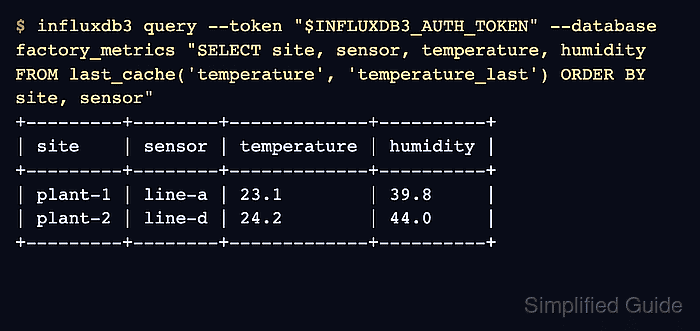
$ influxdb3 query --token "$INFLUXDB3_AUTH_TOKEN" --database factory_metrics "SELECT site, sensor, temperature, humidity FROM last_cache('temperature', 'temperature_last') ORDER BY site, sensor"
+---------+--------+-------------+----------+
| site    | sensor | temperature | humidity |
+---------+--------+-------------+----------+
| plant-1 | line-a | 23.1        | 39.8     |
| plant-2 | line-d | 24.2        | 44.0     |
+---------+--------+-------------+----------+
Use SQL for last_cache() queries. InfluxQL does not support the cache function.

Mohd Shakir Zakaria is a cloud architect with deep roots in software development and open-source advocacy. Certified in AWS, Red Hat, VMware, ITIL, and Linux, he specializes in designing and managing robust cloud and on-premises infrastructures.


