An InfluxDB 3 Core Distinct Value Cache keeps selected tag or string-field values in memory for fast filter lists and metadata lookups. Create one when dashboards, applications, or operators repeatedly need available values for columns such as site, line, room, or device.
A DVC belongs to one table and caches the column hierarchy in the order passed to --columns. Put broad grouping columns before narrow columns when the lookup path usually moves from site to line, room to sensor, or region to host.
InfluxDB stores DVC data in memory. Cache definitions persist, but cached values can have a refill window after cache creation or server restart, so a smoke test should query a value written after the cache is in place.
Steps to create an InfluxDB 3 Core Distinct Value Cache:
- Set the admin token for the current terminal session.
$ export INFLUXDB3_AUTH_TOKEN='AUTH_TOKEN'
Use an InfluxDB 3 Core admin token. Do not paste a real token into shared transcripts, screenshots, or shell history.
- Create a disposable database for the cache example.
$ influxdb3 create database --token "$INFLUXDB3_AUTH_TOKEN" factory_metrics
Database "factory_metrics" created successfully
Use an existing database and table in production. The sample database keeps the cache example isolated.
Related: How to create an InfluxDB 3 Core database - Write a sample point to create the temperature table and the tag columns.
$ influxdb3 write --token "$INFLUXDB3_AUTH_TOKEN" --database factory_metrics 'temperature,site=plant-1,line=line-a value=22.4'
140ms: 1 request (7.11 requests/sec), 1 lines (7 lines/s), 47B (334B/s)
site and line are tags because they appear before the first space in line protocol. The DVC caches those two columns.
- Create the Distinct Value Cache for the tag hierarchy.
$ influxdb3 create distinct_cache --token "$INFLUXDB3_AUTH_TOKEN" --database factory_metrics --table temperature --columns site,line --max-cardinality 1000 --max-age 24h temperature_site_line
new cache created: {
  "catalog_batch": {
    "Database": {
##### snipped #####
          "CreateDistinctCache": {
            "table_name": "temperature",
            "cache_name": "temperature_site_line",
            "column_ids": [
##### snipped #####
            "max_cardinality": 1000,
            "max_age_seconds": 86400,
##### snipped #####
  "sequence_number": 7
}
The site,line order creates a hierarchy from site to line. Keep --max-cardinality below the number of value combinations the node can hold in memory, and set --max-age to the longest age of values the lookup should return.
- Show the cache definition from the system table.
$ influxdb3 show system --token "$INFLUXDB3_AUTH_TOKEN" --database factory_metrics table distinct_caches --select table,name,column_names,max_cardinality,max_age_seconds
+-------------+-----------------------+--------------+-----------------+-----------------+
| table       | name                  | column_names | max_cardinality | max_age_seconds |
+-------------+-----------------------+--------------+-----------------+-----------------+
| temperature | temperature_site_line | [site, line] | 1000            | 86400           |
+-------------+-----------------------+--------------+-----------------+-----------------+
- Write a new point after the cache exists.
$ influxdb3 write --token "$INFLUXDB3_AUTH_TOKEN" --database factory_metrics 'temperature,site=plant-2,line=line-d value=24.2'
579ms: 1 request (1.73 requests/sec), 1 lines (2 lines/s), 47B (81B/s)
A value written after cache creation gives the DVC a value it can return immediately. Existing table values can have a load window after cache creation or restart.
Related: How to write line protocol with the influxdb3 CLI - Query the Distinct Value Cache with SQL.
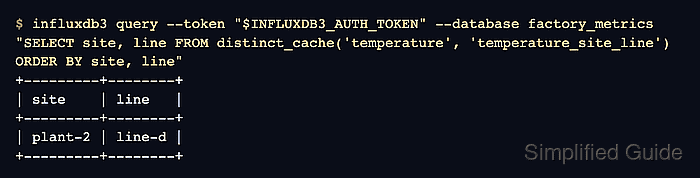
$ influxdb3 query --token "$INFLUXDB3_AUTH_TOKEN" --database factory_metrics "SELECT site, line FROM distinct_cache('temperature', 'temperature_site_line') ORDER BY site, line"
+---------+--------+
| site    | line   |
+---------+--------+
| plant-2 | line-d |
+---------+--------+
Use SQL for distinct_cache() queries. InfluxQL does not support the cache function.

Mohd Shakir Zakaria is a cloud architect with deep roots in software development and open-source advocacy. Certified in AWS, Red Hat, VMware, ITIL, and Linux, he specializes in designing and managing robust cloud and on-premises infrastructures.


