Adding an orderer to a Hyperledger Fabric channel expands the ordering set that can receive transactions and replicate channel blocks. The change is useful when an ordering service needs another node for capacity, location, or fault tolerance without recreating the channel.
A new ordering service node joins the channel through the channel participation API with an up-to-date config block. At that point it can track the channel as a follower, but it does not become a voting consenter until the channel configuration includes its endpoint and consensus identity.
Use a channel admin identity that can satisfy the channel modification policy, plus the new orderer's admin TLS client certificate. BFT channels need endpoint, consenter mapping, and BlockValidation policy changes; a Raft channel uses the Raft consenter TLS certificate list instead, and either consensus type should add or remove one orderer at a time so the existing cluster keeps quorum.
Steps to add a Hyperledger Fabric orderer to a channel:
- Set the channel, orderer, and certificate values in the admin shell.
$ export CHANNEL_ID=mychannel
$ export EXISTING_ORDERER=orderer.example.com:7050
$ export EXISTING_ORDERER_HOST=orderer.example.com
$ export NEW_ORDERER=orderer5.example.com:7060
$ export NEW_ORDERER_HOST=orderer5.example.com
$ export NEW_ORDERER_ADMIN=orderer5.example.com:7061
$ export ORDERER_CA=/etc/hyperledger/fabric/tls/orderer-ca.crt
$ export OSN_TLS_CA_ROOT_CERT=/etc/hyperledger/fabric/tls/admin-ca.crt
$ export ADMIN_TLS_SIGN_CERT=/etc/hyperledger/fabric/admin/client.crt
$ export ADMIN_TLS_PRIVATE_KEY=/etc/hyperledger/fabric/admin/client.key
The new orderer must already be running with its own MSP, TLS key pair, cluster listener, admin TLS listener, and channel participation enabled. Do not reuse another orderer's MSP or TLS private key.
- Fetch the current config block from an existing consenter.
$ peer channel fetch config config_block.pb \
  -o "$EXISTING_ORDERER" \
  --ordererTLSHostnameOverride "$EXISTING_ORDERER_HOST" \
  -c "$CHANNEL_ID" \
  --tls --cafile "$ORDERER_CA"
INFO [channelCmd] readBlock -> Received block: 3
- Join the new orderer to the channel as a follower.
$ osnadmin channel join \
  -o "$NEW_ORDERER_ADMIN" \
  --ca-file "$OSN_TLS_CA_ROOT_CERT" \
  --client-cert "$ADMIN_TLS_SIGN_CERT" \
  --client-key "$ADMIN_TLS_PRIVATE_KEY" \
  --channelID "$CHANNEL_ID" \
  --config-block config_block.pb
Status: 201
{
  "name": "mychannel",
  "url": "/participation/v1/channels/mychannel",
  "consensusRelation": "follower",
  "status": "onboarding",
  "height": 0
}
A follower orderer can receive channel blocks before it is added to the consenter set. If the output already shows consenter, the channel config block already includes this orderer.
- Decode the config block to JSON.
$ configtxlator proto_decode \
  --input config_block.pb \
  --type common.Block \
  --output config_block.json
- Extract the channel config object.
$ jq '.data.data[0].payload.data.config' \
  config_block.json > original_config.json
The JSON edit uses jq only to extract and wrap Fabric config JSON. Install it on the admin workstation before building the update envelope.
- Copy the original config before editing it.
$ cp original_config.json modified_config.json
- Add the new orderer's BFT fields to modified_config.json.
BFT channel config item Value to add for the new orderer Orderer organization Endpoints orderer5.example.com:7060 Orderer Orderers.value.consenter_mapping New id, host, port, msp_id, enrollment identity PEM, client TLS cert PEM, and server TLS cert PEM. Orderer BlockValidation policy The new orderer identity and the updated threshold rule required by the channel policy. Channel config JSON stores certificate bytes, not local filesystem paths. Add the PEM content that belongs to the new orderer, and keep the BFT id unique inside the channel.
- Encode the original channel config.
$ configtxlator proto_encode \
  --input original_config.json \
  --type common.Config \
  --output original_config.pb
- Encode the modified channel config.
$ configtxlator proto_encode \
  --input modified_config.json \
  --type common.Config \
  --output modified_config.pb
- Compute the channel config update.
$ configtxlator compute_update \
  --channel_id "$CHANNEL_ID" \
  --original original_config.pb \
  --updated modified_config.pb \
  --output config_update.pb
- Decode the config update to JSON.
$ configtxlator proto_decode \
  --input config_update.pb \
  --type common.ConfigUpdate \
  --output config_update.json
- Wrap the config update in an envelope JSON document.
$ jq -n \ --arg channel "$CHANNEL_ID" \ --slurpfile update config_update.json \ '{"payload":{"header":{"channel_header":{"channel_id":$channel,"type":2}},"data":{"config_update":$update[0]}}}' \ > config_update_in_envelope.json - Encode the envelope as the channel update transaction.
$ configtxlator proto_encode \
  --input config_update_in_envelope.json \
  --type common.Envelope \
  --output envelope.pb
- Sign the channel update with each required admin identity.
$ peer channel signconfigtx -f envelope.pb
Run the signing command after loading every peer or orderer admin MSP required by the channel modification policy. The final submitter signs automatically when it sends the update.
- Submit the channel update through an existing orderer.
$ peer channel update \
  -o "$EXISTING_ORDERER" \
  --ordererTLSHostnameOverride "$EXISTING_ORDERER_HOST" \
  -c "$CHANNEL_ID" \
  -f envelope.pb \
  --tls --cafile "$ORDERER_CA"
INFO [channelCmd] InitCmdFactory -> Endorser and orderer connections initialized
INFO [channelCmd] update -> Successfully submitted channel update
- Check the channel state on the new orderer.
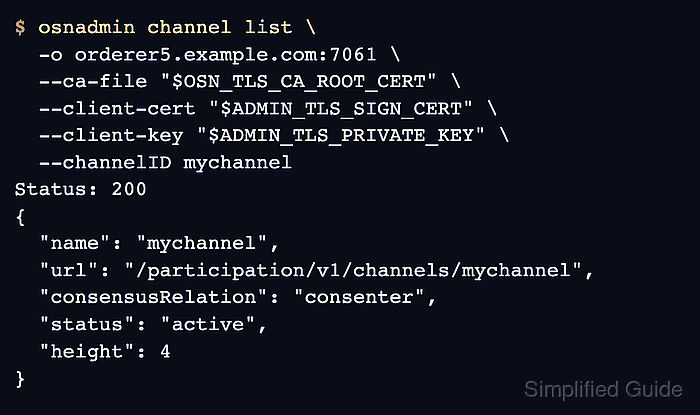
$ osnadmin channel list \
  -o "$NEW_ORDERER_ADMIN" \
  --ca-file "$OSN_TLS_CA_ROOT_CERT" \
  --client-cert "$ADMIN_TLS_SIGN_CERT" \
  --client-key "$ADMIN_TLS_PRIVATE_KEY" \
  --channelID "$CHANNEL_ID"
Status: 200
{
  "name": "mychannel",
  "url": "/participation/v1/channels/mychannel",
  "consensusRelation": "consenter",
  "status": "active",
  "height": 4
}
consenter and active show that the channel config update promoted the new orderer from follower tracking to active ordering membership.
- Fetch the newest channel block through the new orderer's client endpoint.
$ peer channel fetch newest newest_block.pb \
  -o "$NEW_ORDERER" \
  --ordererTLSHostnameOverride "$NEW_ORDERER_HOST" \
  -c "$CHANNEL_ID" \
  --tls --cafile "$ORDERER_CA"
INFO [channelCmd] readBlock -> Received block: 4
A successful block fetch from orderer5.example.com:7060 proves the new orderer is serving the channel from its client-facing endpoint.
- Remove the temporary update files after the channel change is verified.
$ rm -f config_block.pb config_block.json original_config.json modified_config.json \
  original_config.pb modified_config.pb config_update.pb config_update.json \
  config_update_in_envelope.json envelope.pb newest_block.pb

Mohd Shakir Zakaria is a cloud architect with deep roots in software development and open-source advocacy. Certified in AWS, Red Hat, VMware, ITIL, and Linux, he specializes in designing and managing robust cloud and on-premises infrastructures.


