A Hyperledger Fabric application channel defines the ledger, policies, and ordering service used by selected network organizations. Creating one with the channel participation API is the supported path for Fabric v3 networks and for v2.5 networks that have moved away from the legacy system channel.
configtxgen reads a channel profile from configtx.yaml and writes a channel genesis block. The osnadmin channel join command submits that block to each orderer's admin endpoint through mutual TLS, which creates the channel on the ordering nodes named in the profile.
Start with the ordering service running, ChannelParticipation enabled in each orderer, admin TLS client certificates available, and peer admin MSPs ready. A complete handoff leaves the orderers showing the channel as active and at least one peer able to join the genesis block and report channel ledger information.
Steps to create a Hyperledger Fabric channel:
- Set the channel name.
$ export CHANNEL_NAME=opschannel
Fabric channel names must be lowercase, fewer than 250 characters, and match the pattern [a-z][a-z0-9.-]*.
- Create the channel artifact directory.
$ mkdir -p channel-artifacts
- Point the Fabric tools at the directory that contains configtx.yaml.
$ export FABRIC_CFG_PATH="$PWD/configtx"
Use the directory that contains the channel profile for this network. In the Fabric samples, that directory is usually fabric-samples/test-network/configtx.
- Generate the channel genesis block from the selected profile.
$ configtxgen -profile ChannelUsingRaft \
  -outputBlock "./channel-artifacts/${CHANNEL_NAME}.block" \
  -channelID "$CHANNEL_NAME"
INFO [common.tools.configtxgen.localconfig] completeInitialization -> orderer type: etcdraft
INFO [common.tools.configtxgen] doOutputBlock -> Generating genesis block
INFO [common.tools.configtxgen] doOutputBlock -> Creating application channel genesis block
INFO [common.tools.configtxgen] doOutputBlock -> Writing genesis block
ChannelUsingRaft must exist in configtx.yaml and must include the peer organizations, ordering organization, orderer endpoints, consenters, policies, and capabilities for the new channel.
Do not use peer channel create for a new Fabric v3 channel. Current Fabric command help marks that path deprecated in favor of the orderer channel participation API.
- Inspect the generated block before sending it to an orderer.
$ configtxgen -inspectBlock "./channel-artifacts/${CHANNEL_NAME}.block"
{
  "data": {
    "data": [
      {
        "payload": {
          "data": {
            "config": {
              "channel_group": {
                "groups": {
                  "Application": {
                    "groups": {
                      "Org1MSP": {},
                      "Org2MSP": {}
                    }
                  },
                  "Orderer": {
                    "values": {
                      "ConsensusType": {
                        "value": {
                          "type": "etcdraft"
                        }
                      }
                    }
                  }
                }
              }
            }
          }
        }
      }
    ]
  }
}
##### snipped #####
The full inspection output includes MSP definitions and certificate material. Check the profile structure and membership, not the generated certificate payloads.
- Set the orderer admin TLS paths for the first ordering node.
$ export ORDERER_ADMIN_CA="$PWD/organizations/ordererOrganizations/example.com/orderers/orderer.example.com/tls/ca.crt"
$ export ORDERER_ADMIN_CLIENT_CERT="$PWD/organizations/ordererOrganizations/example.com/orderers/orderer.example.com/tls/server.crt"
$ export ORDERER_ADMIN_CLIENT_KEY="$PWD/organizations/ordererOrganizations/example.com/orderers/orderer.example.com/tls/server.key"
The osnadmin channel commands use the orderer admin endpoint, not the normal broadcast endpoint. The admin listener must require mutual TLS and trust the supplied client certificate.
- Join the first orderer to the channel.
$ osnadmin channel join \
  -o orderer.example.com:7053 \
  --ca-file "$ORDERER_ADMIN_CA" \
  --client-cert "$ORDERER_ADMIN_CLIENT_CERT" \
  --client-key "$ORDERER_ADMIN_CLIENT_KEY" \
  --channelID "$CHANNEL_NAME" \
  --config-block "./channel-artifacts/${CHANNEL_NAME}.block"
Status: 201
{
  "name": "opschannel",
  "url": "/participation/v1/channels/opschannel",
  "consensusRelation": "consenter",
  "status": "active",
  "height": 1
}
The first orderer that accepts the channel genesis block creates the channel on that node. A multi-orderer Raft channel still needs enough consenters joined for the ordering service to reach quorum.
- Join each remaining consenter orderer to the same channel.
$ osnadmin channel join \
  -o orderer2.example.com:8053 \
  --ca-file "$ORDERER_ADMIN_CA" \
  --client-cert "$ORDERER_ADMIN_CLIENT_CERT" \
  --client-key "$ORDERER_ADMIN_CLIENT_KEY" \
  --channelID "$CHANNEL_NAME" \
  --config-block "./channel-artifacts/${CHANNEL_NAME}.block"
Status: 201
{
  "name": "opschannel",
  "url": "/participation/v1/channels/opschannel",
  "consensusRelation": "consenter",
  "status": "active",
  "height": 1
}
Run the join command against every orderer admin endpoint that belongs to the channel consenter set. Change the TLS file paths when a different orderer uses a different admin CA or client certificate. An orderer that is not in the consenter set joins as a follower until a channel update adds it as a consenter.
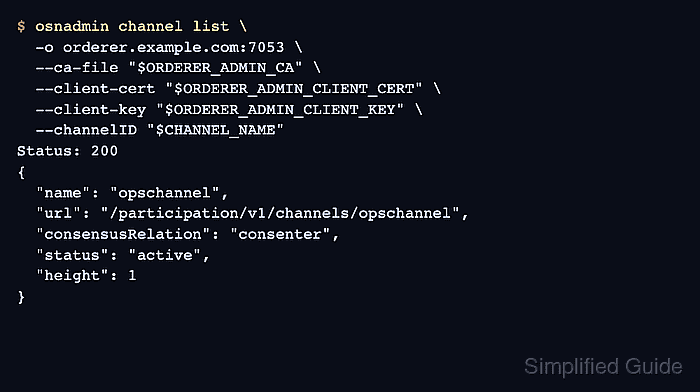
- Check the channel state on an orderer.
$ osnadmin channel list \
  -o orderer.example.com:7053 \
  --ca-file "$ORDERER_ADMIN_CA" \
  --client-cert "$ORDERER_ADMIN_CLIENT_CERT" \
  --client-key "$ORDERER_ADMIN_CLIENT_KEY" \
  --channelID "$CHANNEL_NAME"
Status: 200
{
  "name": "opschannel",
  "url": "/participation/v1/channels/opschannel",
  "consensusRelation": "consenter",
  "status": "active",
  "height": 1
}
consenter and active confirm that the orderer is a voting member of the channel and has opened the channel ledger.
- Set the Org1 peer admin environment.
$ export CORE_PEER_TLS_ENABLED=true
$ export CORE_PEER_LOCALMSPID=Org1MSP
$ export CORE_PEER_MSPCONFIGPATH="$PWD/organizations/peerOrganizations/org1.example.com/users/Admin@org1.example.com/msp"
$ export CORE_PEER_TLS_ROOTCERT_FILE="$PWD/organizations/peerOrganizations/org1.example.com/peers/peer0.org1.example.com/tls/ca.crt"
$ export CORE_PEER_ADDRESS=localhost:7051
Use an admin MSP for the organization that owns the peer being joined. Change CORE_PEER_ADDRESS and the certificate paths for each additional peer organization.
- Join the peer to the channel from the genesis block.
$ peer channel join -b "./channel-artifacts/${CHANNEL_NAME}.block"
INFO [channelCmd] InitCmdFactory -> Endorser and orderer connections initialized
INFO [channelCmd] executeJoin -> Successfully submitted proposal to join channel
INFO [main] main -> Exiting.....
- List the channels joined by the peer.
$ peer channel list
INFO [channelCmd] InitCmdFactory -> Endorser and orderer connections initialized
Channels peers has joined:
opschannel
INFO [main] main -> Exiting.....
- Check the peer ledger information for the new channel.
$ peer channel getinfo -c "$CHANNEL_NAME"
Blockchain info: {"height":1,"currentBlockHash":"B2Bj9x8sD4nM4s0xZy6F2mKXzS1uD0yM1gA5vQeLx8c=","previousBlockHash":""}
A height of at least 1 confirms that the peer opened the channel ledger from the genesis block. Set anchor peers next when service discovery or private data needs cross-organization gossip.
Related: How to update anchor peers in a Hyperledger Fabric channel
Related: How to deploy Hyperledger Fabric chaincode

Mohd Shakir Zakaria is a cloud architect with deep roots in software development and open-source advocacy. Certified in AWS, Red Hat, VMware, ITIL, and Linux, he specializes in designing and managing robust cloud and on-premises infrastructures.


