A Haystack pipeline is a directed graph, and a wiring mistake is easier to spot in a picture than across a long run of connect() calls. Pipeline.draw() saves that graph as a diagram, so a reviewer can check every component name and connection in a PNG before the pipeline ever runs.
Drawing reads the assembled Pipeline object without running it, so no model is called and no stored document is read. Each box shows a component's name and class, and each arrow between components shows the sender and receiver sockets with their data type. Two diamonds mark the values supplied at run time and the outputs the pipeline returns.
Haystack does not render the image itself. It sends the graph to a Mermaid server, by default the public mermaid.ink service, which Haystack's own documentation says has no clear data-retention or privacy terms. The request carries component names, class names, socket names and socket types, but not prompt templates, document content or component settings. A local Mermaid container keeps that request on the same machine when those names are sensitive or mermaid.ink is out of reach.
Steps to visualize a pipeline in Haystack:
- Create support_pipeline.py in the project directory with the components the diagram must show.
- support_pipeline.py
from haystack import Pipeline
from haystack.components.builders import PromptBuilder
from haystack.components.joiners import DocumentJoiner
from haystack.components.retrievers.in_memory import (
    InMemoryBM25Retriever,
)
from haystack.document_stores.in_memory import (
    InMemoryDocumentStore,
)


def build_pipeline() -> Pipeline:
    pipeline = Pipeline()
    pipeline.add_component(
        "faq_retriever",
        InMemoryBM25Retriever(
            document_store=InMemoryDocumentStore()
        ),
    )
    pipeline.add_component(
        "manual_retriever",
        InMemoryBM25Retriever(
            document_store=InMemoryDocumentStore()
        ),
    )
    pipeline.add_component("joiner", DocumentJoiner())
    pipeline.add_component(
        "prompt_builder",
        PromptBuilder(
            template=(
                "Answer {{ query }} from: "
                "{% for doc in documents %}"
                "{{ doc.content }} {% endfor %}"
            ),
            required_variables=["query", "documents"],
        ),
    )
The active Python environment needs haystack-ai, tested here on version 3.4.1 with Python 3.12. A pipeline already defined in the project can stand in for build_pipeline(), since draw() only needs an assembled Pipeline object.
Related: How to install Haystack with pip - Add the connections to the end of build_pipeline().
    pipeline.connect(
        "faq_retriever.documents", "joiner.documents"
    )
    pipeline.connect(
        "manual_retriever.documents", "joiner.documents"
    )
    pipeline.connect(
        "joiner.documents", "prompt_builder.documents"
    )
    return pipeline
Both retrievers feed the same joiner.documents socket, so the diagram has to show two separate arrows entering joiner.
- Save support_pipeline.py.
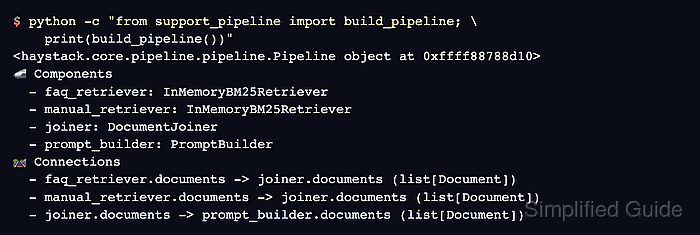
- Print the pipeline from the project directory to list its components and connections.
$ python -c "from support_pipeline import build_pipeline; \
    print(build_pipeline())"
<haystack.core.pipeline.pipeline.Pipeline object at 0xffff88788d10>
🚅 Components
  - faq_retriever: InMemoryBM25Retriever
  - manual_retriever: InMemoryBM25Retriever
  - joiner: DocumentJoiner
  - prompt_builder: PromptBuilder
🛤️ Connections
  - faq_retriever.documents -> joiner.documents (list[Document])
  - manual_retriever.documents -> joiner.documents (list[Document])
  - joiner.documents -> prompt_builder.documents (list[Document])
This text comes from the same graph that draw() renders, so a wiring mistake in the code appears here too.
- Start a local Mermaid server in Docker when component names must stay on this machine or mermaid.ink cannot be reached.
CI=true makes this image start Chromium with --no-sandbox, so only the container stands between a Chromium flaw and the machine. Do not send this server graphs from sources you do not trust.
$ docker run --detach --rm --name mermaid-server \
    --platform linux/amd64 \
    --publish 127.0.0.1:3000:3000 \
    --env CI=true \
    --env QUEUE_ADD_TIMEOUT=60000 \
    ghcr.io/jihchi/mermaid.ink
On an ARM Mac with Docker Desktop 4.94 (Docker Engine 29.8), Chromium did not start without CI. The image is published only for linux/amd64, so it runs under emulation there and can take several seconds to start answering. QUEUE_ADD_TIMEOUT raises the renderer's 3-second job limit, which emulated Chromium exceeded with an HTTP 503 response.
- Create draw_support_pipeline.py in the project directory with the output path and the Mermaid server to use.
- draw_support_pipeline.py
from pathlib import Path

from support_pipeline import build_pipeline

pipeline = build_pipeline()
pipeline.draw(
    path=Path("support_pipeline.png"),
    server_url="https://mermaid.ink",
)
With this server_url, the next run sends the component names, class names, socket names and socket types to a public service. Use http://localhost:3000 as the value instead when the local server from the previous step is running.
For a vector or printable file, pass params={"format": "svg"} or the pdf format with a matching file name. draw() in haystack-ai 3.4.1 rejects the mermaid-text format that Haystack's visualization page lists. In a Jupyter notebook, pipeline.show() takes the same server_url and displays the diagram in the cell output.
- Save draw_support_pipeline.py.
- Run draw_support_pipeline.py from the project directory to render the diagram.
$ python draw_support_pipeline.py
A successful run prints nothing. PipelineDrawingError means the Mermaid server could not be reached or refused the request, and no file is written.
- Open support_pipeline.png in an image viewer.
- Confirm the diagram shows the components and connections the pipeline was designed to have.
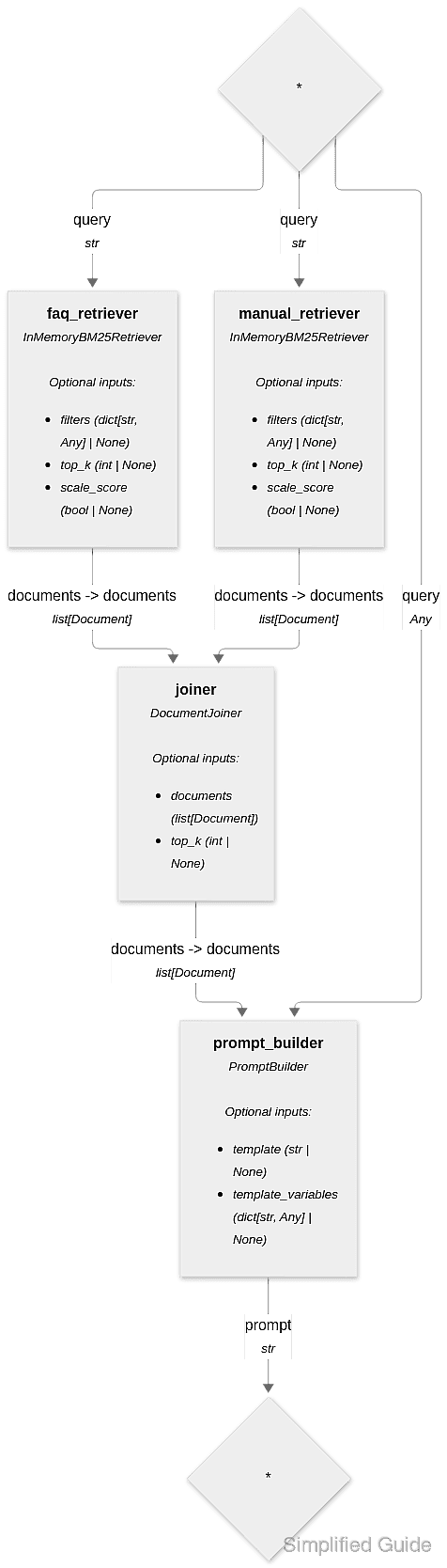
The example was designed with four named boxes, an arrow into joiner from each retriever, and one arrow from joiner to prompt_builder. The query arrows from the top diamond are values supplied at run time, and the arrow into the bottom diamond is the pipeline's output, so neither diamond is a component. A missing or extra arrow means a connect() call differs from the design.
- Stop the local Mermaid server if it was started earlier.
$ docker stop mermaid-server
mermaid-server
--rm removes the stopped container.