Markdown files are common source material for developer documentation, support notes, and runbooks that need to be searchable in a Haystack indexing pipeline. MarkdownToDocument converts those files into Document objects, so the same pipeline can pass extracted text and metadata to cleaners, splitters, embedders, or writers.
The converter accepts Markdown file paths or ByteStream sources and returns a documents list. Each document contains the converted text plus source metadata, and any metadata passed to run() is attached to the produced document.
The Python environment must include haystack-ai plus the Markdown parser packages markdown-it-py and mdit_plain. A small fixture should be checked before indexing a larger documentation set, especially when headings, lists, tables, or source labels matter to downstream filtering.
Steps to convert Markdown files to Haystack documents:
- Install the Markdown converter dependencies in the active Haystack Python environment.
$ python -m pip install markdown-it-py mdit_plain
Collecting markdown-it-py
##### snipped #####
Successfully installed markdown-it-py-4.2.0 mdit_plain-1.0.1 mdurl-0.1.2
MarkdownToDocument imports these packages when it converts Markdown. Install them in the same virtual environment that imports haystack.
- Save a representative Markdown file in the project directory.
- support-runbook.md
# Support runbook

## Login recovery

Use the identity portal reset link when SSO sessions expire.

## Search notes

Index Markdown runbooks with the support collection tag.

- Login help belongs to the IAM team.
- Search FAQ belongs to the docs team.
Use a fixture that includes the Markdown structures being indexed. Headings and lists expose whether the converted text still carries the terms a retriever should match.
- Create the converter script.
- markdown_to_documents.py
from pathlib import Path

from haystack.components.converters import MarkdownToDocument


source = Path("support-runbook.md")
converter = MarkdownToDocument(
    progress_bar=False,
    store_full_path=False,
)
result = converter.run(
    sources=[source],
    meta={
        "collection": "support-docs",
        "source_format": "markdown",
    },
)

documents = result["documents"]
document = documents[0]

print(f"documents: {len(documents)}")
print("content:")
print(document.content.strip())
print("source:", document.meta["file_path"])
print("collection:", document.meta["collection"])
print("format:", document.meta["source_format"])
Leave store_full_path disabled when the document store only needs the filename. Set table_to_single_line only after testing table-heavy Markdown, because table flattening changes the text that retrievers receive.
- Run the converter script.
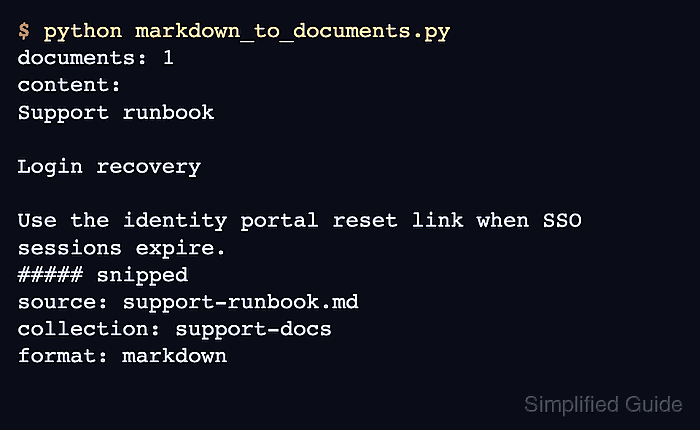
$ python markdown_to_documents.py
documents: 1
content:
Support runbook

Login recovery

Use the identity portal reset link when SSO sessions expire.

Search notes

Index Markdown runbooks with the support collection tag.

Login help belongs to the IAM team.
Search FAQ belongs to the docs team.
source: support-runbook.md
collection: support-docs
format: markdown
- Check that the converted document matches the source and metadata.
The documents: 1 line confirms one Document was produced. The content lines come from the Markdown headings, paragraphs, and list items, while collection and source_format confirm the metadata passed to run().
- Remove the sample fixture and script after copying the pattern into the indexing pipeline.
$ rm support-runbook.md markdown_to_documents.py

Mohd Shakir Zakaria is a cloud architect with deep roots in software development and open-source advocacy. Certified in AWS, Red Hat, VMware, ITIL, and Linux, he specializes in designing and managing robust cloud and on-premises infrastructures.


