Document collections often mix plain text, Markdown, JSON exports, office files, and PDFs before they reach an indexing pipeline. Haystack's MultiFileConverter routes each supported source to the matching converter and returns one document list for downstream preprocessing.
The component supports CSV, DOCX, HTML, JSON, Markdown, PDF, PPTX, TXT, and XLSX inputs. Its encoding value applies to text-oriented formats, while json_content_key identifies the JSON field that should become document content.
Conversion success requires more than a non-empty document list. The unclassified and failed routes expose files that were not converted, while source-path metadata can prove that every expected input contributed content to the batch.
Steps to convert multiple file types with Haystack MultiFileConverter:
- Install the optional dependencies for every MultiFileConverter file type.
$ python -m pip install pypdf markdown-it-py mdit_plain trafilatura python-pptx python-docx jq openpyxl tabulate pandas
A narrower production source set needs only the dependencies used by its converters.
- Create the incoming directory for the mixed source batch.
$ mkdir incoming
- Create incoming/refund-policy.txt as the plain-text source.
- incoming/refund-policy.txt
Refund requests are reviewed within 14 days.
- Create incoming/support-runbook.md as the Markdown source.
- incoming/support-runbook.md
# Login recovery

Use SSO reset when sessions expire.
- Create incoming/faq-entry.json with searchable text under the content key.
- incoming/faq-entry.json
{"content": "Password reset articles belong to the identity queue."}
The json_content_key setting must match the field that holds searchable text in each JSON export.
- Start convert_files.py with deterministic source discovery.
- convert_files.py
from pathlib import Path

from haystack.components.converters import MultiFileConverter


source_dir = Path("incoming")
sources = sorted(path for path in source_dir.iterdir() if path.is_file())

if not sources:
    raise SystemExit("No files found in incoming/")
- Append the MultiFileConverter execution block.
- convert_files.py
converter = MultiFileConverter(
    encoding="utf-8",
    json_content_key="content",
)
result = converter.run(
    sources=sources,
    meta={"collection": "support-knowledge-base"},
)

documents = result["documents"]
unclassified = result.get("unclassified", [])
failed = result.get("failed", [])
The shared collection value is merged into every converted document's metadata.
- Append fail-capable checks for the completed conversion.
- convert_files.py
converted_sources = sorted(
    {Path(document.meta["file_path"]).name for document in documents}
)
expected_sources = [path.name for path in sources]

assert not unclassified
assert not failed
assert converted_sources == expected_sources
assert all(document.content and document.content.strip() for document in documents)
assert all(
    document.meta.get("collection") == "support-knowledge-base"
    for document in documents
)

print(f"converted source files: {len(converted_sources)}/{len(expected_sources)}")
print(f"documents created: {len(documents)}")
print(f"unclassified files: {len(unclassified)}")
print(f"failed files: {len(failed)}")
print("collection metadata: support-knowledge-base")
for name in converted_sources:
    print(f"- {name}")
The assertions stop execution when routing, extracted content, source coverage, or shared metadata differs from the expected batch.
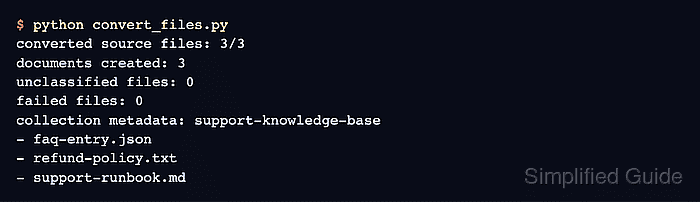
- Run the completed converter program to verify the mixed source batch.
$ python convert_files.py
converted source files: 3/3
documents created: 3
unclassified files: 0
failed files: 0
collection metadata: support-knowledge-base
- faq-entry.json
- refund-policy.txt
- support-runbook.md

Mohd Shakir Zakaria is a cloud architect with deep roots in software development and open-source advocacy. Certified in AWS, Red Hat, VMware, ITIL, and Linux, he specializes in designing and managing robust cloud and on-premises infrastructures.


