TLS termination belongs at the HAProxy edge when clients need HTTPS but the application servers should continue receiving plain HTTP on an internal network. A wrong certificate bundle, missing ssl bind option, or skipped reload can make the public listener serve the wrong identity or return backend errors even though the application itself is running.
HAProxy enables client-side TLS on a frontend listener with the ssl and crt arguments on the bind line. The crt file is a PEM bundle that HAProxy can read at startup, and the bundle normally contains the server certificate chain plus the matching private key.
This path assumes HAProxy is already installed on a Linux host and that the backend service is reachable over HTTP from the HAProxy server. Use a certificate issued for the public hostname, protect the private key, validate the configuration before reloading, and verify the listener with SNI so HAProxy presents the certificate for the hostname clients actually request.
Steps to configure HAProxy TLS termination:
- Create the HAProxy certificate directory.
$ sudo install -d -m 0755 /etc/haproxy/certs
- Build a PEM bundle from the certificate chain and private key.
$ sudo sh -c 'cat /etc/ssl/certs/www.example.net.fullchain.crt /etc/ssl/private/www.example.net.key > /etc/haproxy/certs/www.example.net.pem'
Keep the leaf certificate first, any intermediate certificates next, and the private key in the same PEM file. Replace the paths with the certificate and key locations used by the certificate issuer or renewal tool.
- Restrict the PEM bundle permissions.
$ sudo chmod 0600 /etc/haproxy/certs/www.example.net.pem
The private key in this file can impersonate the HTTPS service. Do not make it world-readable or copy it into a web-accessible directory.
- Edit the HAProxy configuration file.
$ sudo vi /etc/haproxy/haproxy.cfg
- Add a TLS-enabled frontend that forwards decrypted HTTP traffic to the backend.
- /etc/haproxy/haproxy.cfg
global
    log /dev/log local0
    maxconn 2000
    ssl-default-bind-options ssl-min-ver TLSv1.2

defaults
    mode http
    log global
    option httplog
    option forwardfor
    timeout connect 5s
    timeout client 30s
    timeout server 30s

frontend https_frontend
    bind :443 ssl crt /etc/haproxy/certs/www.example.net.pem alpn h2,http/1.1
    http-request set-header X-Forwarded-Proto https
    default_backend app_servers

backend app_servers
    server app1 10.0.0.21:80 check
ssl-default-bind-options ssl-min-ver TLSv1.2 keeps older TLS protocol versions off new frontend bind lines. Tune cipher and protocol policy to match the clients the service must support.
- Validate the HAProxy configuration.
$ sudo haproxy -c -V -f /etc/haproxy/haproxy.cfg
Configuration file is valid
- Reload the HAProxy service.
$ sudo systemctl reload haproxy
The Ubuntu package reloads by testing the configured file and then signaling the running HAProxy process, so a syntax failure should block the reload before the old process is replaced.
Related: How to reload HAProxy gracefully
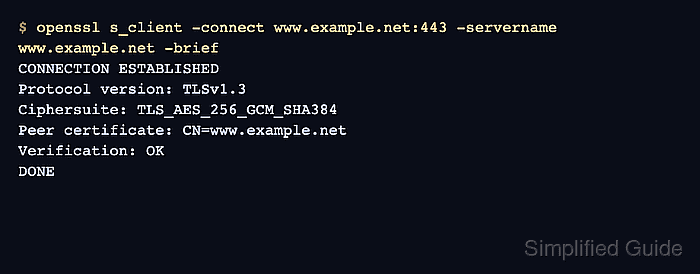
- Check the certificate served by the HTTPS listener.
$ openssl s_client -connect www.example.net:443 -servername www.example.net -brief
CONNECTION ESTABLISHED
Protocol version: TLSv1.3
Ciphersuite: TLS_AES_256_GCM_SHA384
Peer certificate: CN=www.example.net
Verification: OK
DONE
Use the public hostname with -servername so SNI reaches HAProxy. A public CA certificate should verify as OK from a client with a current trust store.
Tool: TLS Handshake Trace
- Request the application through HTTPS.
$ curl --silent --show-error https://www.example.net/
HAProxy TLS termination reached the HTTP backend
If the handshake succeeds but the request returns 503 Service Unavailable, check the backend address, port, and health-check state before changing the TLS certificate.

Mohd Shakir Zakaria is a cloud architect with deep roots in software development and open-source advocacy. Certified in AWS, Red Hat, VMware, ITIL, and Linux, he specializes in designing and managing robust cloud and on-premises infrastructures.


