Rebuilding a Gentoo system forces Portage to compile the selected system again instead of only upgrading packages with newer versions. Use it after changes that affect already installed packages, such as a profile switch, broad USE flag cleanup, compiler or libc changes, or recovery from a package state that should be rebuilt from source.
The rebuild command is emerge –emptytree @world. The @world set includes selected packages plus the system and profile sets, and –emptytree tells Portage to reinstall the target set and its deep dependency tree as if those packages were not already installed.
A full rebuild can run for hours and can expose blockers, unread Gentoo news, protected configuration files, preserved libraries, and packages that fail to compile under the current profile. Start from synced repositories, preview the full merge list, and keep a working root shell or recovery path available before approving the rebuild.
Related: How to sync the Gentoo repository
Related: How to read Gentoo news items
Related: How to update a Gentoo world set
Related: How to switch a Gentoo profile
Steps to rebuild a Gentoo system:
- Open a terminal on the Gentoo system with sudo privileges.
- Sync configured repositories before calculating the rebuild.
$ sudo emaint --auto sync
>>> Syncing repository 'gentoo' into '/var/db/repos/gentoo'...
>>> Sync completed for gentoo
Action: sync for repo: gentoo, returned code = 0
emaint –auto sync updates repositories whose auto-sync setting is enabled. Related: How to sync the Gentoo repository
- Read unread Gentoo news before starting the rebuild.
$ sudo eselect news read new
No news is good news.
Do not skip news items that mention profile migrations, toolchain changes, Python target changes, repository policy, or required manual cleanup. Those instructions can change the safe order of a full rebuild.
- Record the active profile and build settings.
$ emerge --info
Portage 3.0.79 (default/linux/amd64/23.0, gcc-15, glibc-2.42-r7, 6.12.76-gentoo x86_64)
=================================================================
Timestamp of repository gentoo: Thu, 11 Jun 2026 00:45:00 +0000
USE="acl bzip2 ipv6 ncurses readline ssl zlib"
##### snipped #####
Keep this output with the maintenance ticket or terminal log so the profile, compiler, repository timestamp, and USE state are available if a package fails during the rebuild.
- Bring the system current under the existing dependency graph first.
$ sudo emerge --ask --verbose --update --deep --newuse @world
Calculating dependencies... done!
These are the packages that would be merged, in order:

[ebuild     U ] sys-apps/portage-3.0.79 [3.0.78]
##### snipped #####

Would you like to merge these packages? [Yes/No]
Resolve ordinary update blockers before adding –emptytree. A full rebuild should start from a system whose normal @world update plan is understood. Related: How to update a Gentoo world set
- Preview the full rebuild plan.
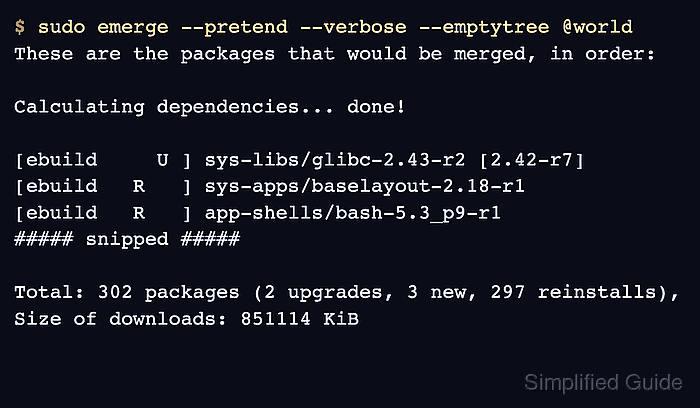
$ sudo emerge --pretend --verbose --emptytree @world
These are the packages that would be merged, in order:

Calculating dependencies... done!

[ebuild     U ] sys-libs/glibc-2.43-r2 [2.42-r7]
[ebuild   R   ] sys-apps/baselayout-2.18-r1
[ebuild   R   ] app-shells/bash-5.3_p9-r1
##### snipped #####

Total: 302 packages (2 upgrades, 3 new, 297 reinstalls), Size of downloads: 851114 KiB
The R marker shows packages selected for reinstall. Review blockers, downgrades, masked packages, fetch-restricted files, and large unexpected package groups before approving the real rebuild.
- Start the rebuild after the preview is acceptable.
$ sudo emerge --ask --verbose --emptytree @world
These are the packages that would be merged, in order:

Calculating dependencies... done!
##### snipped #####

Would you like to merge these packages? [Yes/No]
Answer No if the merge list includes unexplained downgrades, profile changes, masked packages, or packages that should not be rebuilt on the current system. Fix the cause and rerun the pretend check before starting over.
- Resume the merge list only after fixing any package failure.
$ sudo emerge --resume
Calculating dependencies... done!
>>> Resuming merge...
Use emerge –resume after correcting a failed dependency, disk-space issue, fetch problem, or package build failure. Use –skipfirst only when the failed package has been reviewed and can safely be handled later.
- Merge protected configuration file updates after packages finish.
$ sudo dispatch-conf
Scanning Configuration files...
No updates found.
dispatch-conf reviews files protected by CONFIG_PROTECT and prompts before replacing local configuration. Related: How to edit Gentoo make.conf
- Rebuild preserved-library consumers if Portage reports preserved libraries.
$ sudo emerge --ask @preserved-rebuild
Calculating dependencies... done!
>>> No packages selected for @preserved-rebuild.
>>> Nothing to merge; quitting.
- Remove unused dependencies only after reviewing the proposed list.
$ sudo emerge --ask --depclean
Calculating dependencies... done!
>>> No packages selected for removal.
>>> Nothing to unmerge; quitting.
depclean recalculates against the current world, system, and profile sets. Do not approve removal of packages that still provide boot, login, network, compiler, kernel, or desktop functionality.
Related: How to remove a Gentoo package
- Regenerate the environment cache after package changes.
$ sudo env-update
>>> Regenerating /etc/ld.so.cache...
- Reload the shell environment or open a new login shell.
$ source /etc/profile
- Verify that a normal world update has no remaining selected rebuilds or upgrades.
$ sudo emerge --pretend --verbose --update --deep --newuse @world
Calculating dependencies... done!
>>> No packages selected for @world.
>>> Nothing to merge; quitting.
–emptytree will always plan reinstalls when it is used, so the final check uses a normal @world update plan. Run sudo emerge --ask @preserved-rebuild again if Portage reports preserved libraries after the final check.

Mohd Shakir Zakaria is a cloud architect with deep roots in software development and open-source advocacy. Certified in AWS, Red Hat, VMware, ITIL, and Linux, he specializes in designing and managing robust cloud and on-premises infrastructures.


