A Gentoo slot conflict stops Portage before it can choose one package instance for a dependency graph. The resolver block names the package slot more than once and shows which installed packages or planned merges require each side.
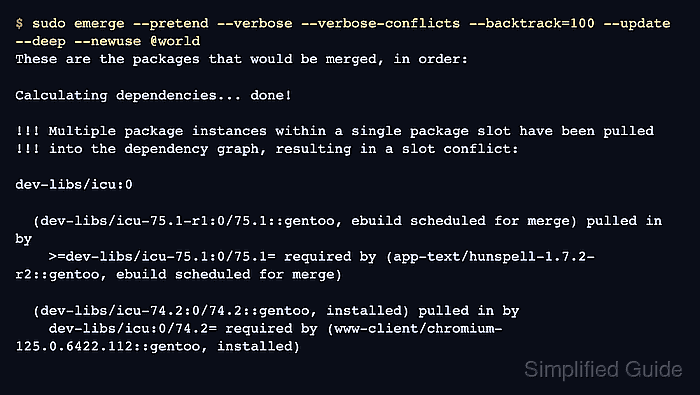
Slots let incompatible package lines coexist, but reverse dependencies can still require a specific slot, sub-slot, or USE combination. Conflicts often appear during a @world update after a repository sync, profile switch, keyword change, or USE flag change exposes packages that were built against different ABI or flag states.
Resolve the conflict from the resolver output, not by removing packages first. The usual fix is to let Portage search further, merge the highest requested package and its affected reverse dependencies together, or apply the exact USE flag alignment named in the conflict before retesting the original merge.
Related: How to update a Gentoo world set
Related: How to set Gentoo USE flags
Related: How to install a package on Gentoo with emerge
Steps to fix a Gentoo slot conflict:
- Reproduce the failure with verbose conflict details.
$ sudo emerge --pretend --verbose --verbose-conflicts --backtrack=100 --update --deep --newuse @world
These are the packages that would be merged, in order:

Calculating dependencies... done!

!!! Multiple package instances within a single package slot have been pulled
!!! into the dependency graph, resulting in a slot conflict:

dev-libs/icu:0

  (dev-libs/icu-75.1-r1:0/75.1::gentoo, ebuild scheduled for merge) pulled in by
    >=dev-libs/icu-75.1:0/75.1= required by (app-text/hunspell-1.7.2-r2::gentoo, ebuild scheduled for merge)

  (dev-libs/icu-74.2:0/74.2::gentoo, installed) pulled in by
    dev-libs/icu:0/74.2= required by (www-client/chromium-125.0.6422.112::gentoo, installed)

It might be possible to solve this slot collision
by applying all of the following changes:
   - www-client/chromium-125.0.6422.112 (rebuild)
–verbose-conflicts makes the slot block show more of the packages pulling each side into the graph. emerge may print a long block for large desktops; keep the full output when asking for help instead of copying only the first package name.
- Read the slot block and record the package that must be made consistent.
Output part What it means dev-libs/icu:0 Package and slot that cannot be resolved in one graph. ebuild scheduled for merge Version Portage wants to use in the current plan. installed Version or build state already present on the system. :0/74.2= or :0/75.1= Reverse dependency is tied to a slot/sub-slot and may need a rebuild. Do not start with emerge --depclean or manual unmerge commands. Removing the installed side before understanding which reverse dependency needs it can break more packages than the original resolver conflict.
- If the output says a larger backtrack value may solve the graph, retry the pretend merge before editing configuration.
$ sudo emerge --pretend --verbose --verbose-conflicts --backtrack=300 --update --deep --newuse @world
Calculating dependencies... done!
##### snipped #####

Total: 28 packages (24 upgrades, 4 reinstalls), Size of downloads: 482,114 KiB
–backtrack raises the number of dependency-calculation retries. Keep it temporary on the command line unless the same system routinely needs a higher value.
- If Portage recommends a USE change, add the exact package-specific flag state it names.
$ sudo install -d /etc/portage/package.use
$ sudoedit /etc/portage/package.use/slot-conflict
# Match the resolver recommendation for the conflicting Qt stack.
dev-qt/qtbase gles2-only
kde-plasma/kwin gles2-only
kde-plasma/libplasma gles2-only
Use the package names and flags from the local resolver output. Prefix a flag with - when the conflict should be resolved by disabling that flag, and keep one package atom per line with space-delimited flags. Related: How to set Gentoo USE flags
- Preview the changed package set together when the conflict names related packages.
$ sudo emerge --pretend --verbose --changed-use --oneshot dev-qt/qtbase kde-plasma/kwin kde-plasma/libplasma
Calculating dependencies... done!

[ebuild   R    ] dev-qt/qtbase-6.7.3-r2:6/6.7.3::gentoo  USE="gles2-only ..."
[ebuild   R    ] kde-plasma/kwin-6.1.5:6/6::gentoo  USE="gles2-only ..."
[ebuild   R    ] kde-plasma/libplasma-6.1.5:6/6::gentoo  USE="gles2-only ..."

Total: 3 packages (3 reinstalls), Size of downloads: 0 KiB
–oneshot rebuilds the conflict set without adding those packages to /var/lib/portage/world when they are dependencies of existing selected packages.
- Merge the conflict set after the pretend output no longer shows a slot conflict.
$ sudo emerge --ask --changed-use --oneshot dev-qt/qtbase kde-plasma/kwin kde-plasma/libplasma
Calculating dependencies... done!

These are the packages that would be merged, in order:

[ebuild   R    ] dev-qt/qtbase-6.7.3-r2:6/6.7.3::gentoo
[ebuild   R    ] kde-plasma/kwin-6.1.5:6/6::gentoo
[ebuild   R    ] kde-plasma/libplasma-6.1.5:6/6::gentoo

Would you like to merge these packages? [Yes/No]
Answer No if a new blocker, downgrade, hard mask, or unrelated large rebuild appears. Return to the verbose pretend output and fix that new signal first.
- For a version or sub-slot conflict without a USE recommendation, merge the highest requested version and the named reverse dependencies together.
$ sudo emerge --ask --oneshot =dev-libs/icu-75.1-r1 www-client/chromium app-text/hunspell
Calculating dependencies... done!

[ebuild     U ] dev-libs/icu-75.1-r1:0/75.1::gentoo [74.2:0/74.2::gentoo]
[ebuild   R    ] www-client/chromium-125.0.6422.112::gentoo
[ebuild   R    ] app-text/hunspell-1.7.2-r2::gentoo

Would you like to merge these packages? [Yes/No]
Use the exact package atom and affected reverse dependencies from the local conflict block. The goal is to move the conflicting package and the packages tied to its old sub-slot in one calculation.
- Retest the original update command and confirm the slot conflict is gone.
$ sudo emerge --pretend --verbose --update --deep --newuse @world
Calculating dependencies... done!
>>> No packages selected for @world.
>>> Nothing to merge; quitting.
When packages are still selected, review the normal merge plan and then run the same command without --pretend after the output is understood. Related: How to update a Gentoo world set
- Run cleanup only after the original update can calculate a clean graph.
$ sudo emerge --ask --depclean
Calculating dependencies... done!
>>> No packages selected for removal.
>>> Nothing to unmerge; quitting.
Review every package listed by depclean before approving removal. A clean dependency graph does not prove that optional services, local overlays, or manually managed packages are safe to remove.

Mohd Shakir Zakaria is a cloud architect with deep roots in software development and open-source advocacy. Certified in AWS, Red Hat, VMware, ITIL, and Linux, he specializes in designing and managing robust cloud and on-premises infrastructures.


