Installing one Gentoo package is safest after Portage has shown the exact merge plan. A package atom can pull dependencies, rebuild an already installed target, or stop on keyword, license, and USE decisions before any files are merged.
emerge reads ebuilds from the configured repositories and records explicitly requested packages in /var/lib/portage/world for later @world updates. The --noreplace option keeps a simple install command from rebuilding the target when it is already present, while still adding the package to the selected package set when needed.
Use app-misc/tmux as the example package because it is a normal Gentoo package with a command that can be checked after the merge. Replace it with the package atom returned by search, and review the pretend output before answering Yes to the install prompt.
Related: How to sync the Gentoo repository
Related: How to update a Gentoo world set
Steps to install a Gentoo package with emerge:
- Open a terminal with sudo privileges.
- Sync configured repositories if Portage has not synced recently.
$ sudo emaint --auto sync
>>> Syncing repository 'gentoo' into '/var/db/repos/gentoo'...
>>> Sync completed for gentoo
Action: sync for repo: gentoo, returned code = 0
emaint –auto sync updates repositories whose auto-sync setting is enabled in /etc/portage/repos.conf. Related: How to sync the Gentoo repository
- Search for the package atom.
$ emerge --search tmux
[ Results for search key : tmux ]
Searching...

*  app-misc/tmux
      Latest version available: 3.5a
      Latest version installed: [ Not Installed ]
      Size of files: 699 KiB
      Homepage:      https://tmux.github.io/
      Description:   Terminal multiplexer
      License:       ISC

##### snipped #####
[ Applications found : 5 ]
Use the full category/package atom from the result, such as app-misc/tmux, so Portage does not have to guess between similarly named packages.
- Preview the merge plan.
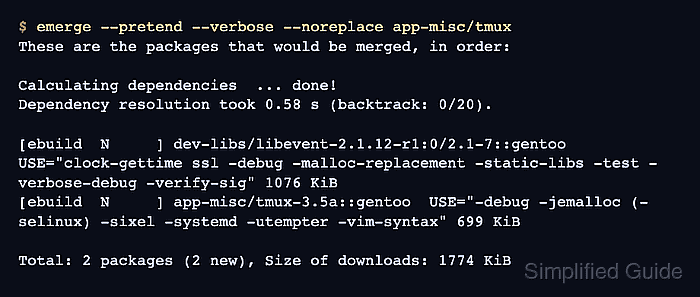
$ emerge --pretend --verbose --noreplace app-misc/tmux
These are the packages that would be merged, in order:

Calculating dependencies  ... done!
Dependency resolution took 0.58 s (backtrack: 0/20).

[ebuild  N     ] dev-libs/libevent-2.1.12-r1:0/2.1-7::gentoo  USE="clock-gettime ssl -debug -malloc-replacement -static-libs -test -verbose-debug -verify-sig" 1076 KiB
[ebuild  N     ] app-misc/tmux-3.5a::gentoo  USE="-debug -jemalloc (-selinux) -sixel -systemd -utempter -vim-syntax" 699 KiB

Total: 2 packages (2 new), Size of downloads: 1774 KiB
The N marker means a new install. A R marker means a reinstall, and a U marker means an upgrade. Review the USE flags, masks, licenses, and dependencies before approving the real merge.
Related: How to set Gentoo USE flags
Related: How to unmask a Gentoo package keyword
Related: How to mask a Gentoo package - Install the package after the preview is correct.
$ sudo emerge --ask --noreplace app-misc/tmux

These are the packages that would be merged, in order:

Calculating dependencies... done!

[ebuild  N     ] dev-libs/libevent-2.1.12-r1:0/2.1-7::gentoo
[ebuild  N     ] app-misc/tmux-3.5a::gentoo

Would you like to merge these packages? [Yes/No] yes
>>> Emerging (1 of 2) dev-libs/libevent-2.1.12-r1:0/2.1-7::gentoo
##### snipped #####
>>> Installing (2 of 2) app-misc/tmux-3.5a::gentoo
>>> Recording app-misc/tmux in "world" favorites file...
>>> Completed (2 of 2) app-misc/tmux-3.5a::gentoo
>>> Jobs: 2 of 2 complete
Answer No if emerge shows unexpected downgrades, blockers, hard masks, broad rebuilds, or configuration changes that were not visible in the preview.
- Verify that the installed command runs.
$ tmux -V
tmux 3.5a
- Verify that Portage reports the package as installed.
$ emerge --search app-misc/tmux
[ Results for search key : app-misc/tmux ]
Searching...

*  app-misc/tmux
      Latest version available: 3.5a
      Latest version installed: 3.5a
      Size of files: 699 KiB
      Homepage:      https://tmux.github.io/
      Description:   Terminal multiplexer
      License:       ISC

##### snipped #####
[ Applications found : 5 ]
For packages that install libraries, plugins, or data files instead of a user-facing command, the installed-version line is the package-state check.

Mohd Shakir Zakaria is a cloud architect with deep roots in software development and open-source advocacy. Certified in AWS, Red Hat, VMware, ITIL, and Linux, he specializes in designing and managing robust cloud and on-premises infrastructures.


