Checking Elastic Stack health across Filebeat, Logstash, Elasticsearch, and Kibana exposes ingestion breaks before dashboards, alerts, and investigations drift away from current events. A fast stack sweep is especially useful after pipeline edits, certificate changes, node restarts, and upgrades because each layer can fail differently while adjacent components still look reachable.
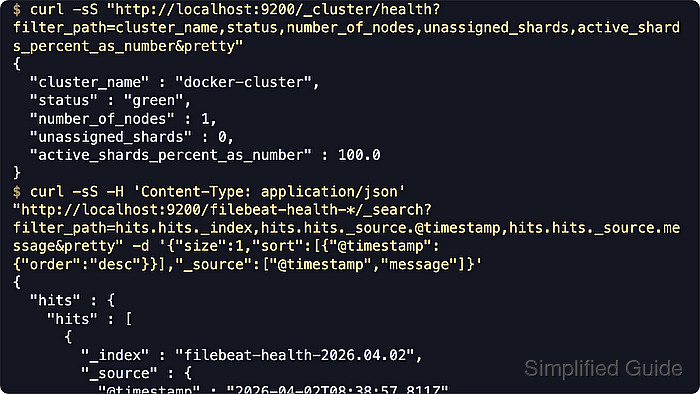
A decisive health pass uses one short API query per layer: _cluster/health for shard availability in Elasticsearch, Logstash health and pipeline metrics for blocked or terminated pipelines, Filebeat runtime counters for published versus acknowledged events, and /api/status for Kibana readiness. A final search for the newest event confirms data is still crossing the full path from shipping to indexing.
Current Elastic deployments often secure Elasticsearch and Kibana with HTTPS and authentication, Filebeat keeps its HTTP endpoint disabled until explicitly enabled, and Logstash exposes a richer _health_report endpoint on current releases while older 8.x builds may only have pipeline stats. Keep the Filebeat and Logstash monitoring APIs on localhost or a trusted management network because they reveal host, version, and pipeline metadata.
Related: How to monitor Elasticsearch cluster health
Related: How to check Logstash pipeline metrics
Related: How to enable the Filebeat HTTP endpoint
Related: How to check Kibana status
Steps to check Elastic Stack health across Filebeat, Logstash, Elasticsearch, and Kibana:
- Query the Elasticsearch cluster health API for the current shard and node state.
$ curl -sS --fail "http://localhost:9200/_cluster/health?filter_path=cluster_name,status,number_of_nodes,number_of_data_nodes,active_primary_shards,active_shards,relocating_shards,initializing_shards,unassigned_primary_shards,unassigned_shards,number_of_pending_tasks,active_shards_percent_as_number&pretty"
{
  "cluster_name" : "docker-cluster",
  "status" : "green",
  "number_of_nodes" : 1,
  "number_of_data_nodes" : 1,
  "active_primary_shards" : 7,
  "active_shards" : 7,
  "relocating_shards" : 0,
  "initializing_shards" : 0,
  "unassigned_primary_shards" : 0,
  "unassigned_shards" : 0,
  "number_of_pending_tasks" : 0,
  "active_shards_percent_as_number" : 100.0
}
green means all primary and replica shards are assigned, yellow usually means only replicas are unassigned, and red means at least one primary shard is unavailable.
On secured deployments, switch the URL to https:// and add authentication such as --user or an Authorization header when the HTTP endpoint uses a private CA.
- Query the Logstash health report for the top-level status of running pipelines.
$ curl -sS --fail "http://localhost:9600/_health_report?pretty=true"
{
  "status" : "green",
  "symptom" : "1 indicator is healthy (`pipelines`)",
  "indicators" : {
    "pipelines" : {
      "status" : "green",
      "symptom" : "1 indicator is healthy (`main`)",
      "indicators" : {
        "main" : {
          "status" : "green",
          "symptom" : "The pipeline is healthy",
          "details" : {
            "status" : {
              "state" : "RUNNING"
            }
          }
        }
      }
    }
  }
}
Current Logstash releases use green, yellow, red, and unknown here; yellow often means a pipeline finished normally, while red commonly means a terminated or blocked pipeline.
/_health_report performs root-cause analysis for non-green states and can be more expensive than simple stats polling, so reserve it for checks and triage rather than tight polling loops.
- Check Logstash pipeline event and flow counters for backpressure and throughput drift.
$ curl -sS --fail "http://localhost:9600/_node/stats/pipelines/main?filter_path=pipelines.main.events,pipelines.main.flow.input_throughput.last_1_minute,pipelines.main.flow.output_throughput.last_1_minute,pipelines.main.flow.worker_utilization.last_1_minute,pipelines.main.flow.queue_backpressure.last_1_minute,pipelines.main.queue&pretty"
{
  "pipelines" : {
    "main" : {
      "events" : {
        "in" : 1,
        "filtered" : 1,
        "out" : 1,
        "queue_push_duration_in_millis" : 0
      },
      "flow" : {
        "input_throughput" : {
          "last_1_minute" : 0.01632
        },
        "output_throughput" : {
          "last_1_minute" : 0.01632
        },
        "worker_utilization" : {
          "last_1_minute" : 0.06996
        },
        "queue_backpressure" : {
          "last_1_minute" : 0.0
        }
      },
      "queue" : {
        "type" : "memory",
        "events_count" : 0
      }
    }
  }
}
events.in and events.out rising together with queue_backpressure near 0 indicates the pipeline is keeping up with inputs and outputs.
Replace main with the pipeline name returned by /_node/pipelines when the deployment uses multiple pipelines.
- Check Filebeat publish and acknowledgement counters from the HTTP stats endpoint.
$ curl -sS --fail "http://127.0.0.1:5066/stats" | jq '{published:.libbeat.pipeline.events.published,retry:.libbeat.pipeline.events.retry,failed:(.libbeat.output.events.failed // 0),acked:.libbeat.output.events.acked,active:.libbeat.output.events.active,added:.filebeat.events.added,done:.filebeat.events.done,running_harvesters:.filebeat.harvester.running}'
{
  "published" : 1,
  "retry" : 0,
  "failed" : 0,
  "acked" : 1,
  "active" : 0,
  "added" : 1,
  "done" : 1,
  "running_harvesters" : 1
}
published and acked should keep moving together, while non-zero retry or failed indicates downstream pressure or output errors.
The Filebeat HTTP endpoint is disabled by default; enable it first if port 5066 does not respond.
- Check Kibana overall readiness and its current connection to Elasticsearch.
$ curl -sS --fail "http://localhost:5601/api/status" | jq '.status.overall, .status.core.elasticsearch'
{
  "level" : "available",
  "summary" : "All services and plugins are available"
}
{
  "level" : "available",
  "summary" : "Elasticsearch is available",
  "meta" : {
    "warningNodes" : [],
    "incompatibleNodes" : []
  }
}
Current status responses use levels such as available, degraded, unavailable, and critical to show overall and component readiness.
If server.basePath is configured, include that prefix in the URL, and add https://, authentication, when Kibana is served through TLS.
Related: How to check Kibana status
- Search for the newest event in the expected index pattern or data stream to confirm end-to-end delivery.
$ curl -sS --fail \
  -H 'Content-Type: application/json' \
  "http://localhost:9200/filebeat-health-*/_search?filter_path=hits.hits._index,hits.hits._source.@timestamp,hits.hits._source.message&pretty" \
  -d '{"size":1,"sort":[{"@timestamp":{"order":"desc"}}],"_source":["@timestamp","message"]}'
{
  "hits" : {
    "hits" : [
      {
        "_index" : "filebeat-health-2026.04.02",
        "_source" : {
          "@timestamp" : "2026-04-02T08:38:57.811Z",
          "message" : "2026-04-02T08:39:00Z INFO sample application event delivered through Logstash"
        }
      }
    ]
  }
}
Replace filebeat-health-* with the production data stream, index alias, or custom index pattern used by the pipeline output.
On secured clusters, reuse the same https://, authentication, options from the cluster health step.


Mohd Shakir Zakaria is a cloud architect with deep roots in software development and open-source advocacy. Certified in AWS, Red Hat, VMware, ITIL, and Linux, he specializes in designing and managing robust cloud and on-premises infrastructures.


