Creating an Elasticsearch snapshot gives a cluster a repository-backed restore point before upgrades, index cleanup, or other changes that could remove data. A manual snapshot is also a direct way to prove that the repository can store index data before maintenance starts.
Elasticsearch writes snapshots to a registered snapshot repository. For a shared filesystem repository, every master and data node must have the same mounted path listed in path.repo before the repository can be registered and verified.
On self-managed Linux nodes, use a shared mount such as /mnt/elasticsearch-snapshots instead of a node-local data path. Local HTTP keeps ad hoc API calls readable during validation. Secured clusters should use the cluster HTTPS URL with authentication and the configured CA trust. Only one cluster should write to a repository; register the same repository as read-only from any other cluster.
Steps to create and manage Elasticsearch snapshots:
- Create the shared repository directory.
$ sudo mkdir -p /mnt/elasticsearch-snapshots
On multi-node clusters, mount the same shared storage path on every master and data node before registering the repository. A node-local directory protects only that node and can make repository verification fail.
- Assign the repository directory to the Elasticsearch service account.
$ sudo chown elasticsearch:elasticsearch /mnt/elasticsearch-snapshots
- Restrict repository access to Elasticsearch and administrators.
$ sudo chmod 750 /mnt/elasticsearch-snapshots
- Back up the node configuration file before changing path.repo.
$ sudo cp /etc/elasticsearch/elasticsearch.yml /etc/elasticsearch/elasticsearch.yml.bak
- Open the Elasticsearch configuration file.
$ sudo vi /etc/elasticsearch/elasticsearch.yml
- Add the repository path to path.repo.
path:
  repo:
    - /mnt/elasticsearch-snapshots
Set the same mounted repository path on every master and data node that should create, verify, or restore snapshots.
- Restart Elasticsearch so the node loads the new repository path.
$ sudo systemctl restart elasticsearch.service
On a running cluster, restart one node at a time so shard allocation and repository verification remain predictable.
Related: How to manage the Elasticsearch service with systemctl in Linux - Confirm the cluster responds before registering the repository.
$ curl --silent --show-error --fail "http://localhost:9200/_cluster/health?pretty"
{
  "cluster_name" : "elasticsearch",
  "status" : "green",
  "timed_out" : false,
  "number_of_nodes" : 1,
  "number_of_data_nodes" : 1,
  "active_primary_shards" : 2,
  "active_shards" : 2,
  "relocating_shards" : 0,
  "initializing_shards" : 0,
  "unassigned_shards" : 0
}
For secured clusters, switch the URL to https:// and add authentication plus CA trust, such as --user elastic with --cacert /etc/elasticsearch/certs/http_ca.crt or an Authorization: ApiKey header.
Related: How to create an Elasticsearch API key - Register the shared filesystem snapshot repository.
$ curl --silent --show-error --fail \
  --header "Content-Type: application/json" \
  --request PUT "http://localhost:9200/_snapshot/local_fs?pretty" \
  --data '{
  "type": "fs",
  "settings": {
    "location": "/mnt/elasticsearch-snapshots"
  }
}'
{
  "acknowledged" : true
}
If another cluster can see the same repository, register it there with "readonly": true so only one cluster writes snapshot metadata.
- Verify the repository is reachable from the cluster nodes.
$ curl --silent --show-error --fail \
  --request POST "http://localhost:9200/_snapshot/local_fs/_verify?pretty"
{
  "nodes" : {
    "cSsPgLPQTr-V8DZZQ1Y93Q" : {
      "name" : "es-node-01"
    }
  }
}
Missing nodes usually mean the shared mount is absent, permissions are wrong, or one or more nodes still need a restart after adding path.repo.
- Create a manual snapshot for the target index.
$ curl --silent --show-error --fail \
  --header "Content-Type: application/json" \
  --request PUT "http://localhost:9200/_snapshot/local_fs/manual-preupgrade-2026.06.18?wait_for_completion=true&pretty" \
  --data '{
  "indices": "logs-2026.06.18",
  "include_global_state": false
}'
{
  "snapshot" : {
    "snapshot" : "manual-preupgrade-2026.06.18",
    "repository" : "local_fs",
    "indices" : [
      "logs-2026.06.18"
    ],
    "include_global_state" : false,
    "state" : "SUCCESS",
    "failures" : [ ],
    "shards" : {
      "total" : 1,
      "failed" : 0,
      "successful" : 1
    }
  }
}
Use wait_for_completion=true for small manual snapshots where the terminal should wait for SUCCESS. For larger snapshots, omit it and monitor GET /_snapshot/local_fs/_current or GET /_snapshot/_status.
- List the snapshots stored in the repository.
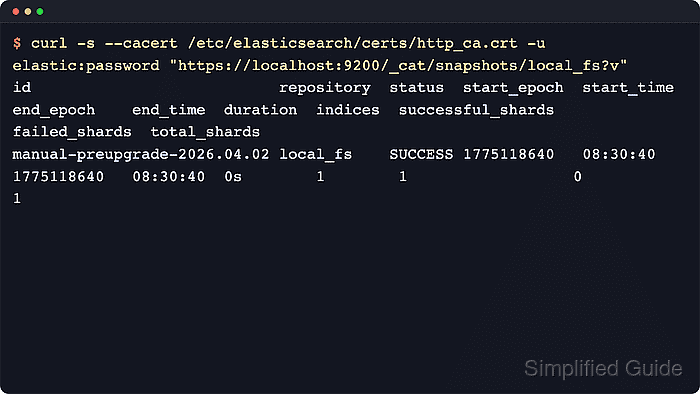
$ curl --silent --show-error --fail "http://localhost:9200/_cat/snapshots/local_fs?v&s=id"
id                           repository  status start_epoch start_time end_epoch  end_time duration indices successful_shards failed_shards total_shards
manual-preupgrade-2026.06.18 local_fs   SUCCESS 1781760344  05:25:44   1781760344 05:25:44       0s       1                 1             0            1
- Inspect a snapshot before using or deleting it.
$ curl --silent --show-error --fail "http://localhost:9200/_snapshot/local_fs/manual-preupgrade-2026.06.18?pretty"
{
  "snapshots" : [
    {
      "snapshot" : "manual-preupgrade-2026.06.18",
      "repository" : "local_fs",
      "indices" : [
        "logs-2026.06.18"
      ],
      "data_streams" : [ ],
      "include_global_state" : false,
      "state" : "SUCCESS",
      "failures" : [ ],
      "shards" : {
        "total" : 1,
        "failed" : 0,
        "successful" : 1
      }
    }
  ],
  "total" : 1,
  "remaining" : 0
}
Use the restore API only after checking the snapshot contents and current index names, because an open index with the same name blocks an in-place restore.
Related: How to restore Elasticsearch snapshots - Delete a snapshot that is no longer required.
$ curl --silent --show-error --fail \
  --request DELETE "http://localhost:9200/_snapshot/local_fs/manual-preupgrade-2026.06.18?pretty"
{
  "acknowledged" : true
}
Deleting an in-progress snapshot cancels it. Elasticsearch removes only files that are not referenced by any other snapshot in the repository.
- Confirm the deleted snapshot no longer appears in the repository listing.
$ curl --silent --show-error --fail "http://localhost:9200/_cat/snapshots/local_fs?v&s=id"
id repository status start_epoch start_time end_epoch end_time duration indices successful_shards failed_shards total_shards

Mohd Shakir Zakaria is a cloud architect with deep roots in software development and open-source advocacy. Certified in AWS, Red Hat, VMware, ITIL, and Linux, he specializes in designing and managing robust cloud and on-premises infrastructures.


