Adding the NGINX integration to a Fleet-managed Elastic Agent policy sends web access logs, error logs, and stub-status metrics into Elastic without a separate Beats configuration. Use it when an existing policy already manages the NGINX host and the web telemetry should share the same rollout, namespace, and agent health view as the rest of the host data.
The integration has two collection paths. Log streams read access and error files from the agent host, while the metrics stream scrapes NGINX's stub_status endpoint through the nginx.stubstatus data stream. The saved Fleet policy must match the host's real log paths and the HTTP endpoint reachable from the agent process.
Start with one enrolled agent and one NGINX instance before applying the same integration policy to a larger web tier. After Fleet saves the integration, policy application is only the midpoint; successful setup is visible when nginx.access, nginx.error, and nginx.stubstatus documents appear in Elastic and the NGINX dashboards show fresh events.
Steps to add the NGINX integration to Elastic Agent with Fleet:
- Choose the Fleet policy and NGINX host that should receive the integration.
The policy must contain an enrolled agent on the NGINX host. That agent needs permission to read the NGINX log files and reach the local status endpoint.
Related: How to create an Elastic Agent policy in Fleet
Related: How to install a Fleet-managed Elastic Agent - Confirm the NGINX access and error log paths on the host.
$ sudo ls -l /var/log/nginx/access.log /var/log/nginx/error.log
-rw-r----- 1 www-data adm 0 Jun 18 04:37 /var/log/nginx/access.log
-rw-r----- 1 www-data adm 0 Jun 18 04:37 /var/log/nginx/error.log
The NGINX package defaults to /var/log/nginx/access.log* and /var/log/nginx/error.log*. Use the real paths when the host writes logs somewhere else.
- Confirm the NGINX status endpoint when metrics collection will stay enabled.
$ curl http://127.0.0.1/nginx_status
Active connections: 1
server accepts handled requests
 1 1 1
Reading: 0 Writing: 1 Waiting: 0
Expose stub_status only to localhost or the agent host address. A public status endpoint reveals request and connection counters.
- Open Kibana → Management → Fleet → Agent policies.
- Open the policy selected for the NGINX host.
- Click Add integration.
- Search for Nginx and select the Nginx integration.
- Click Add Nginx.
- Set Integration name to a label that identifies the web tier.
nginx-web-default
- Set the Namespace field for the environment.
default
The namespace becomes part of data stream names such as logs-nginx.access-default and metrics-nginx.stubstatus-default.
- Keep Collect logs from Nginx instances enabled.
- Set the access log Paths field to the host's access log path.
/var/log/nginx/access.log*
- Set the error log Paths field to the host's error log path.
/var/log/nginx/error.log*
- Keep Collect metrics from Nginx instances enabled only when the status endpoint responds from the agent host.
http://127.0.0.1:80
The NGINX package default server_status_path is /nginx_status, so this host value maps to http://127.0.0.1:80/nginx_status.
- Select Existing hosts and choose the target agent policy if Kibana asks where to add the integration.
- Click Save and continue.
- Confirm that the policy's Integrations list shows Nginx.
- Open Fleet → Agents and wait for the NGINX host to return to Healthy on the new policy revision.
If the agent becomes Unhealthy or Degraded, open the agent details page and inspect the NGINX unit message before changing more settings.
Related: How to monitor Elastic Agent health in Fleet - Generate one request against NGINX so the access log has a fresh event.
$ curl http://www.example.net/
fleet nginx smoke
- Search for NGINX events in Discover.
data_stream.dataset : ("nginx.access" or "nginx.error" or "nginx.stubstatus")Use the namespace selected in the integration policy when the data view or space filters by namespace.
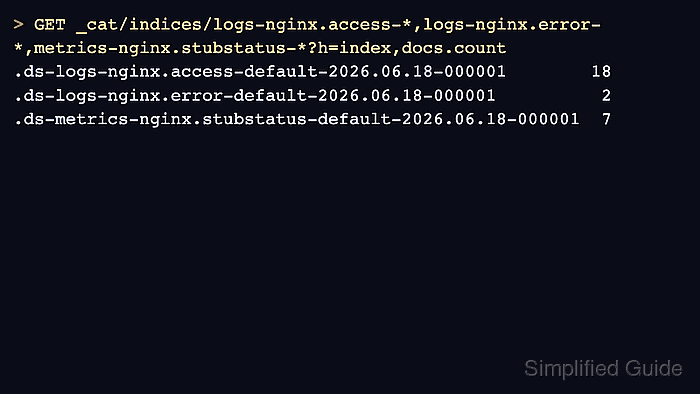
- Run a Dev Tools count check when the ingest proof needs to be saved outside Kibana.
> GET _cat/indices/logs-nginx.access-*,logs-nginx.error-*,metrics-nginx.stubstatus-*?h=index,docs.count
.ds-logs-nginx.access-default-2026.06.18-000001        18
.ds-logs-nginx.error-default-2026.06.18-000001          2
.ds-metrics-nginx.stubstatus-default-2026.06.18-000001  7
The dates and counts are sanitized example values. The important proof is that all expected NGINX data streams have nonzero document counts in the selected namespace.
- Open Analytics → Dashboards and check [Logs Nginx] Access and error logs plus [Metrics Nginx] Overview for fresh events from the host.

Mohd Shakir Zakaria is a cloud architect with deep roots in software development and open-source advocacy. Certified in AWS, Red Hat, VMware, ITIL, and Linux, he specializes in designing and managing robust cloud and on-premises infrastructures.


