Changing the DRBD replication protocol controls when a write is acknowledged between peer nodes. Operators usually change it when a resource needs a different balance between write latency and replication durability, such as moving a test resource back to protocol C before production use.
The protocol is a net option for a DRBD connection and is normally stored in the resource file under /etc/drbd.d/ or inherited from /etc/drbd.conf. Keep the resource definition identical on every node before applying the change, because drbdadm reads the on section that matches the node's kernel hostname.
Use a maintenance window or cluster-manager maintenance mode when the resource backs a mounted filesystem, database, or application. drbdadm adjust can reconfigure an operational resource, but a protocol change can reconnect peer communication while DRBD applies the new connection options.
Related: How to validate DRBD configuration
Related: How to check DRBD resource status
Related: How to back up DRBD metadata before a change
Steps to change the DRBD replication protocol:
- Check the current DRBD resource state.
$ sudo drbdadm status webdata
webdata role:Primary
  volume:0 disk:UpToDate
  node-b role:Secondary
    volume:0 replication:Established peer-disk:UpToDate
Resolve unexpected Disconnected, Inconsistent, Outdated, or resynchronizing states before changing connection behavior.
Related: How to check DRBD resource status
- Back up the active resource file.
$ sudo cp -a /etc/drbd.d/webdata.res /etc/drbd.d/webdata.res.before-protocol-change
Use the active resource file for the real resource name. Back up every resource file or included common file that will be changed.
Related: How to back up DRBD metadata before a change - Open the resource file that owns the protocol setting.
$ sudoedit /etc/drbd.d/webdata.res
If protocol is inherited from a common net section, edit that common file only when every resource inheriting it should receive the same protocol.
- Set the protocol in the connection net block.
resource webdata {
    connection {
        host node-a port 7788;
        host node-b port 7788;
        net {
            protocol C;
        }
    }
}
protocol C acknowledges writes after local and remote disks have the data. protocol B waits for peer receipt, and protocol A waits for local disk plus the local TCP send buffer. Dual-primary resources require protocol C.
Related: How to configure DRBD dual-primary mode - Parse the edited resource file on the local node.
$ sudo drbdadm dump webdata
# resource webdata on node-a: not ignored, not stacked
# defined at /etc/drbd.d/webdata.res:1
resource webdata {
    on node-a {
        node-id 0;
        device           /dev/drbd0 minor 0;
        disk             /dev/vg0/webdata;
        meta-disk        internal;
        address          ipv4 192.0.2.10:7788;
    }
##### snipped #####
    connection {
        host node-a port 7788;
        host node-b port 7788;
        net {
            _name        node-b;
            protocol       C;
        }
    }
}
drbdadm dump fails on syntax errors and prints the normalized configuration that the current node will use.
Related: How to validate DRBD configuration - Synchronize the edited resource file to every peer node.
Use the same configuration-management, csync2, scp, or package-managed process already used for /etc/drbd.conf and /etc/drbd.d/. The file content should match before any node runs drbdadm adjust.
- Parse the resource file on a peer node.
$ ssh node-b sudo drbdadm dump webdata
# resource webdata on node-b: not ignored, not stacked
# defined at /etc/drbd.d/webdata.res:1
resource webdata {
##### snipped #####
    connection {
        host node-a port 7788;
        host node-b port 7788;
        net {
            _name        node-a;
            protocol       C;
        }
    }
}
A file can parse on one node and fail on another when hostnames, local addresses, backing disks, or include paths differ.
- Preview the runtime adjustment on the local node.
$ sudo drbdadm --dry-run adjust webdata
drbdsetup disconnect webdata 1
##### snipped #####
drbdsetup new-peer webdata 1 --_name=node-b --protocol=C
drbdsetup connect webdata 1
The exact lower-level calls depend on the current resource state and drbd-utils version. Review any disk, address, peer, or detach operation before running a real adjustment.
- Apply the resource adjustment on the local node.
$ sudo drbdadm adjust webdata
Run the real adjustment only after the dry run matches the intended connection change. Pause application or cluster ownership first when the environment requires it.
- Apply the same adjustment on the peer node.
$ ssh node-b sudo drbdadm adjust webdata
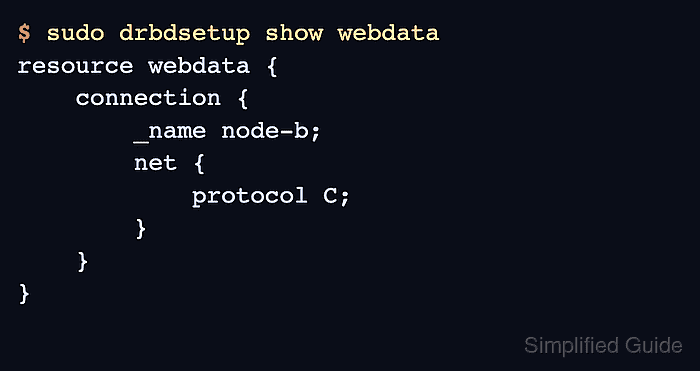
- Verify the active protocol in the running DRBD configuration.
$ sudo drbdsetup show webdata
resource webdata {
    connection {
        _name node-b;
        net {
            protocol C;
        }
    }
}
drbdsetup show reads the live kernel configuration. A clean drbdadm dump proves the file parses, while drbdsetup show proves the applied resource is using the intended protocol.
- Confirm the resource returned to the expected peer state.
$ sudo drbdadm status webdata
webdata role:Primary
  volume:0 disk:UpToDate
  node-b role:Secondary
    volume:0 replication:Established peer-disk:UpToDate
If the peer reconnects and resynchronizes after the adjustment, wait for UpToDate on both disks before returning the workload to normal service.

Mohd Shakir Zakaria is a cloud architect with deep roots in software development and open-source advocacy. Certified in AWS, Red Hat, VMware, ITIL, and Linux, he specializes in designing and managing robust cloud and on-premises infrastructures.


